> For clean Markdown content of this page, append .md to this URL. For the complete documentation index, see https://learning.postman.com/llms.txt. For full content including API reference and SDK examples, see https://learning.postman.com/llms-full.txt.
# Manage your team's API governance groups
Postman's Governance Groups feature enables you to apply a ruleset from your team's [Ruleset Library](/docs/api-catalog/governance-groups/ruleset-library/) to one or more workspaces. For example, you might create one group for public-facing APIs that enforces strict security and consistency rules, and a separate group for internal APIs with a lighter ruleset. Users with the [API Governance Manager or the API Catalog Manager role](/docs/administration/roles-and-permissions#team-roles) can create and manage governance groups.
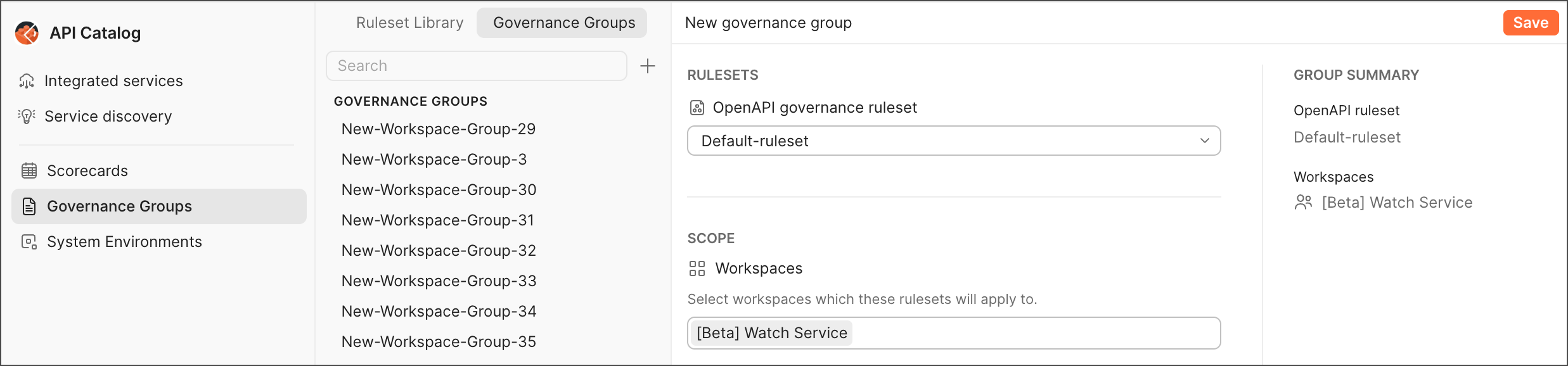
## Create a governance group
To create a governance group, do the following:
1. Click  **Home** in the upper-left corner of the Postman app, then select **API Catalog**.
2. Select **Governance Groups** in the sidebar, then select the **Governance Groups** tab.
3. Click
**Home** in the upper-left corner of the Postman app, then select **API Catalog**.
2. Select **Governance Groups** in the sidebar, then select the **Governance Groups** tab.
3. Click  **Create governance group**.
4. (Optional) Click the governance group's filename to rename it. By default, Postman creates a governance group with a generic name (for example, "New governance group").
5. Select a ruleset to use for your governance group from the **OpenAPI governance ruleset** dropdown list.
Only users with the [API Catalog Manager](/docs/administration/roles-and-permissions/#team-roles) role can add private workspaces to a governance group.
6. Select the workspaces you want to apply the ruleset to from the **Workspaces** dropdown list. You can select multiple workspaces.
7. Review the summary of the governance group's settings in the **Group Summary** section.
You can click the name of a ruleset or the workspaces to view them directly, but you'll lose any unsaved changes if you navigate away. Make certain to save your changes before clicking a ruleset or workspace.
8. Click **Save** to create the governance group.
## Edit governance groups
To edit a governance group's settings, do the following:
1. Click **Home** in the upper-left corner of the Postman app, then select **API Catalog**.
2. Select **Governance Groups** in the sidebar, then select the **Governance Groups** tab.
3. Choose a governance group you want to edit from the **Governance Groups** list.
4. Select a new ruleset to apply to the workspaces assigned to the governance group from the **OpenAPI governance ruleset** dropdown list.
5. Add or remove workspaces assigned to the governance group using the **Workspaces** dropdown list. You can select multiple workspaces.
6. Review the summary of the governance group's changes in the **Group Summary** section.
7. Click **Save** to apply your changes to the governance group.
### Rename a governance group
To rename a governance group, click
**Create governance group**.
4. (Optional) Click the governance group's filename to rename it. By default, Postman creates a governance group with a generic name (for example, "New governance group").
5. Select a ruleset to use for your governance group from the **OpenAPI governance ruleset** dropdown list.
Only users with the [API Catalog Manager](/docs/administration/roles-and-permissions/#team-roles) role can add private workspaces to a governance group.
6. Select the workspaces you want to apply the ruleset to from the **Workspaces** dropdown list. You can select multiple workspaces.
7. Review the summary of the governance group's settings in the **Group Summary** section.
You can click the name of a ruleset or the workspaces to view them directly, but you'll lose any unsaved changes if you navigate away. Make certain to save your changes before clicking a ruleset or workspace.
8. Click **Save** to create the governance group.
## Edit governance groups
To edit a governance group's settings, do the following:
1. Click **Home** in the upper-left corner of the Postman app, then select **API Catalog**.
2. Select **Governance Groups** in the sidebar, then select the **Governance Groups** tab.
3. Choose a governance group you want to edit from the **Governance Groups** list.
4. Select a new ruleset to apply to the workspaces assigned to the governance group from the **OpenAPI governance ruleset** dropdown list.
5. Add or remove workspaces assigned to the governance group using the **Workspaces** dropdown list. You can select multiple workspaces.
6. Review the summary of the governance group's changes in the **Group Summary** section.
7. Click **Save** to apply your changes to the governance group.
### Rename a governance group
To rename a governance group, click  **More actions** and select **Rename** next to the governance group's name, enter a new name, and click **Save**.
### Delete a governance group
To delete a governance group, do the following:
1. Click **More actions** and select **Delete** next to the governance group's name.
2. In the confirmation dialog, click **Delete** to confirm that you want to remove the governance group.
**More actions** and select **Rename** next to the governance group's name, enter a new name, and click **Save**.
### Delete a governance group
To delete a governance group, do the following:
1. Click **More actions** and select **Delete** next to the governance group's name.
2. In the confirmation dialog, click **Delete** to confirm that you want to remove the governance group.