# Create an API in the Postman API Builder
Go to one of your workspaces and use the Postman API Builder to create an API. Postman supports version control and a variety of API definition types such as protobuf (protocol buffers), OpenAPI (formerly Swagger), WSDL, RAML, and GraphQL.
## Create an API
You can use the API Builder to create a new API and optionally connect it to a repository for version control. You can then build your API from scratch or import a definition or collection to get started.
To create an API, do the following:
1. From the Postman sidebar, click **APIs**.
2. Click  **Create new API**.
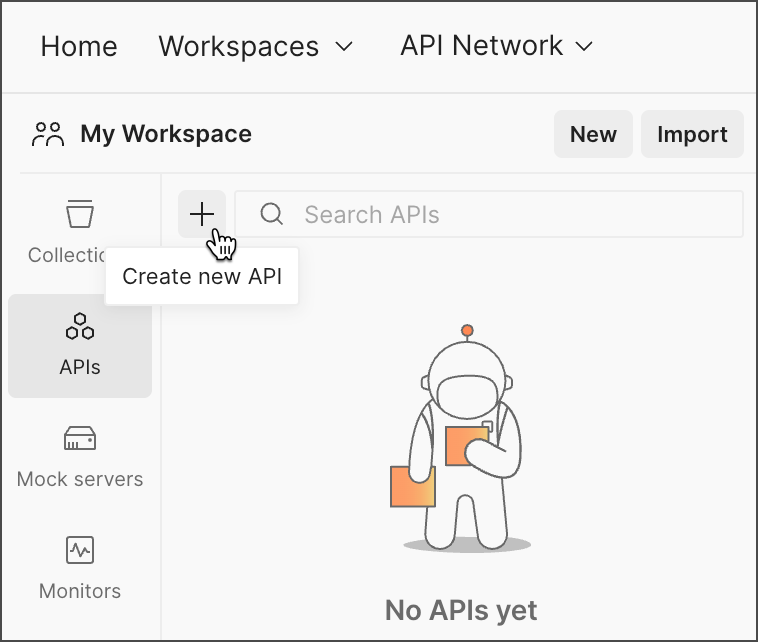 3. Enter your API's name.
4. Choose whether to connect a repository or continue without one. To learn more about repositories and version control, see [Manage changes with Git in the Postman API Builder](/docs/design-apis/api-builder/versioning-an-api/overview/).
**Git integrations are available with Postman team plans.** If you are on a Free individual plan, [create a new team](/docs/administration/managing-your-team/create-teams/) to connect to a remote repository. [Learn more about what's included with each plan](https://www.postman.com/pricing/).
5. Define or import a definition:
* [Create a new API definition](/docs/design-apis/api-builder/develop-apis/defining-an-api/#add-an-example-api-definition) for your API.
* [Use a collection as a starting point for your API](/docs/design-apis/api-builder/develop-apis/adding-api-elements/). Select a collection in your workspace you want to use and add a copy of it to your API. You can also create new collections in your API.
* [Import an existing API definition](/docs/design-apis/api-builder/importing-an-api/) from a file, a folder, a code repository, or an API gateway.
## Rename your API
1. From the Postman sidebar, click **APIs**.
2. Next to your API, click
3. Enter your API's name.
4. Choose whether to connect a repository or continue without one. To learn more about repositories and version control, see [Manage changes with Git in the Postman API Builder](/docs/design-apis/api-builder/versioning-an-api/overview/).
**Git integrations are available with Postman team plans.** If you are on a Free individual plan, [create a new team](/docs/administration/managing-your-team/create-teams/) to connect to a remote repository. [Learn more about what's included with each plan](https://www.postman.com/pricing/).
5. Define or import a definition:
* [Create a new API definition](/docs/design-apis/api-builder/develop-apis/defining-an-api/#add-an-example-api-definition) for your API.
* [Use a collection as a starting point for your API](/docs/design-apis/api-builder/develop-apis/adding-api-elements/). Select a collection in your workspace you want to use and add a copy of it to your API. You can also create new collections in your API.
* [Import an existing API definition](/docs/design-apis/api-builder/importing-an-api/) from a file, a folder, a code repository, or an API gateway.
## Rename your API
1. From the Postman sidebar, click **APIs**.
2. Next to your API, click  **View more actions**.
3. Click **Rename**.
4. Enter your API's new name.
## Delete your API
To delete an API, you must have the [Workspace Admin](/docs/administration/roles-and-permissions/#workspace-roles) or [API Admin](/docs/administration/roles-and-permissions/#api-roles) role. You can't undo this action.
When you delete an API, you delete the API and all its elements, such as its collections, environments, and definition. This extends to anything you published.
To delete your API, do the following:
1. From the Postman sidebar, click **APIs**.
2. Next to your API, click **View more actions**.
3. Click **Delete**.
4. To confirm, enter your API's name.
5. Click **Delete**.
## Upgrade your API
**Postman recommends upgrading your APIs to the latest format.** The Postman v9 API format has been deprecated. If you have v9 APIs, you can upgrade them to the new format. After upgrading, you can continue working with your APIs in Postman. In the future, all APIs that are still in v9 format will be automatically upgraded.
The Postman API v9 endpoints have also been deprecated. Any workflows that use the v9 endpoints will no longer work with an API that's been upgraded to the new format. Instead, use the new Postman API endpoints for your workflows.
Postman can display APIs created in previous versions of Postman. To work with the API in Postman v10 and later, you need to upgrade the API to the new format. You'll be prompted to upgrade the API when you make changes to it, for example, adding a collection, adding a definition, or connecting to a Git repository. Click **Upgrade this API** to complete the upgrade.
**View more actions**.
3. Click **Rename**.
4. Enter your API's new name.
## Delete your API
To delete an API, you must have the [Workspace Admin](/docs/administration/roles-and-permissions/#workspace-roles) or [API Admin](/docs/administration/roles-and-permissions/#api-roles) role. You can't undo this action.
When you delete an API, you delete the API and all its elements, such as its collections, environments, and definition. This extends to anything you published.
To delete your API, do the following:
1. From the Postman sidebar, click **APIs**.
2. Next to your API, click **View more actions**.
3. Click **Delete**.
4. To confirm, enter your API's name.
5. Click **Delete**.
## Upgrade your API
**Postman recommends upgrading your APIs to the latest format.** The Postman v9 API format has been deprecated. If you have v9 APIs, you can upgrade them to the new format. After upgrading, you can continue working with your APIs in Postman. In the future, all APIs that are still in v9 format will be automatically upgraded.
The Postman API v9 endpoints have also been deprecated. Any workflows that use the v9 endpoints will no longer work with an API that's been upgraded to the new format. Instead, use the new Postman API endpoints for your workflows.
Postman can display APIs created in previous versions of Postman. To work with the API in Postman v10 and later, you need to upgrade the API to the new format. You'll be prompted to upgrade the API when you make changes to it, for example, adding a collection, adding a definition, or connecting to a Git repository. Click **Upgrade this API** to complete the upgrade.
 There are some differences in the way API versions work in Postman v10 and later compared to v9:
* In Postman v9, versions were major iterations of your API you could work on at the same time. In Postman v10 and later, [published versions](/docs/design-apis/api-builder/versioning-an-api/api-versions/) are static representations of your API that consumers can reference (like releases in Postman v9).
* If you need to work on more than one major iteration of your API in Postman v10 and later, create separate APIs.
* If an API created in Postman v9 had multiple versions, each version will appear as a separate API in Postman v10 and later. For example, if you had an API named `sample-api` with two versions `v1` and `v2`, they would appear as `sample-api:v1` and `sample-api:v2`.
There are some differences in the way API versions work in Postman v10 and later compared to v9:
* In Postman v9, versions were major iterations of your API you could work on at the same time. In Postman v10 and later, [published versions](/docs/design-apis/api-builder/versioning-an-api/api-versions/) are static representations of your API that consumers can reference (like releases in Postman v9).
* If you need to work on more than one major iteration of your API in Postman v10 and later, create separate APIs.
* If an API created in Postman v9 had multiple versions, each version will appear as a separate API in Postman v10 and later. For example, if you had an API named `sample-api` with two versions `v1` and `v2`, they would appear as `sample-api:v1` and `sample-api:v2`.