# Add types to parameters and headers with an API collection
You can add types to [parameters](/docs/sending-requests/create-requests/parameters/) and [headers](/docs/sending-requests/create-requests/headers/#configure-request-headers). Types can include data type, format, default value, and possible values. You can also specify if a component is required. Details you add will appear in the [collection's documentation](/docs/design-apis/collections/view-properties-and-documentation/#view-documentation-for-a-collection-with-types).
To add types to a parameter or header, do the following:
1. Open a request and click the **Params** or **Headers** tab. Add any [parameters](/docs/sending-requests/create-requests/parameters/) or [headers](/docs/sending-requests/create-requests/headers/#configure-request-headers) as needed.
2. Hover over a query or path parameter or a header and click  **Type**.
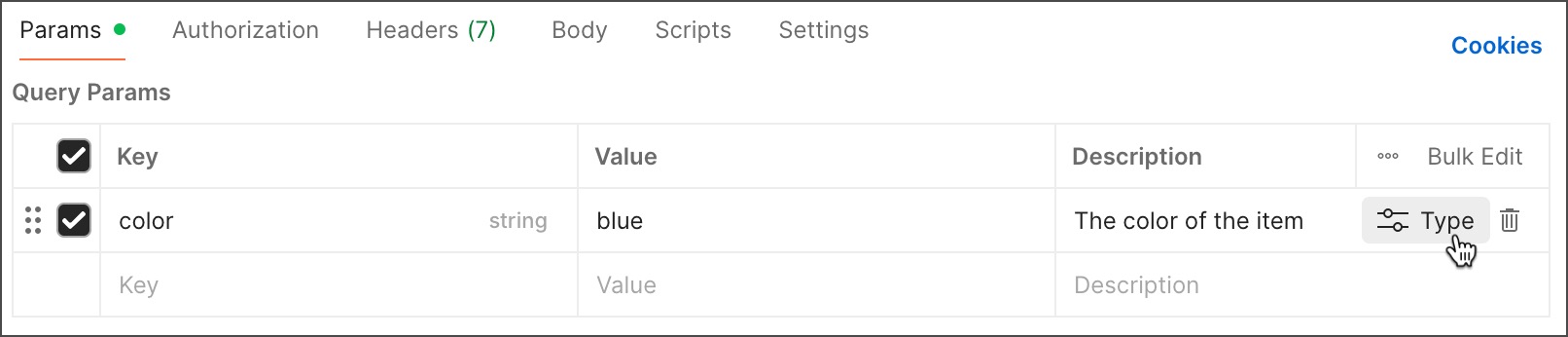
3. Specify details for the parameter or header:
* **Type** - Select the component's data type (string, integer, number, or boolean).
* **Required** - Turn on if the component is required, or turn off if it's optional.
* **Deprecated** - Turn on if the component is deprecated. A deprecated parameter or header is still functional, but its usage is discouraged because support may be discontinued.
* **Default value** - Specify the default value for the component.
* **Possible enum values** - (All data types except boolean) Enter the allowed values for the component (enumerations), and press **Return** or **Enter** after each item. You can also paste in a comma-separated list, such as "red,green,blue", and Postman adds each value.
**Type**.

3. Specify details for the parameter or header:
* **Type** - Select the component's data type (string, integer, number, or boolean).
* **Required** - Turn on if the component is required, or turn off if it's optional.
* **Deprecated** - Turn on if the component is deprecated. A deprecated parameter or header is still functional, but its usage is discouraged because support may be discontinued.
* **Default value** - Specify the default value for the component.
* **Possible enum values** - (All data types except boolean) Enter the allowed values for the component (enumerations), and press **Return** or **Enter** after each item. You can also paste in a comma-separated list, such as "red,green,blue", and Postman adds each value.
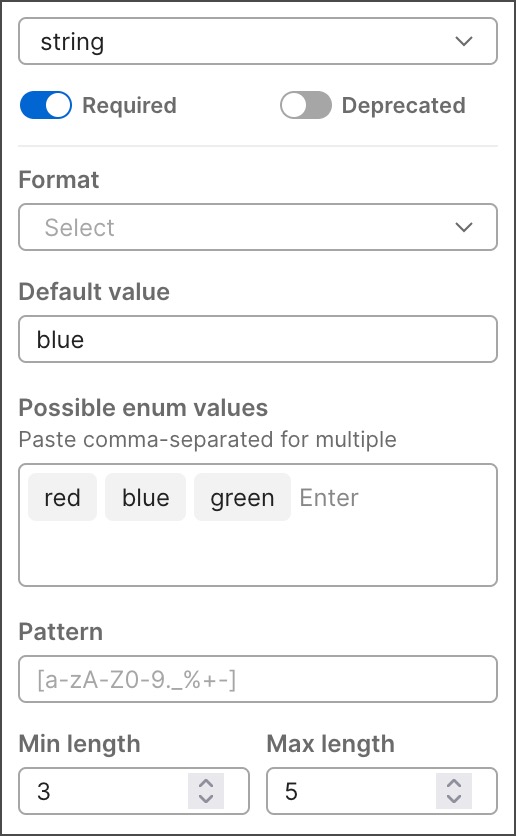 4. Specify optional details depending on the component type:
* Type **string**:
* **Format** - Select the data format for the string (for example, date, time, or email).
* **Pattern** - Enter allowed data patterns for the component using regex (regular expressions). You can't enter a pattern if you selected a format for the string.
* **Min length** - Enter the minimum length for the component.
* **Max length** - Enter the maximum length for the component.
* Type **integer** or **number**:
* **Min value** - Enter the minimum value for the component.
* **Max value** - Enter the maximum value for the component.
5. Click
4. Specify optional details depending on the component type:
* Type **string**:
* **Format** - Select the data format for the string (for example, date, time, or email).
* **Pattern** - Enter allowed data patterns for the component using regex (regular expressions). You can't enter a pattern if you selected a format for the string.
* **Min length** - Enter the minimum length for the component.
* **Max length** - Enter the maximum length for the component.
* Type **integer** or **number**:
* **Min value** - Enter the minimum value for the component.
* **Max value** - Enter the maximum value for the component.
5. Click  **Save** to save the changes to your request.
If you [generated a specification](/docs/design-apis/collections/generate-specifications/#generate-openapi-specifications-from-a-collection) from a collection, make sure to [update the specification](/docs/design-apis/collections/generate-specifications/#keep-openapi-specifications-in-sync-with-a-collection) once you're done making changes.
**Save** to save the changes to your request.
If you [generated a specification](/docs/design-apis/collections/generate-specifications/#generate-openapi-specifications-from-a-collection) from a collection, make sure to [update the specification](/docs/design-apis/collections/generate-specifications/#keep-openapi-specifications-in-sync-with-a-collection) once you're done making changes.