***
title: Generate an API specification from your collection
approved: 2025-10-15T00:00:00.000Z
max-toc-depth: 2
----------------
You can [generate an OpenAPI 2.0, 3.0, and 3.1 specification from a collection](#generate-openapi-specifications-from-a-collection) in [Spec Hub](/docs/design-apis/specifications/overview/). Generated specifications enable you to complete the API lifecycle by integrating your API with downstream systems, such as API gateways or security scanners. You can also [keep the specification in sync](#keep-openapi-specifications-in-sync-with-a-collection) with its collection.
Add types to [parameters and headers](/docs/design-apis/collections/add-properties-to-parameters-and-headers/) and [body data](/docs/design-apis/collections/add-properties-to-body-data/) that describe your APIs. This way Postman can generate a complete OpenAPI specification in Spec Hub. Learn more about [types in collections](/docs/design-apis/collections/overview/).
To learn more about generating and syncing specifications, see [Sync collections and specifications reference](/docs/design-apis/sync-specifications-reference/).
## Generate OpenAPI specifications from a collection
You can generate an OpenAPI specification from your collection. Postman automatically creates a specification with paths, components, and more based on your collection. The specification will also have types associated with parameters, headers, and body data if types are defined in the collection.
To generate a specification from a collection, do the following:
1. Expand **Collections** in the sidebar.
2. Click  **View more actions** next to a collection, then select **More > Generate specification**.
3. Enter a name for the specification.
4. Select **YAML** or **JSON** as the file format in the generated specification.
5. Click **Generate Specification**.
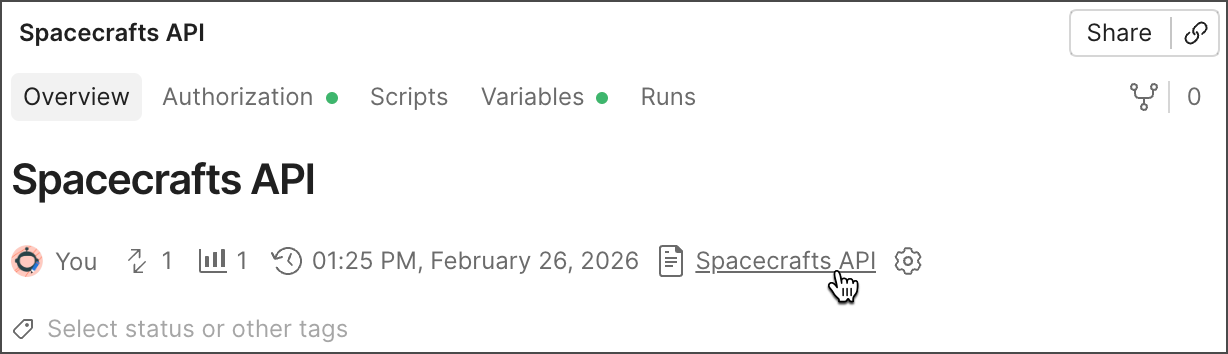
To view the generated specification, open the collection's overview, and then click the specification's name under **Specification**. You can also expand **Specs** in the sidebar and select the specification.
Your [Postman plan](https://www.postman.com/pricing/) gives you a limited number of specifications in your team's internal workspaces. Learn more about [resource usage in Postman](/docs/billing/resource-usage/#specifications).
You can only generate one API specification from the same collection. To generate a new specification from the collection, [delete the generated specification](/docs/design-apis/specifications/create-a-specification/#delete-a-specification) from Spec Hub.
## Keep OpenAPI specifications in sync with a collection
Syncing isn't available for collections generated from AsyncAPI specifications.
When you [generate an OpenAPI specification](#generate-openapi-specifications-from-a-collection) from a collection, Postman creates a specification that matches the requests in the collection. If you update the collection or specification, such as by adding a new request, Postman alerts you that the generated specification isn't in sync with the collection.
Postman doesn't delete elements from a collection when you sync it with the specification. For example, if you change the name of an existing path in your specification, Postman creates a new path in your collection when it's updated. The existing path still exists with the previous name in your generated collection, and you can choose to delete the path.
### Sync changes to a specification
Syncing collections to [multi-file OpenAPI specifications](/docs/design-apis/specifications/add-files-to-a-specification/) isn't supported.
To sync changes made in a generated collection to your OpenAPI specification, do the following:
1. Expand **Collections** in the sidebar, then select the collection you want to sync.
2. In the collection's **Overview** tab, click
**View more actions** next to a collection, then select **More > Generate specification**.
3. Enter a name for the specification.
4. Select **YAML** or **JSON** as the file format in the generated specification.
5. Click **Generate Specification**.
To view the generated specification, open the collection's overview, and then click the specification's name under **Specification**. You can also expand **Specs** in the sidebar and select the specification.

Your [Postman plan](https://www.postman.com/pricing/) gives you a limited number of specifications in your team's internal workspaces. Learn more about [resource usage in Postman](/docs/billing/resource-usage/#specifications).
You can only generate one API specification from the same collection. To generate a new specification from the collection, [delete the generated specification](/docs/design-apis/specifications/create-a-specification/#delete-a-specification) from Spec Hub.
## Keep OpenAPI specifications in sync with a collection
Syncing isn't available for collections generated from AsyncAPI specifications.
When you [generate an OpenAPI specification](#generate-openapi-specifications-from-a-collection) from a collection, Postman creates a specification that matches the requests in the collection. If you update the collection or specification, such as by adding a new request, Postman alerts you that the generated specification isn't in sync with the collection.
Postman doesn't delete elements from a collection when you sync it with the specification. For example, if you change the name of an existing path in your specification, Postman creates a new path in your collection when it's updated. The existing path still exists with the previous name in your generated collection, and you can choose to delete the path.
### Sync changes to a specification
Syncing collections to [multi-file OpenAPI specifications](/docs/design-apis/specifications/add-files-to-a-specification/) isn't supported.
To sync changes made in a generated collection to your OpenAPI specification, do the following:
1. Expand **Collections** in the sidebar, then select the collection you want to sync.
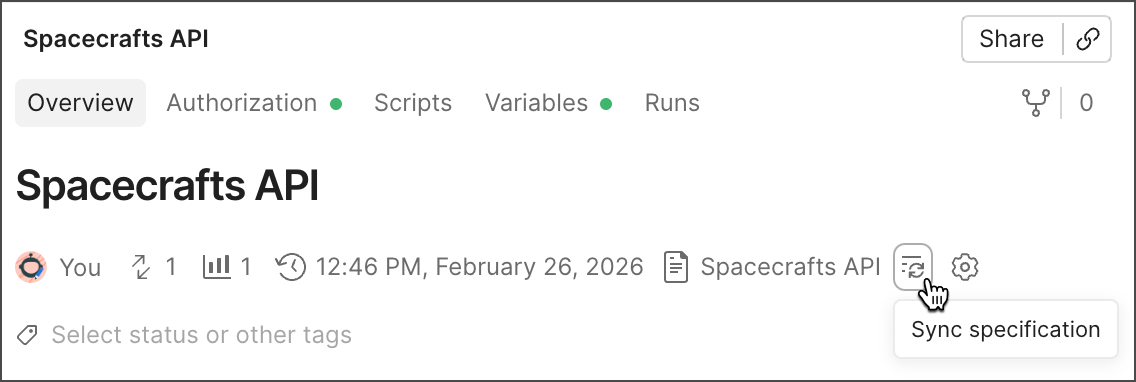
2. In the collection's **Overview** tab, click  **Sync specification**.
Changes to vendor extensions, operations, and requests made directly to the specification won't be overwritten by the collection.
### Sync changes to a collection
To sync changes made in an OpenAPI specification to a generated collection, do the following:
1. Expand **Specs** in the sidebar and select an OpenAPI specification.
2. Click
**Sync specification**.

Changes to vendor extensions, operations, and requests made directly to the specification won't be overwritten by the collection.
### Sync changes to a collection
To sync changes made in an OpenAPI specification to a generated collection, do the following:
1. Expand **Specs** in the sidebar and select an OpenAPI specification.
2. Click  **Update Collection**.
3. Click **Update** next to the generated collection.
## Configure sync settings
You can configure settings that enable you to customize the syncing behavior between collections and OpenAPI specifications.
To configure sync settings from a collection, do the following:
1. Expand **Collections** in the sidebar, then select the collection you want to sync.
2. In the collection's **Overview** tab, click
**Update Collection**.
3. Click **Update** next to the generated collection.
## Configure sync settings
You can configure settings that enable you to customize the syncing behavior between collections and OpenAPI specifications.
To configure sync settings from a collection, do the following:
1. Expand **Collections** in the sidebar, then select the collection you want to sync.
2. In the collection's **Overview** tab, click  **Configure update settings**.
3. [Configure sync settings](#sync-settings) between the collection and specification.
4. Click **Save**.
You can also [configure sync settings](/docs/design-apis/specifications/generate-collections/#configure-sync-settings) from an OpenAPI specification.
### Sync settings
You can configure the following sync settings between collections and OpenAPI specifications:
* **Sync example values between Spec and Collection** — Turn this on to keep examples in the specification and values in the collection in sync.
**Configure update settings**.
3. [Configure sync settings](#sync-settings) between the collection and specification.
4. Click **Save**.
You can also [configure sync settings](/docs/design-apis/specifications/generate-collections/#configure-sync-settings) from an OpenAPI specification.
### Sync settings
You can configure the following sync settings between collections and OpenAPI specifications:
* **Sync example values between Spec and Collection** — Turn this on to keep examples in the specification and values in the collection in sync.