***
title: Manage a multi-file API specification
updated: 2026-02-05T00:00:00.000Z
max-toc-depth: 2
----------------
With a *multi-file API specification* in Spec Hub, your specification can span across multiple files and folders, improving its organization and management.
## Supported multi-file specification formats
Postman supports the following multi-file specifications in Spec Hub:
* OpenAPI 2.0, 3.0, and 3.1
* protobuf 2 and protobuf 3
## About multi-file specifications
All files in a multi-file specification are considered the full API specification. Each multi-file specification has a root file that's the top-level file in your specification where the root object is defined. The root file hosts the operations defined by the API and it can reference other files in your specification.
When you [create a multi-file specification](#create-a-multi-file-specification) or [import a multi-file specification](/docs/design-apis/specifications/import-a-specification/), Postman determines the root file based on the references across the files. Your specification can only have one root file.
You can use the [Postman API](/docs/developer/postman-api/intro-api/) to bundle all files in your multi-file specification into a single OpenAPI file. Provide the specification ID to get the bundled specification in the response. Learn how to [bundle a multi-file specification with the Postman API](https://www.postman.com/postman/postman-public-workspace/request/3da633u/get-a-spec-s-definition).
## Create a multi-file specification
Add one or more files to an OpenAPI or protobuf specification to turn it into a multi-file specification. Then you can [add more files and folders](#add-files-and-folders) to your specification from the file manager.
To create a multi-file specification, do the following:
1. Click  **Specs** in the sidebar.
2. If you don't have a specification, select
**Specs** in the sidebar.
2. If you don't have a specification, select  **Create new specification** and select a specification type. You can also [import a specification](/docs/design-apis/specifications/import-a-specification/).
3. Next to your specification, select
**Create new specification** and select a specification type. You can also [import a specification](/docs/design-apis/specifications/import-a-specification/).
3. Next to your specification, select  **View more actions > Add File**. This adds a new file to the file manager in the sidebar, which is located below the outline.
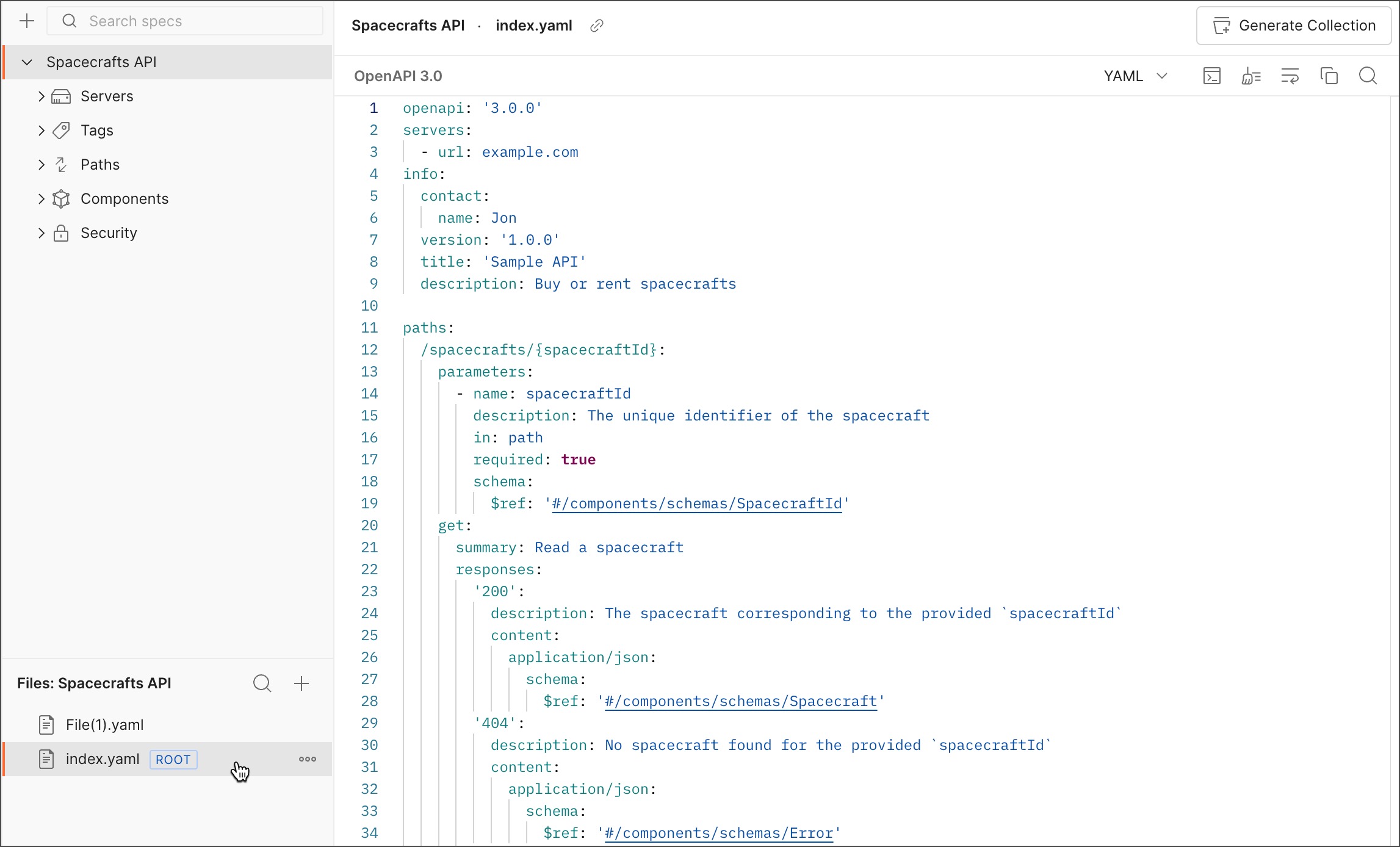
## Add files and folders
Once you've created or imported a multi-file OpenAPI or protobuf specification, you can add more files and folders and even search them by name, all from the file manager. You can also rename and delete your files and folders.
To add more files and folders to your specification, do the following:
1. Click **Specs** in the sidebar.
2. Click a multi-file specification in the sidebar.
3. In the file manager, click **Add Files and Folders** and then select one of the following:
* **New File** - Adds a new file at the top level of your specification.
* **New Folder** - Adds a new folder at the top level of your specification.
4. Next to a folder, you can also click **View more actions** and then select one of the following:
* **Add File** - Adds a new file to the folder.
* **Add Folder** - Adds a new folder within the folder.
**View more actions > Add File**. This adds a new file to the file manager in the sidebar, which is located below the outline.

## Add files and folders
Once you've created or imported a multi-file OpenAPI or protobuf specification, you can add more files and folders and even search them by name, all from the file manager. You can also rename and delete your files and folders.
To add more files and folders to your specification, do the following:
1. Click **Specs** in the sidebar.
2. Click a multi-file specification in the sidebar.
3. In the file manager, click **Add Files and Folders** and then select one of the following:
* **New File** - Adds a new file at the top level of your specification.
* **New Folder** - Adds a new folder at the top level of your specification.
4. Next to a folder, you can also click **View more actions** and then select one of the following:
* **Add File** - Adds a new file to the folder.
* **Add Folder** - Adds a new folder within the folder.
 You can also take the following actions from the file manager:
* To search files and folders by name, click
You can also take the following actions from the file manager:
* To search files and folders by name, click  **Search Files and Folders** and enter a name.
* To rename files and folders, select **View more actions > Rename**. Update the name then press **Return** or **Enter**.
* To delete files and folders, select **View more actions > Delete**. Then click **Delete** to confirm.
## Change the root file
Your multi-file specification can only have one [root file](#about-multi-file-specifications) that's used to reference other files in your specification. You can change the root file in your OpenAPI or protobuf 2 and protobuf 3 multi-file specification at any time.
To change the root file in a multi-file specification, do the following:
1. Click **Specs** in the sidebar.
2. Click a multi-file specification in the sidebar.
3. Next to a file in the file manager, select **View more actions > Mark as Root file**.
**Search Files and Folders** and enter a name.
* To rename files and folders, select **View more actions > Rename**. Update the name then press **Return** or **Enter**.
* To delete files and folders, select **View more actions > Delete**. Then click **Delete** to confirm.
## Change the root file
Your multi-file specification can only have one [root file](#about-multi-file-specifications) that's used to reference other files in your specification. You can change the root file in your OpenAPI or protobuf 2 and protobuf 3 multi-file specification at any time.
To change the root file in a multi-file specification, do the following:
1. Click **Specs** in the sidebar.
2. Click a multi-file specification in the sidebar.
3. Next to a file in the file manager, select **View more actions > Mark as Root file**.
 4. Click **Confirm**.
Make sure to update the new root file with the root OpenAPI object and references to other files in your specification. Otherwise, Postman can't parse your specification.
4. Click **Confirm**.
Make sure to update the new root file with the root OpenAPI object and references to other files in your specification. Otherwise, Postman can't parse your specification.