***
title: Create a new API specification
approved: 2026-02-05T00:00:00.000Z
max-toc-depth: 2
ux: v12
-------
[Create a specification](#create-a-new-specification) in Spec Hub to design and test your API's structure. You can create specifications in OpenAPI, AsyncAPI, protobuf, and GraphQL [format](/docs/design-apis/specifications/overview#supported-specification-formats), then [share your specification with collaborators](#share-a-specification).
You can also [import a specification](/docs/design-apis/specifications/import-a-specification/) into Spec Hub.
## Create a new specification
You can create OpenAPI, AsyncAPI, protobuf, and GraphQL specifications in Spec Hub. You can also [import an existing specification](/docs/design-apis/specifications/import-a-specification/) into Postman.
1. In the sidebar, click  and select **Spec**.
2. Select the type of specification you want to create. Postman creates a new specification with boilerplate content.
3. To rename your specification, click
and select **Spec**.
2. Select the type of specification you want to create. Postman creates a new specification with boilerplate content.
3. To rename your specification, click  **More actions** next to the specification in the sidebar and select **Rename**. Type a new name and press **Return** or **Enter**. Or, select the filename in the workbench, enter a new name, and press **Return** or **Enter**.
4. Edit or replace the content in the specification as needed for your API. Learn more about [editing your specification](/docs/design-apis/specifications/edit-a-specification/).
Your [Postman plan](https://www.postman.com/pricing/) gives you a limited number of specifications in your team's internal workspaces. Learn more about [resource usage in Postman](/docs/billing/resource-usage/#specifications).
You can't change the specification's type after creating a specification. Create a new specification instead.
## Share a specification
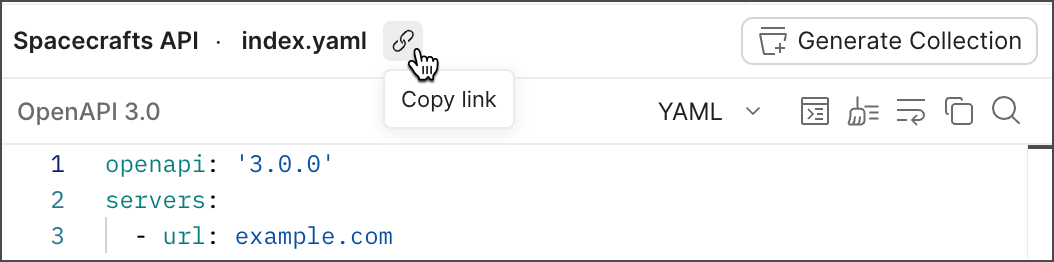
You can share a specification with collaborators. Expand **Specs** in the sidebar and select a specification. Then click
**More actions** next to the specification in the sidebar and select **Rename**. Type a new name and press **Return** or **Enter**. Or, select the filename in the workbench, enter a new name, and press **Return** or **Enter**.
4. Edit or replace the content in the specification as needed for your API. Learn more about [editing your specification](/docs/design-apis/specifications/edit-a-specification/).
Your [Postman plan](https://www.postman.com/pricing/) gives you a limited number of specifications in your team's internal workspaces. Learn more about [resource usage in Postman](/docs/billing/resource-usage/#specifications).
You can't change the specification's type after creating a specification. Create a new specification instead.
## Share a specification
You can share a specification with collaborators. Expand **Specs** in the sidebar and select a specification. Then click  **Copy link** in the workbench.
For more details about sharing elements, see [Share your work in Postman](/docs/collaborating-in-postman/sharing/).
## Rename a specification
1. Expand **Specs** in the sidebar.
2. Next to your specification, select **More actions > Rename**.
3. Enter a new name for your specification.
4. Press **Return** or **Enter**.
## Delete a specification
1. Expand **Specs** in the sidebar.
2. Next to your specification, select **More actions > Delete**.
3. Click **Delete** to confirm.
## Comment on a specification
You can add one or more [comments](/docs/collaborating-in-postman/comments/) to a specification in Spec Hub. Use comments to discuss your specifications with collaborators in Postman, keeping the conversation in context and available to other stakeholders.
To add a comment to a specification, do the following:
1. Expand **Specs** in the sidebar, then select the specification that you want to comment on.
2. Click
**Copy link** in the workbench.

For more details about sharing elements, see [Share your work in Postman](/docs/collaborating-in-postman/sharing/).
## Rename a specification
1. Expand **Specs** in the sidebar.
2. Next to your specification, select **More actions > Rename**.
3. Enter a new name for your specification.
4. Press **Return** or **Enter**.
## Delete a specification
1. Expand **Specs** in the sidebar.
2. Next to your specification, select **More actions > Delete**.
3. Click **Delete** to confirm.
## Comment on a specification
You can add one or more [comments](/docs/collaborating-in-postman/comments/) to a specification in Spec Hub. Use comments to discuss your specifications with collaborators in Postman, keeping the conversation in context and available to other stakeholders.
To add a comment to a specification, do the following:
1. Expand **Specs** in the sidebar, then select the specification that you want to comment on.
2. Click  **Comments** in the right sidebar.
3. Enter your comment and click **Comment**.
You can also add comments to collections you've added to your API and to requests and folders in that collection. Learn more about [commenting on a collection](/docs/collaborating-in-postman/comments/#global-comments).
**Comments** in the right sidebar.
3. Enter your comment and click **Comment**.
You can also add comments to collections you've added to your API and to requests and folders in that collection. Learn more about [commenting on a collection](/docs/collaborating-in-postman/comments/#global-comments).