***
title: Discover public APIs on the Postman API Network
approved: 2026-01-12T00:00:00.000Z
topictype: tutorial
slug: docs/getting-started/first-steps/exploring-public-api-network
max-toc-depth: 2
ux: v12
-------
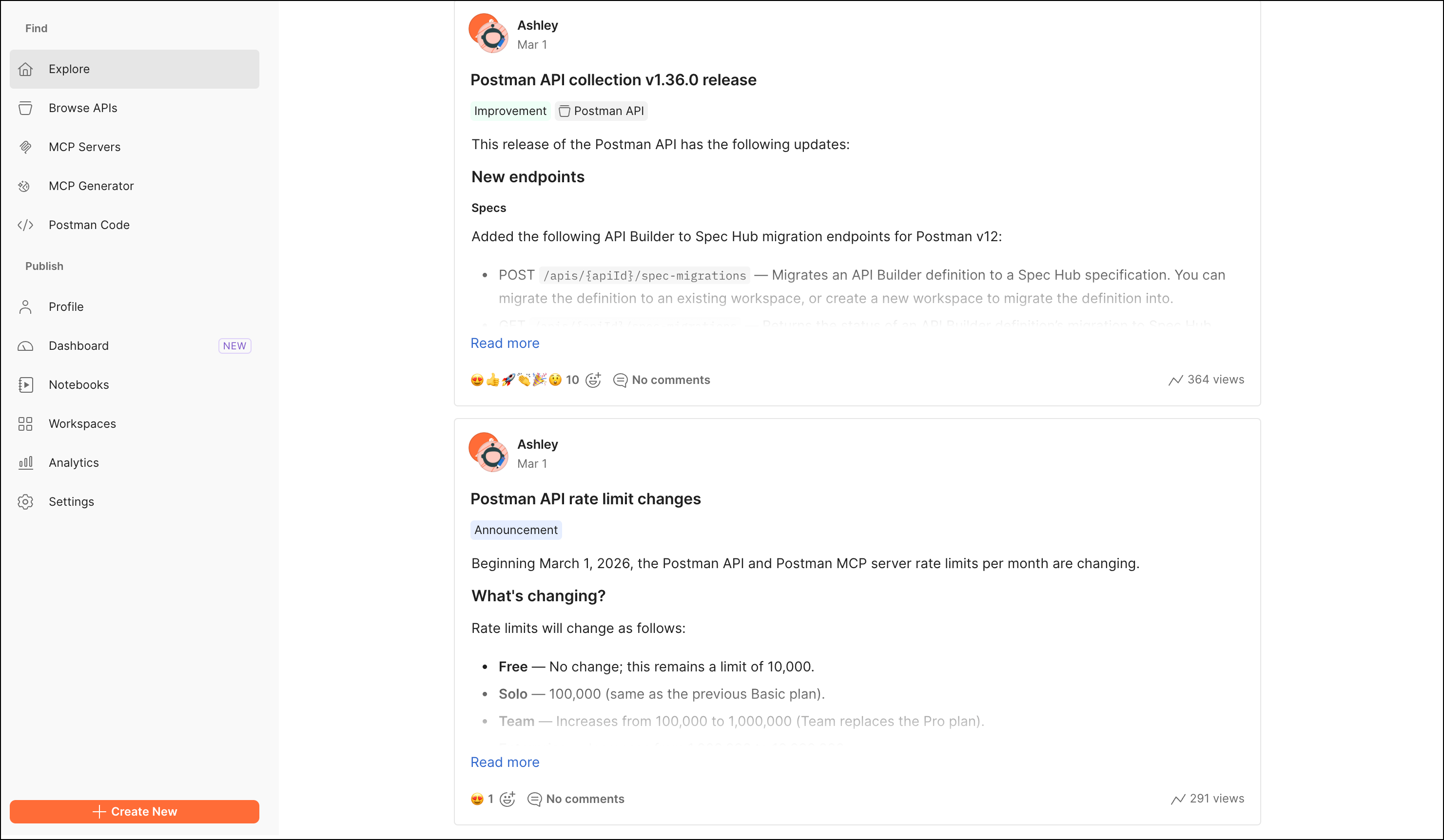
The [Postman API Network](https://www.postman.com/explore/) is the world's largest network of public APIs. Developers can use the API Network to explore APIs, contribute to them, and publish their own. Many of the companies you know and love publish their APIs to a public workspace on the Postman API Network.
As an API consumer, you can discover new and popular workspaces, collections, requests, flows, and teams. If you're an API publisher, you can conveniently access your publisher tools.
To explore the Postman API Network, click  in the header and select **Public API Network.**
## Find public APIs
You can search or browse the Postman API Network to discover public workspaces, collections, requests, flows, and teams.
### Search public elements
To search the Postman API Network, in the Postman header, click
in the header and select **Public API Network.**

## Find public APIs
You can search or browse the Postman API Network to discover public workspaces, collections, requests, flows, and teams.
### Search public elements
To search the Postman API Network, in the Postman header, click  **Search Postman**. You can filter your search by workspace, collection, request, API, flow, or team. To search by one of these types, click **Element type** and select one of the following:
*
**Search Postman**. You can filter your search by workspace, collection, request, API, flow, or team. To search by one of these types, click **Element type** and select one of the following:
*  **Workspaces**
*
**Workspaces**
*  **Collections**
*
**Collections**
*  **Requests**
*
**Requests**
*  **Specs**
*
**Specs**
*  **Flow**
*
**Flow**
*  **Publisher**
### Browse public elements
You can also browse the Postman API Network by visiting the following pages:
* **Explore** — The [Explore](https://www.postman.com/explore/) page is the Postman API Network's landing page. It lists noteworthy public workspaces, collections, APIs, and flows curated by Postman, alongside those that are popular among the community.
* **Browse APIs** — The [Browse](https://www.postman.com/explore/trending-apis/) page lists public workspaces, collections, and flows with the most views, activity, and usage.
*
**Publisher**
### Browse public elements
You can also browse the Postman API Network by visiting the following pages:
* **Explore** — The [Explore](https://www.postman.com/explore/) page is the Postman API Network's landing page. It lists noteworthy public workspaces, collections, APIs, and flows curated by Postman, alongside those that are popular among the community.
* **Browse APIs** — The [Browse](https://www.postman.com/explore/trending-apis/) page lists public workspaces, collections, and flows with the most views, activity, and usage.
*  **MCP Servers** — The [MCP Servers](https://www.postman.com/explore/mcp-servers) page lists official Model Context Protocol (MCP) servers for use within Postman.
*
**MCP Servers** — The [MCP Servers](https://www.postman.com/explore/mcp-servers) page lists official Model Context Protocol (MCP) servers for use within Postman.
*  **MCP Generator** — The [MCP Generator](https://www.postman.com/explore/mcp-generator) page lets you build an MCP server based off of APIs available in the Postman API Network. To learn more, see [Generate an MCP server with public APIs from the Postman API Network](/docs/postman-ai/mcp-servers/generate/).
*
**MCP Generator** — The [MCP Generator](https://www.postman.com/explore/mcp-generator) page lets you build an MCP server based off of APIs available in the Postman API Network. To learn more, see [Generate an MCP server with public APIs from the Postman API Network](/docs/postman-ai/mcp-servers/generate/).
*  **Postman Code** — [Postman Code](https://www.postman.com/explore/code) empowers your coding agent to search Postman, bring API context into your chat, and generate high-quality client code.
*
**Postman Code** — [Postman Code](https://www.postman.com/explore/code) empowers your coding agent to search Postman, bring API context into your chat, and generate high-quality client code.
*  **Profile** — The [Profile](https://www.postman.co) takes you to your team's entry in the Postman API network.
*
**Profile** — The [Profile](https://www.postman.co) takes you to your team's entry in the Postman API network.
*  **Dashboard** — The [Dashboard](https://www.postman.com/publisher/dashboard) page displays your team's recent activity on the Postman API network.
*
**Dashboard** — The [Dashboard](https://www.postman.com/publisher/dashboard) page displays your team's recent activity on the Postman API network.
*  **Notebooks** — [Notebooks](https://www.postman.com/publisher/notebooks) displays your team's saved Postman notebooks.
* **Workspaces** — The [Workspaces](https://www.postman.com/explore/workspaces/) page lists public workspaces. To sort or filter, in the upper-right corner, select **Featured**, **New**, **Week**, or **All Time**.
*
**Notebooks** — [Notebooks](https://www.postman.com/publisher/notebooks) displays your team's saved Postman notebooks.
* **Workspaces** — The [Workspaces](https://www.postman.com/explore/workspaces/) page lists public workspaces. To sort or filter, in the upper-right corner, select **Featured**, **New**, **Week**, or **All Time**.
*  **Analytics** — Your [Analytics](https://www.postman.com/publisher/analytics) page displays data on your team's public APIs, like active users and API users.
*
**Analytics** — Your [Analytics](https://www.postman.com/publisher/analytics) page displays data on your team's public APIs, like active users and API users.
*  **Settings** — The [Settings](https://www.postman.com/publisher/settings) page allows you to change your profile, visibility, and verified status.
To get started with some public APIs on the Postman API Network, see the following collections:
* [Learn by API](https://www.postman.com/apilearningresources/api-learning-resources/collection/vcbuqdx/learn-by-api?ctx=documentation)
* [API Learner](https://www.postman.com/apilearningresources/api-learning-resources/collection/6izoy0h/api-learner?ctx=documentation)
* [Public REST APIs](https://www.postman.com/cs-demo/public-rest-apis/overview)
* [Intro to writing tests](https://www.postman.com/postman/postman-team-collections/collection/9fqcfpk/intro-to-writing-tests-with-examples?ctx=documentation)
* [How to use the Postman Console](https://www.postman.com/postman/postman-team-collections/collection/c8w949c/how-to-use-the-postman-console?ctx=documentation)
* [Postman Echo](https://www.postman.com/postman/published-postman-templates/documentation/ae2ja6x/postman-echo?ctx=documentation)
## Next steps
* To learn how to choose a public API from a verified team, see [Choose public elements](/docs/postman-api-network/explore/consume/#choose-public-elements).
* To learn how to fork a public element, see [Use public elements](/docs/postman-api-network/explore/consume/#use-public-elements).
* To learn how to watch a public element, see [Star workspaces and watch collections](/docs/postman-api-network/explore/consume/#star-workspaces-and-watch-collections).
**Settings** — The [Settings](https://www.postman.com/publisher/settings) page allows you to change your profile, visibility, and verified status.
To get started with some public APIs on the Postman API Network, see the following collections:
* [Learn by API](https://www.postman.com/apilearningresources/api-learning-resources/collection/vcbuqdx/learn-by-api?ctx=documentation)
* [API Learner](https://www.postman.com/apilearningresources/api-learning-resources/collection/6izoy0h/api-learner?ctx=documentation)
* [Public REST APIs](https://www.postman.com/cs-demo/public-rest-apis/overview)
* [Intro to writing tests](https://www.postman.com/postman/postman-team-collections/collection/9fqcfpk/intro-to-writing-tests-with-examples?ctx=documentation)
* [How to use the Postman Console](https://www.postman.com/postman/postman-team-collections/collection/c8w949c/how-to-use-the-postman-console?ctx=documentation)
* [Postman Echo](https://www.postman.com/postman/published-postman-templates/documentation/ae2ja6x/postman-echo?ctx=documentation)
## Next steps
* To learn how to choose a public API from a verified team, see [Choose public elements](/docs/postman-api-network/explore/consume/#choose-public-elements).
* To learn how to fork a public element, see [Use public elements](/docs/postman-api-network/explore/consume/#use-public-elements).
* To learn how to watch a public element, see [Star workspaces and watch collections](/docs/postman-api-network/explore/consume/#star-workspaces-and-watch-collections).