***
title: API governance commands
approved: 2026-03-16T00:00:00.000Z
topictype: reference
slug: docs/postman-cli/postman-cli-governance
max-toc-depth: 2
----------------
This topic covers API governance and security commands for the [Postman CLI](/docs/postman-cli/postman-cli-overview/).
API governance is the practice of applying a defined set of standards consistently across the API design and testing phases of your development process. The Postman CLI includes commands that checks your API specifications in [Spec Hub](#postman-spec-lint) against your team's configured [Postman API governance and security rules](/docs/api-governance/api-governance-overview/).
## `postman spec lint`
This command runs syntax validation and governance rule checks against a single- or multi-file API specification in [Spec Hub](/docs/design-apis/specifications/overview/). Provide the local file path or ID for a specification that's in OpenAPI 2.0, 3.0, or 3.1 format. If you're providing the local file path for a multi-file specification, provide the path to the [root file](/docs/design-apis/specifications/add-files-to-a-specification/#about-multi-file-specifications).
By default, if you provide a local file path for a specification, the command runs syntax validation and governance checks using the **All workspaces** governance group. Use the `--workspace-id` option to run governance checks using the rules from a specific workspace.
To use this command, sign in to Postman with [the `postman login` command](/docs/postman-cli/postman-cli-auth/#postman-login).
You can find the specification ID in Postman. Click  Items tab, click **Specs** in the sidebar, and select a specification. Then click the
  **Specification Info** tab in the right sidebar to view or copy the specification ID.
### Usage
```bash
postman spec lint [options]
```
The local file path to the API specification or the specification's unique identifier.
### Options
Triggers an exit failure code for rule violations at or higher than the specified severity level. The options, in order of lowest to highest severity, are `HINT`, `INFO`, `WARNING`, and `ERROR`.
Controls the output format for issues found in the OpenAPI specification. Accepts `JSON` or `CSV`. Defaults to table view if no output format is specified.
Run syntax validation and governance rule checks using the rules from a particular workspace by providing its ID. You can use this option if you provide the local file path for a specification. Learn how to [get a workspace's ID](/docs/collaborating-in-postman/using-workspaces/internal-workspaces/use-workspaces/#get-the-workspace-id).
### Examples
postman spec lint openapi.yaml --workspace-id 987654321-54321ef-4321-1ab2-1ab2-ab1234112a12
postman spec lint 12345678-12345ab-1234-1ab2-1ab2-ab1234112a12
```
Learn more at [API governance overview](/docs/api-governance/api-governance-overview/) and [Use the Postman CLI with GitHub Actions](/docs/postman-cli/postman-cli-github-actions/).
### Output
You can change the output of governance rule violations to JSON or CSV. If you don't specify an output, it defaults to table view.
The following is an example of the output in table format (default):
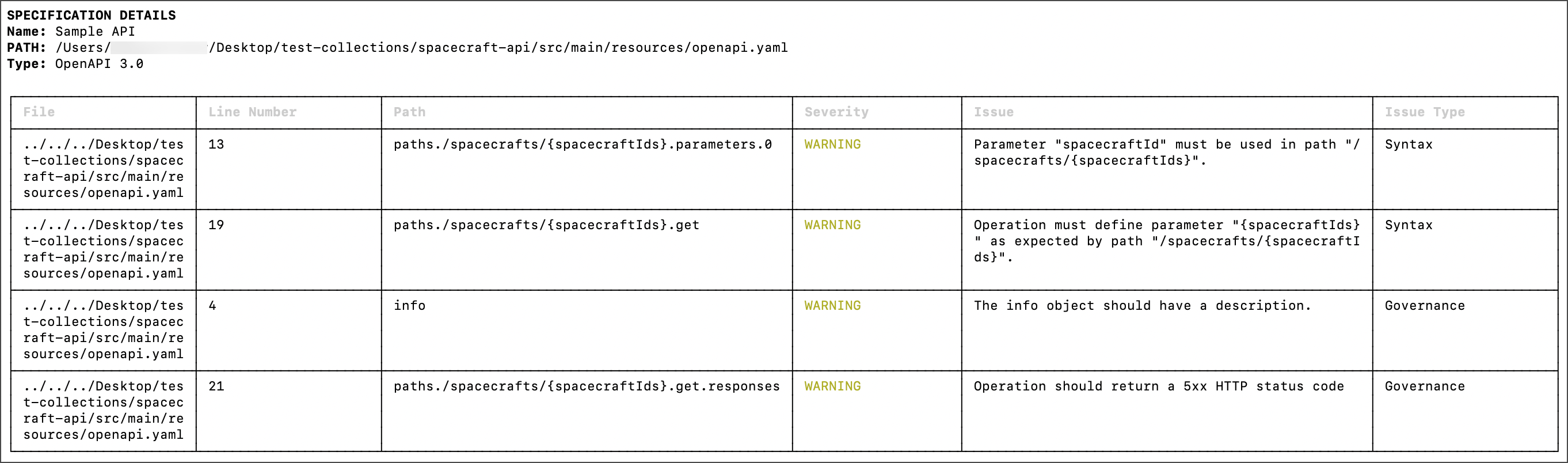
The following is an example of the output in JSON format:
{
"violations": [
{
"file": "../../../Desktop/test-collections/spacecraft-api/src/main/resources/openapi.yaml",
"line number": "13",
"path": "paths./spacecrafts/{spacecraftIds}.parameters.0",
"severity": "WARNING",
"issue": "Parameter \"spacecraftId\" must be used in path \"/spacecrafts/{spacecraftIds}\".",
"issue type": "Syntax"
},
{
"file": "../../../Desktop/test-collections/spacecraft-api/src/main/resources/openapi.yaml",
"line number": "19",
"path": "paths./spacecrafts/{spacecraftIds}.get",
"severity": "WARNING",
"issue": "Operation must define parameter \"{spacecraftIds}\" as expected by path \"/spacecrafts/{spacecraftIds}\".",
"issue type": "Syntax"
},
{
"file": "../../../Desktop/test-collections/spacecraft-api/src/main/resources/openapi.yaml",
"line number": "4",
"path": "info",
"severity": "WARNING",
"issue": "The info object should have a description.",
"issue type": "Governance"
},
{
"file": "../../../Desktop/test-collections/spacecraft-api/src/main/resources/openapi.yaml",
"line number": "21",
"path": "paths./spacecrafts/{spacecraftIds}.get.responses",
"severity": "WARNING",
"issue": "Operation should return a 5xx HTTP status code",
"issue type": "Governance"
}
]
}
```
The following is an example of the output in CSV format:
file,line number,path,severity,issue,issue type
../../../Desktop/test-collections/spacecraft-api/src/main/resources/openapi.yaml,13,paths./spacecrafts/\{spacecraftIds}.parameters.0,WARNING,"Parameter ""spacecraftId"" must be used in path ""/spacecrafts/\{spacecraftIds}"".",Syntax
../../../Desktop/test-collections/spacecraft-api/src/main/resources/openapi.yaml,19,paths./spacecrafts/\{spacecraftIds}.get,WARNING,"Operation must define parameter ""\{spacecraftIds}"" as expected by path ""/spacecrafts/\{spacecraftIds}"".",Syntax
../../../Desktop/test-collections/spacecraft-api/src/main/resources/openapi.yaml,4,info,WARNING,The info object should have a description.,Governance
../../../Desktop/test-collections/spacecraft-api/src/main/resources/openapi.yaml,21,paths./spacecrafts/\{spacecraftIds}.get.responses,WARNING,Operation should return a 5xx HTTP status code,Governance
````
## `postman api lint`
The `postman api lint` command is only supported for API Builder objects in Postman v11. The Postman API Builder isn't supported in Postman v12 and later. Learn about [using the API Builder in Postman v11 and earlier](/v11/docs/design-apis/api-builder/overview/).
This command runs validation checks for governance and security rules against the API specification provided in the Postman config file, a local file, or a UUID. The `api lint` command shows a warning if it's unable to find the API ID to send data back to Postman.
This command supports APIs in the Postman API Builder that aren't linked to Git.
To use this command, sign in to Postman with [the `postman login` command](/docs/postman-cli/postman-cli-auth/#postman-login).
### Usage
```bash
postman api lint [options]
````
The API definition file path or API UUID to lint.
### Options
Triggers an exit failure code for rule violations at or higher than the specified severity level. The options, in order of lowest to highest severity, are `HINT`, `INFO`, `WARN`, and `ERROR`.
Specifies whether to override the default exit code for the current run.
### Examples
```bash
postman api lint my-definition-file.json
postman api lint 12345678-12345ab-1234-1ab2-1ab2-ab1234112a12
```
Learn more at [API governance overview](/docs/api-governance/api-governance-overview/).
**Specification Info** tab in the right sidebar to view or copy the specification ID.
### Usage
```bash
postman spec lint [options]
```
The local file path to the API specification or the specification's unique identifier.
### Options
Triggers an exit failure code for rule violations at or higher than the specified severity level. The options, in order of lowest to highest severity, are `HINT`, `INFO`, `WARNING`, and `ERROR`.
Controls the output format for issues found in the OpenAPI specification. Accepts `JSON` or `CSV`. Defaults to table view if no output format is specified.
Run syntax validation and governance rule checks using the rules from a particular workspace by providing its ID. You can use this option if you provide the local file path for a specification. Learn how to [get a workspace's ID](/docs/collaborating-in-postman/using-workspaces/internal-workspaces/use-workspaces/#get-the-workspace-id).
### Examples
postman spec lint openapi.yaml --workspace-id 987654321-54321ef-4321-1ab2-1ab2-ab1234112a12
postman spec lint 12345678-12345ab-1234-1ab2-1ab2-ab1234112a12
```
Learn more at [API governance overview](/docs/api-governance/api-governance-overview/) and [Use the Postman CLI with GitHub Actions](/docs/postman-cli/postman-cli-github-actions/).
### Output
You can change the output of governance rule violations to JSON or CSV. If you don't specify an output, it defaults to table view.
The following is an example of the output in table format (default):

The following is an example of the output in JSON format:
{
"violations": [
{
"file": "../../../Desktop/test-collections/spacecraft-api/src/main/resources/openapi.yaml",
"line number": "13",
"path": "paths./spacecrafts/{spacecraftIds}.parameters.0",
"severity": "WARNING",
"issue": "Parameter \"spacecraftId\" must be used in path \"/spacecrafts/{spacecraftIds}\".",
"issue type": "Syntax"
},
{
"file": "../../../Desktop/test-collections/spacecraft-api/src/main/resources/openapi.yaml",
"line number": "19",
"path": "paths./spacecrafts/{spacecraftIds}.get",
"severity": "WARNING",
"issue": "Operation must define parameter \"{spacecraftIds}\" as expected by path \"/spacecrafts/{spacecraftIds}\".",
"issue type": "Syntax"
},
{
"file": "../../../Desktop/test-collections/spacecraft-api/src/main/resources/openapi.yaml",
"line number": "4",
"path": "info",
"severity": "WARNING",
"issue": "The info object should have a description.",
"issue type": "Governance"
},
{
"file": "../../../Desktop/test-collections/spacecraft-api/src/main/resources/openapi.yaml",
"line number": "21",
"path": "paths./spacecrafts/{spacecraftIds}.get.responses",
"severity": "WARNING",
"issue": "Operation should return a 5xx HTTP status code",
"issue type": "Governance"
}
]
}
```
The following is an example of the output in CSV format:
file,line number,path,severity,issue,issue type
../../../Desktop/test-collections/spacecraft-api/src/main/resources/openapi.yaml,13,paths./spacecrafts/\{spacecraftIds}.parameters.0,WARNING,"Parameter ""spacecraftId"" must be used in path ""/spacecrafts/\{spacecraftIds}"".",Syntax
../../../Desktop/test-collections/spacecraft-api/src/main/resources/openapi.yaml,19,paths./spacecrafts/\{spacecraftIds}.get,WARNING,"Operation must define parameter ""\{spacecraftIds}"" as expected by path ""/spacecrafts/\{spacecraftIds}"".",Syntax
../../../Desktop/test-collections/spacecraft-api/src/main/resources/openapi.yaml,4,info,WARNING,The info object should have a description.,Governance
../../../Desktop/test-collections/spacecraft-api/src/main/resources/openapi.yaml,21,paths./spacecrafts/\{spacecraftIds}.get.responses,WARNING,Operation should return a 5xx HTTP status code,Governance
````
## `postman api lint`
The `postman api lint` command is only supported for API Builder objects in Postman v11. The Postman API Builder isn't supported in Postman v12 and later. Learn about [using the API Builder in Postman v11 and earlier](/v11/docs/design-apis/api-builder/overview/).
This command runs validation checks for governance and security rules against the API specification provided in the Postman config file, a local file, or a UUID. The `api lint` command shows a warning if it's unable to find the API ID to send data back to Postman.
This command supports APIs in the Postman API Builder that aren't linked to Git.
To use this command, sign in to Postman with [the `postman login` command](/docs/postman-cli/postman-cli-auth/#postman-login).
### Usage
```bash
postman api lint [options]
````
The API definition file path or API UUID to lint.
### Options
Triggers an exit failure code for rule violations at or higher than the specified severity level. The options, in order of lowest to highest severity, are `HINT`, `INFO`, `WARN`, and `ERROR`.
Specifies whether to override the default exit code for the current run.
### Examples
```bash
postman api lint my-definition-file.json
postman api lint 12345678-12345ab-1234-1ab2-1ab2-ab1234112a12
```
Learn more at [API governance overview](/docs/api-governance/api-governance-overview/).