***
title: Loops with external data
updated: 2025-06-06T00:00:00.000Z
topictype: procedure
slug: docs/postman-flows/build-flows/structure/loops/loops-external-data
max-toc-depth: 2
----------------
The [Loops Overview](/docs/postman-flows/build-flows/structure/loops/overview/) showed how to build loops that begin with a **For** or **Repeat** block, then send each iteration's output through a sequence of blocks to a **Collect** block. The blocks in those examples were all *inside the loop*. In this topic, you'll learn how to rigorously define what it means for a block to be *inside the loop* or *outside the loop*. This matters because data that originates outside the loop behaves differently than data that originates inside.
When blocks outside a loop provide data, you can think of this as *external* data, meaning external to the loop but still within Postman.
## What's inside a loop in flows
The inside of a loop is defined as including the following blocks:
* The **For** or **Repeat** block that begins the work of the loop and its respective data source. (A **For** block's data source might be a **List** block; a **Repeat** block's data source might be a **Number** block.)
* The **Collect** block that completes the work of the loop, and any blocks connected to the **Collect** block's output. (This might include **Display** or **Output** blocks.)
* Any blocks that do work after the **For** or **Repeat** block and before the **Collect** block. (This might include **Evaluate**, **Create Variable**, **Get Variable**, **Template**, **Delay**, **Output**, or other kinds of blocks.)
All blocks in the example below are inside the loop. Each iteration of the loop obtains a random number and multiplies it by 11. Later in this topic you'll see how to avoid hard-coding an arbitrary value (in this case 11).
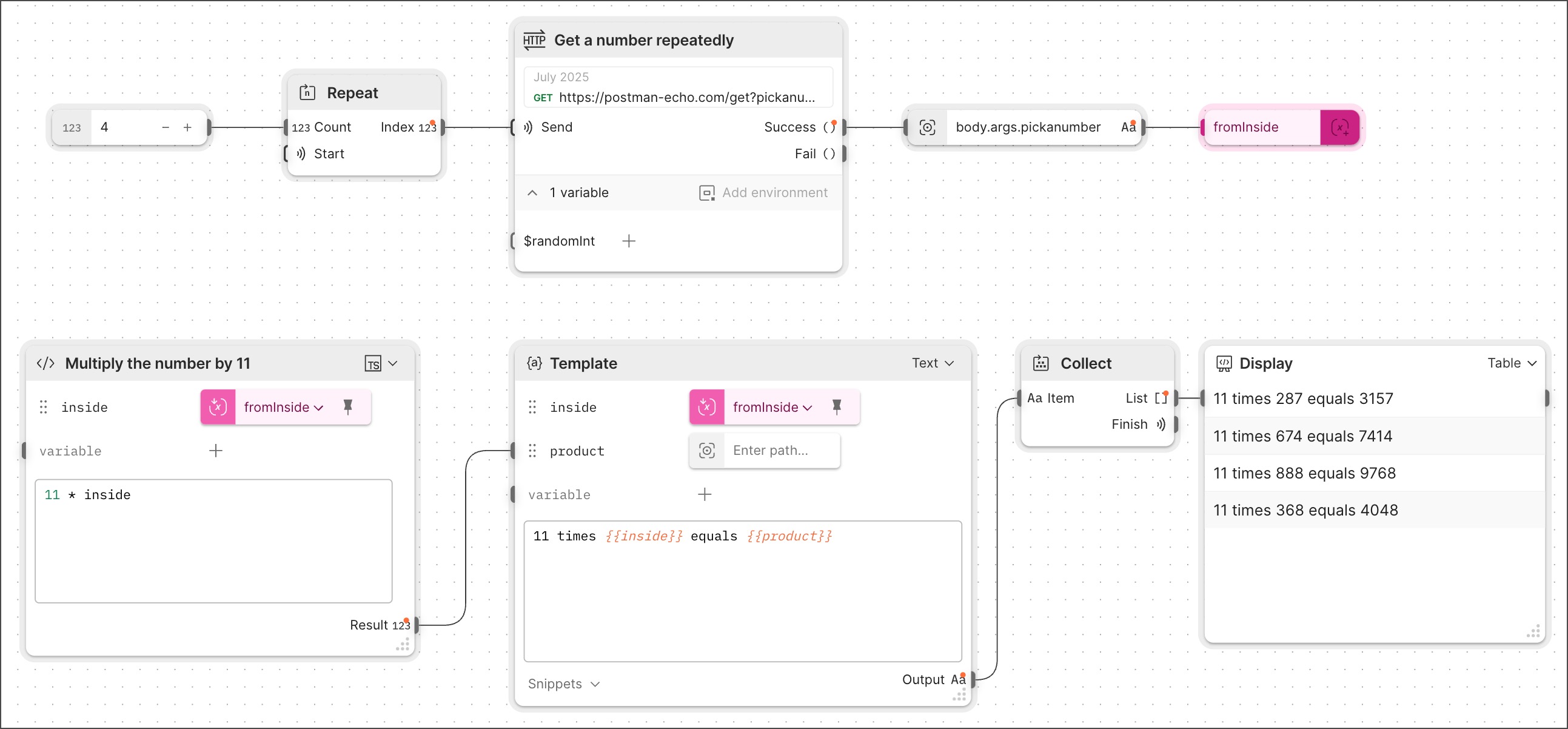 The loop's HTTP request has a parameter that gets assigned a new, random integer value each time you send the request. What makes this work is that the parameter's value is defined as `{{$randomint}}`, one of the special dynamic variables from the [Faker library](/docs/tests-and-scripts/write-scripts/variables-list/#text-numbers-and-colors).
## What's outside a loop in flows
Suppose you add a block that's *not* in between the **For** or **Repeat** block that begins and the **Collect** block that completes the work of the loop? That block will be *outside the loop*. This holds true even if you connect its output to the input of a block inside the loop.
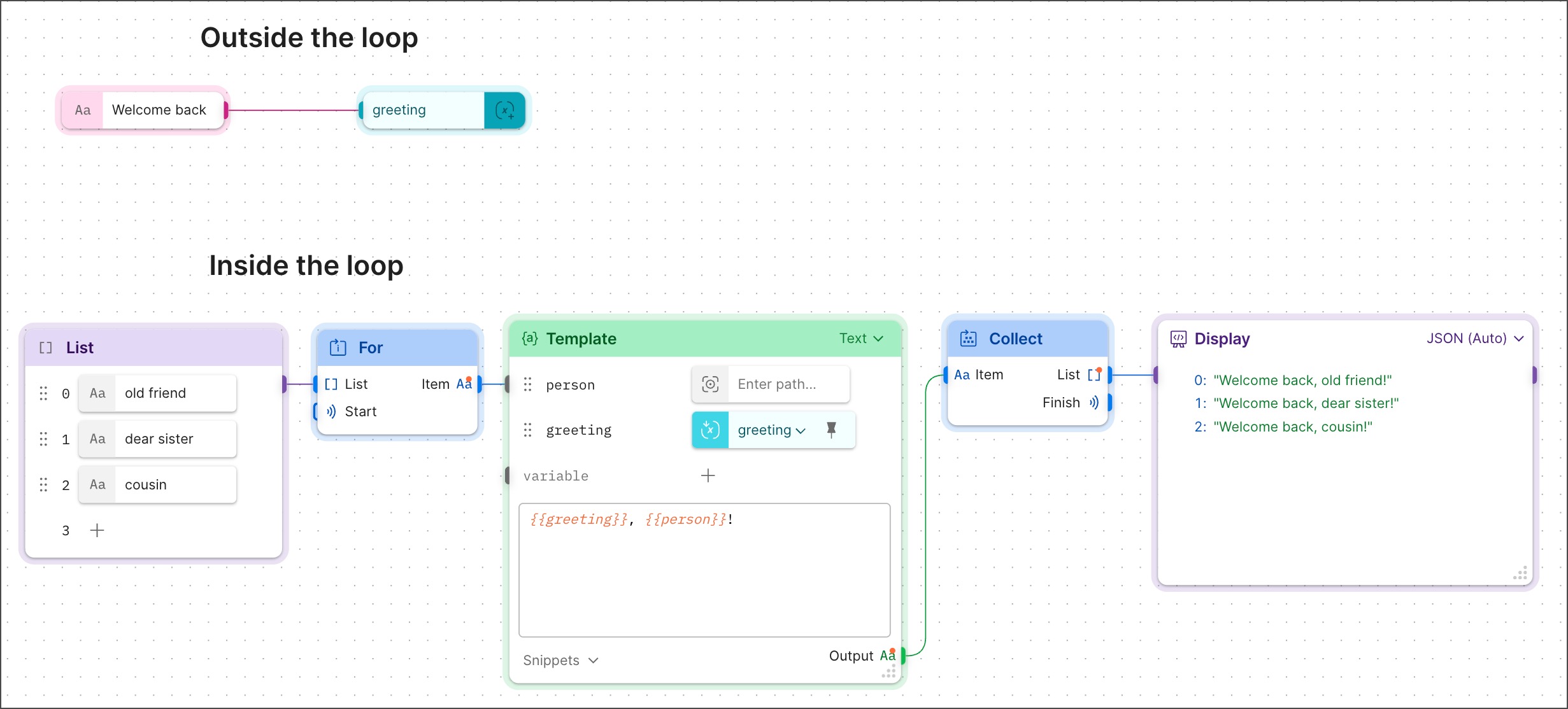
Here's an example where a **String** and **Create Variable** block sit outside the loop. Then, the value they store is consumed inside the loop, by an inline **Get Variable** block within a **Template** block.
The loop's HTTP request has a parameter that gets assigned a new, random integer value each time you send the request. What makes this work is that the parameter's value is defined as `{{$randomint}}`, one of the special dynamic variables from the [Faker library](/docs/tests-and-scripts/write-scripts/variables-list/#text-numbers-and-colors).
## What's outside a loop in flows
Suppose you add a block that's *not* in between the **For** or **Repeat** block that begins and the **Collect** block that completes the work of the loop? That block will be *outside the loop*. This holds true even if you connect its output to the input of a block inside the loop.
Here's an example where a **String** and **Create Variable** block sit outside the loop. Then, the value they store is consumed inside the loop, by an inline **Get Variable** block within a **Template** block.
 ## Work with data from both inside and outside a loop
The example from [What's inside a loop in flows](/docs/postman-flows/build-flows/structure/loops/loops-external-data/#whats-inside-a-loop-in-flows) used the same hard-coded value to process data in every iteration of the loop. To make this example more interesting, you can replace the hard-coded value with a number obtained and stored outside the loop, then consumed inside the loop.
To build this loop, do the following:
1. Clone or build a copy of the example from [What's inside a loop in flows](/docs/postman-flows/build-flows/structure/loops/loops-external-data/#whats-inside-a-loop-in-flows).
2. Clone the HTTP request named **Get a number repeatedly** and rename the clone **Get a number once**. Although the two requests are functionally identical, naming the two copies differently will make your flow easier to understand.
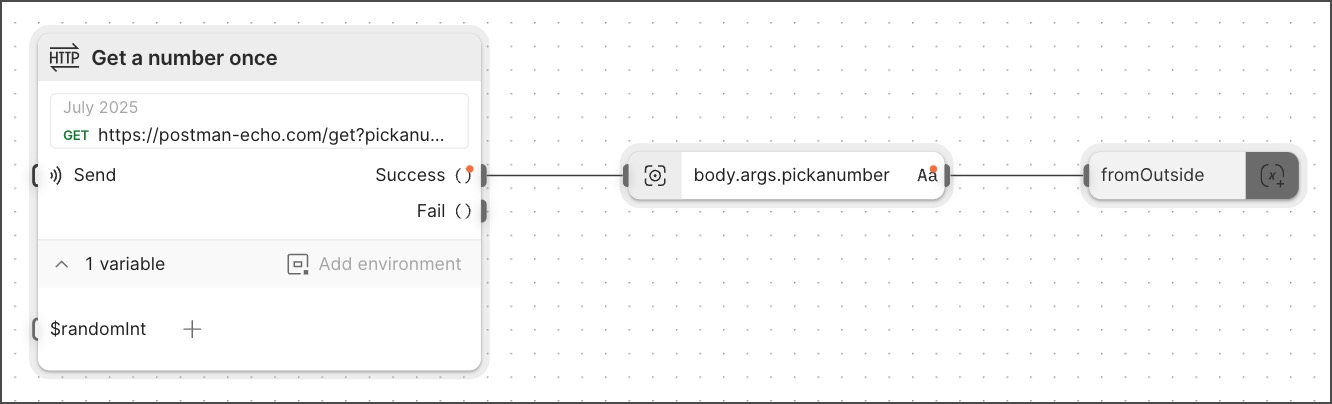
3. Create the new blocks that will sit outside the loop. These will be the **HTTP request**, **Select**, and **Create Variable** blocks shown below:
## Work with data from both inside and outside a loop
The example from [What's inside a loop in flows](/docs/postman-flows/build-flows/structure/loops/loops-external-data/#whats-inside-a-loop-in-flows) used the same hard-coded value to process data in every iteration of the loop. To make this example more interesting, you can replace the hard-coded value with a number obtained and stored outside the loop, then consumed inside the loop.
To build this loop, do the following:
1. Clone or build a copy of the example from [What's inside a loop in flows](/docs/postman-flows/build-flows/structure/loops/loops-external-data/#whats-inside-a-loop-in-flows).
2. Clone the HTTP request named **Get a number repeatedly** and rename the clone **Get a number once**. Although the two requests are functionally identical, naming the two copies differently will make your flow easier to understand.
3. Create the new blocks that will sit outside the loop. These will be the **HTTP request**, **Select**, and **Create Variable** blocks shown below:
 4. Leave the first row of blocks from your original loop as is.
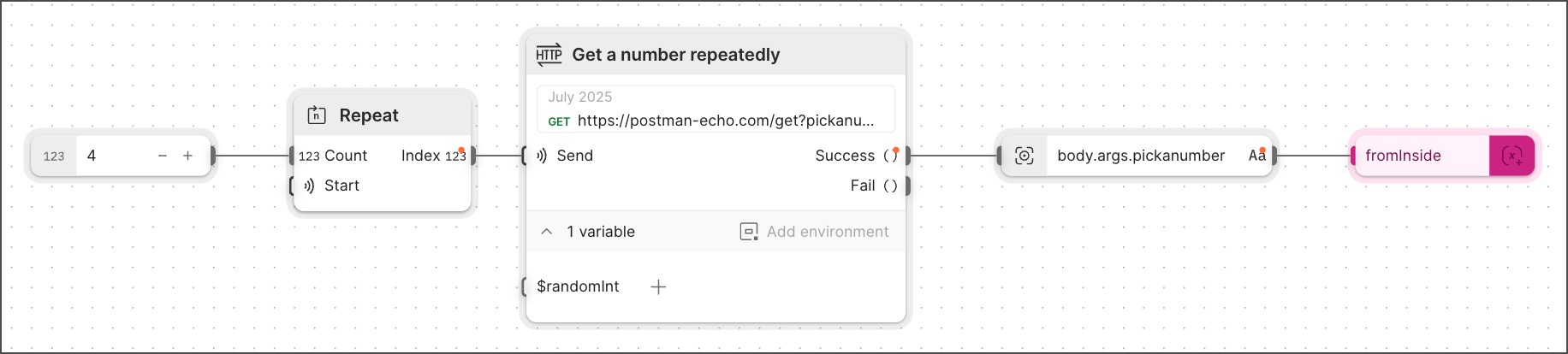 5. Modify the second row of blocks to match what's shown below. Be sure to do the following:
* Rename the **Multiply the number by 11** block as **Multiply the two numbers**.
* Verify that in both the **Multiply the two numbers** block and the **Template** block, there are two inline **Get Variable** blocks: one whose value is `fromOutside` and another whose value is `fromInside`.
5. Modify the second row of blocks to match what's shown below. Be sure to do the following:
* Rename the **Multiply the number by 11** block as **Multiply the two numbers**.
* Verify that in both the **Multiply the two numbers** block and the **Template** block, there are two inline **Get Variable** blocks: one whose value is `fromOutside` and another whose value is `fromInside`.
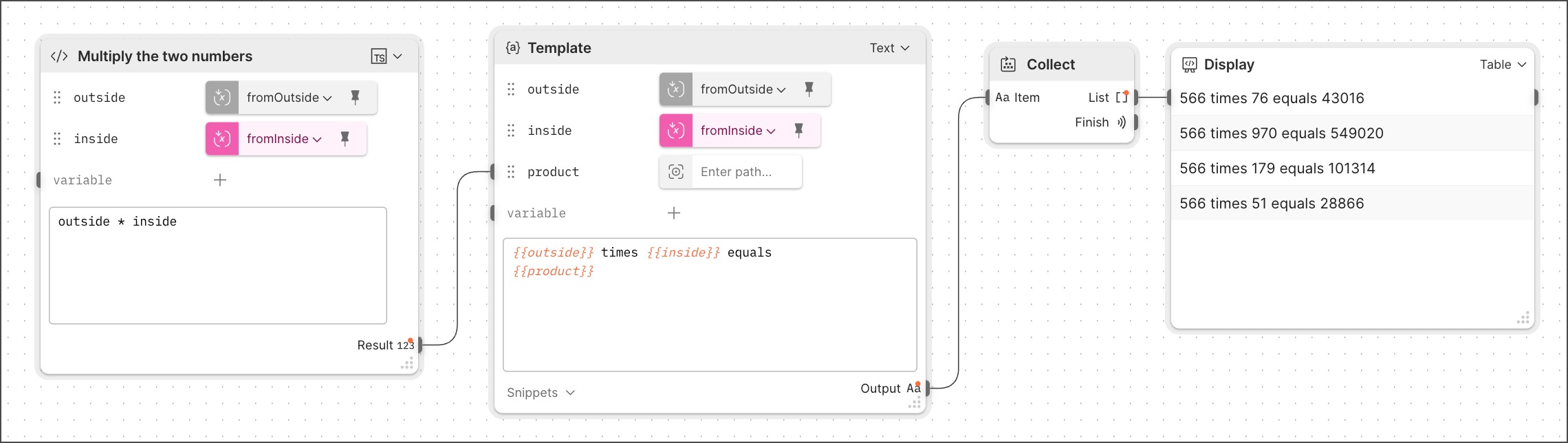 Run the flow. Every time you run it, it will obtain a new random number and multiply that number (the `fromOutside` variable) by four different random numbers (the `fromInside` variable). The completed flow looks like this:
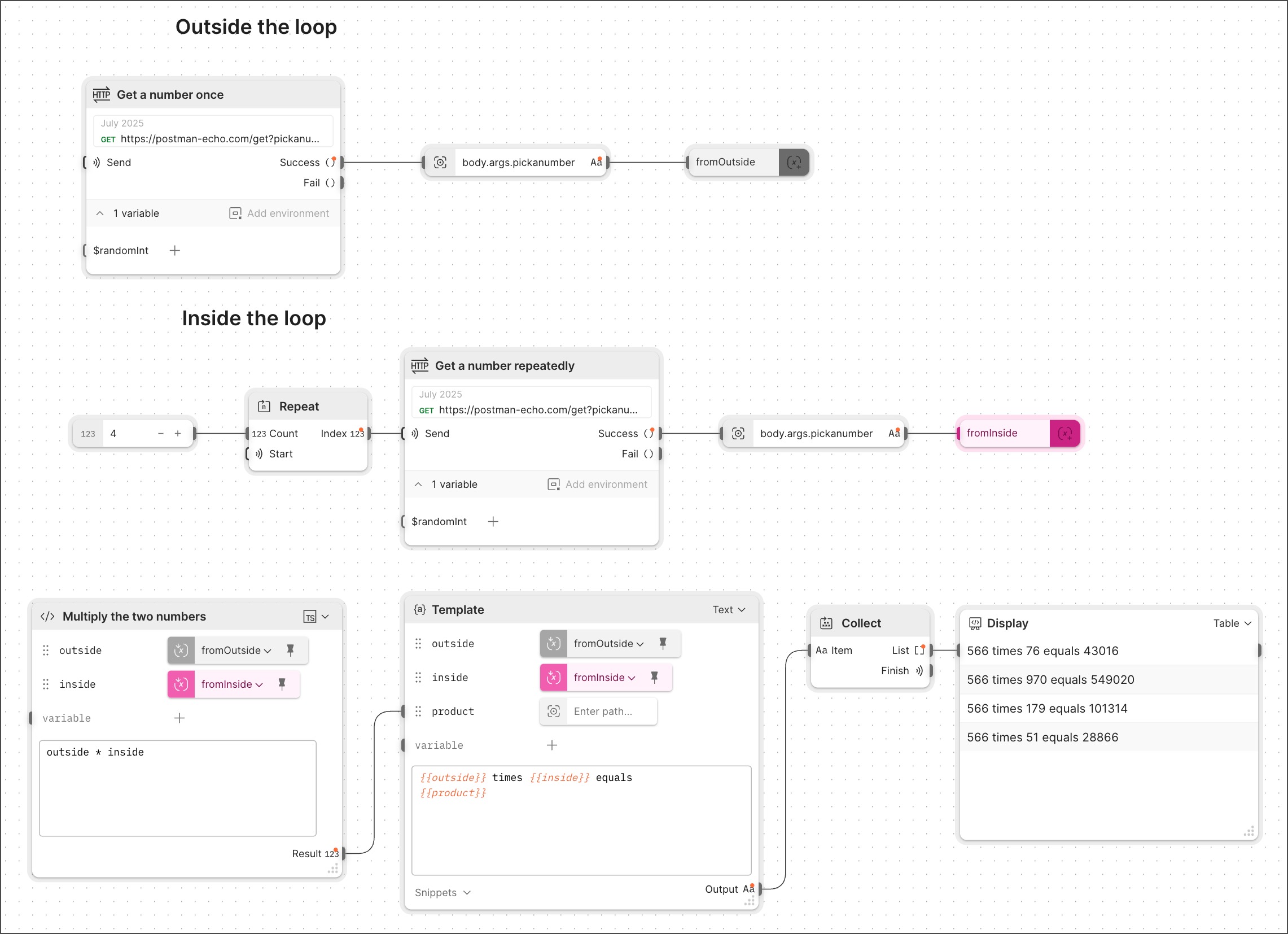 This kind of flow, where a loop combines unchanging data from outside with modifiable data from inside, is another important Flows design pattern. For example, this works well for flows that need to obtain a new API token each time they run.
## About data from outside the loop
A flow won't iterate over any block that's outside the loop. Therefore, when a loop uses data from blocks outside the loop, it only retrieves that data once.
When data originates outside the loop, you store it in a **Create Variable** block. The stored data can then be consumed inside the loop, by an inline **Get Variable** block within an **Evaluate**, **Template**, or some other block.
By default, Postman *pins* the inline **Get Variable** block. The pinned data is then available for each iteration of the loop. If the variable isn't pinned, the block that's using it will run out of data, causing an error. Blocks won't change a pinned variable's value.
Notice the difference in appearance between an unpinned and a pinned variable. When the variable is pinned, the pin icon is vertical and filled in with black. When it's unpinned, the pin icon is angled and has no fill.
Postman recommends that you leave variables pinned.
This kind of flow, where a loop combines unchanging data from outside with modifiable data from inside, is another important Flows design pattern. For example, this works well for flows that need to obtain a new API token each time they run.
## About data from outside the loop
A flow won't iterate over any block that's outside the loop. Therefore, when a loop uses data from blocks outside the loop, it only retrieves that data once.
When data originates outside the loop, you store it in a **Create Variable** block. The stored data can then be consumed inside the loop, by an inline **Get Variable** block within an **Evaluate**, **Template**, or some other block.
By default, Postman *pins* the inline **Get Variable** block. The pinned data is then available for each iteration of the loop. If the variable isn't pinned, the block that's using it will run out of data, causing an error. Blocks won't change a pinned variable's value.
Notice the difference in appearance between an unpinned and a pinned variable. When the variable is pinned, the pin icon is vertical and filled in with black. When it's unpinned, the pin icon is angled and has no fill.
Postman recommends that you leave variables pinned.
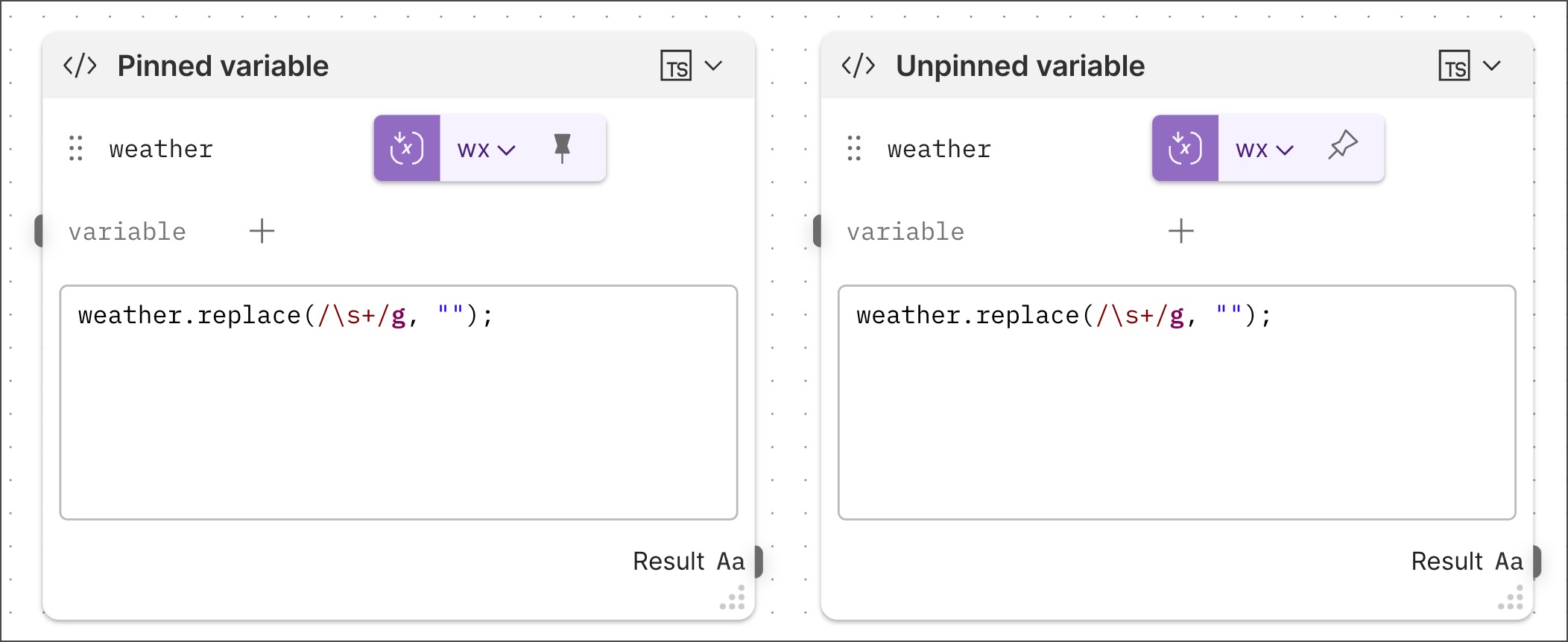 Pinned variables keep their initial values through all of the loop's iterations. For this reason, you can't use a pinned variable in Flows the way you'd use a variable in a "while do" loop coded in a programming language like Python or JavaScript.