# The Flow block
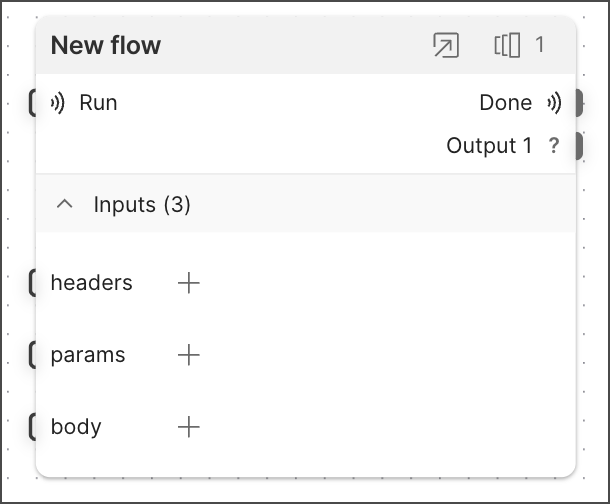 The **Flow** block references a [flow](/docs/postman-flows/get-started/build-your-first-flow/) from your workspace and outputs its result. This block lets you use the logic of multiple other flows in your current flow. By accepting input data and referencing other flows, **Flow** blocks can work like code functions.
Suppose you have two flows: flow A and flow B. Flow A checks the availability of meeting rooms in your office based on input data such as location, time, and room preference. It then outputs whether a room is available. Flow B can use a **Flow** block to send input data to flow A and retrieve its result (room availability), then use that result in its own logic (for example, to decide to send an API call that reserves the room).
The **Flow** block can reference any flow in your workspace that has at least one *snapshot*. Snapshots are saved versions of a flow. To learn more, see [Version flows with snapshots](/docs/postman-flows/build-flows/configure/snapshots/).
## Inputs
By default, the **Flow** block has one **Run** input port and one input port for each input present in the **Start** block of the flow it references. When the **Run** port receives data, it triggers the **Flow** block. If it's not connected, the **Flow** block triggers when its host flow runs.
If the referenced flow has a [**Start**](/docs/postman-flows/reference/blocks/start/) block with inputs, the **Flow** block will also have input ports that correspond with the **Start** block's inputs. For example, if a **Flow** block references a flow with three inputs defined in its **Start** block, the **Flow** block will have three input ports with the same names and data types as the **Start** block's inputs. Data sent to the **Flow** block's input ports will be passed to the corresponding **Start** block inputs in the referenced flow.
When the referenced flow has **Start** block inputs, the **Flow** block must receive data in each of its corresponding input ports to trigger the referenced flow.
## Outputs
The **Flow** block has one output port for each input port in the referenced flow's [**Output**](/docs/postman-flows/reference/blocks/output-module/) block. Each output port sends the value received by its corresponding input port in the referenced flow's **Output** block.
The **Flow** block also has a **Done** output port that sends a boolean true signal when the referenced flow has completed.
## Setup
When you add a **Flow** block, it prompts you to select a flow to reference. The **Flow** block can only reference flows in your workspace that have one or more [snapshots](/docs/postman-flows/build-flows/configure/snapshots/).
To set up a **Flow** block, do the following:
1. Create a flow and add a **Flow** block. A list of flows you can reference appears.
If the list is empty, make sure the flow you want to reference has at least one snapshot.
2. Select a flow from the list. The **Flow** block appears with the same title as the referenced flow. The latest snapshot number appears next to the title. When a newer version of the snapshot is available, the
The **Flow** block references a [flow](/docs/postman-flows/get-started/build-your-first-flow/) from your workspace and outputs its result. This block lets you use the logic of multiple other flows in your current flow. By accepting input data and referencing other flows, **Flow** blocks can work like code functions.
Suppose you have two flows: flow A and flow B. Flow A checks the availability of meeting rooms in your office based on input data such as location, time, and room preference. It then outputs whether a room is available. Flow B can use a **Flow** block to send input data to flow A and retrieve its result (room availability), then use that result in its own logic (for example, to decide to send an API call that reserves the room).
The **Flow** block can reference any flow in your workspace that has at least one *snapshot*. Snapshots are saved versions of a flow. To learn more, see [Version flows with snapshots](/docs/postman-flows/build-flows/configure/snapshots/).
## Inputs
By default, the **Flow** block has one **Run** input port and one input port for each input present in the **Start** block of the flow it references. When the **Run** port receives data, it triggers the **Flow** block. If it's not connected, the **Flow** block triggers when its host flow runs.
If the referenced flow has a [**Start**](/docs/postman-flows/reference/blocks/start/) block with inputs, the **Flow** block will also have input ports that correspond with the **Start** block's inputs. For example, if a **Flow** block references a flow with three inputs defined in its **Start** block, the **Flow** block will have three input ports with the same names and data types as the **Start** block's inputs. Data sent to the **Flow** block's input ports will be passed to the corresponding **Start** block inputs in the referenced flow.
When the referenced flow has **Start** block inputs, the **Flow** block must receive data in each of its corresponding input ports to trigger the referenced flow.
## Outputs
The **Flow** block has one output port for each input port in the referenced flow's [**Output**](/docs/postman-flows/reference/blocks/output-module/) block. Each output port sends the value received by its corresponding input port in the referenced flow's **Output** block.
The **Flow** block also has a **Done** output port that sends a boolean true signal when the referenced flow has completed.
## Setup
When you add a **Flow** block, it prompts you to select a flow to reference. The **Flow** block can only reference flows in your workspace that have one or more [snapshots](/docs/postman-flows/build-flows/configure/snapshots/).
To set up a **Flow** block, do the following:
1. Create a flow and add a **Flow** block. A list of flows you can reference appears.
If the list is empty, make sure the flow you want to reference has at least one snapshot.
2. Select a flow from the list. The **Flow** block appears with the same title as the referenced flow. The latest snapshot number appears next to the title. When a newer version of the snapshot is available, the  **Snapshots** icon turns purple.
### Select a different snapshot
When you add a **Flow** block, it automatically selects the latest snapshot of the referenced flow.
To select a different snapshot, do the following:
1. In the **Flow** block, click **Snapshots**.
2. Select a snapshot from the dropdown list. The **Flow** block uses the selected snapshot of the referenced flow.
## Example
To see the **Flow** block in action, check out [Flow Snippets: Flow block](https://www.postman.com/postman/flows-snippets/flow/6840b15868d0c30032a35bde).
## Related blocks
The [**Start**](/docs/postman-flows/reference/blocks/start/) block is automatically added to every new flow. The [**Output**](/docs/postman-flows/reference/blocks/output-module/) block sends the result from one flow to a **Flow** block in a different flow.
**Snapshots** icon turns purple.
### Select a different snapshot
When you add a **Flow** block, it automatically selects the latest snapshot of the referenced flow.
To select a different snapshot, do the following:
1. In the **Flow** block, click **Snapshots**.
2. Select a snapshot from the dropdown list. The **Flow** block uses the selected snapshot of the referenced flow.
## Example
To see the **Flow** block in action, check out [Flow Snippets: Flow block](https://www.postman.com/postman/flows-snippets/flow/6840b15868d0c30032a35bde).
## Related blocks
The [**Start**](/docs/postman-flows/reference/blocks/start/) block is automatically added to every new flow. The [**Output**](/docs/postman-flows/reference/blocks/output-module/) block sends the result from one flow to a **Flow** block in a different flow.