# The HTTP Request block
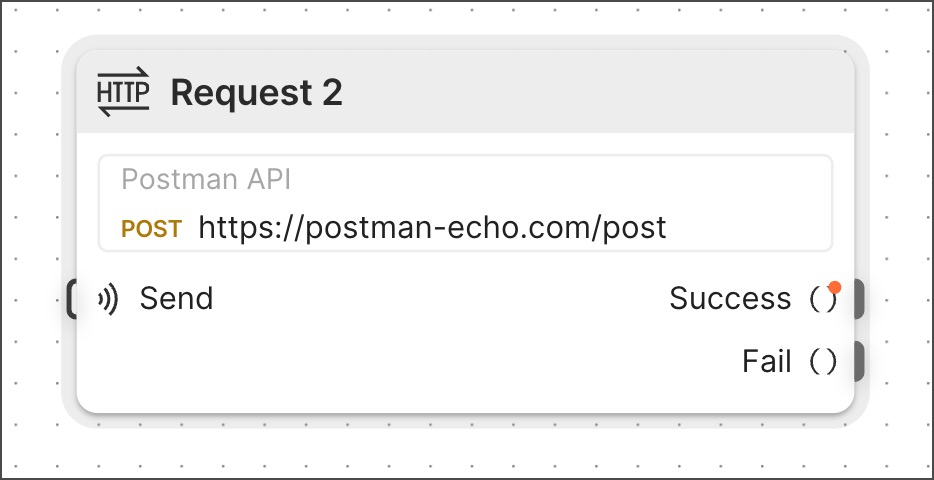 The **HTTP Request** block runs an HTTP request that you select from a collection and sends the result from its output port.
The **HTTP Request** block consumes one credit each time it runs. To learn more, see [How Flows consume credits](/docs/billing/flows-usage/#how-flows-consume-credits).
## Input
**Send** - If you connect another block to this input port, that block triggers the **HTTP Request** block to run. This connection is optional. The **HTTP Request** block will run when the flow runs, even if this port isn't connected to another block.
**Variables** - If the selected request obtains values from variables, those variables will be listed here. Requests can use variables to set values for query parameters and for elements of the request body.
To learn how to set or override these variable values, see [Setup](#setup).
When a request is created in a collection, if a query parameter's value was set without using a variable:
* No variable will be listed for it in the **HTTP Request** block.
* There is no way to override its value from a flow.
## Outputs
**Success** - Sends the response of a successful API request. To succeed, a request must return a 2xx HTTP status code and pass all of its [tests](/docs/tests-and-scripts/write-scripts/test-scripts/).
**Fail** - Sends the response of an unsuccessful API request. A request will fail if it returns an HTTP status code other than 2xx or if any of its tests fail. If your request is returning a 2xx HTTP status code but failing a test, you might want to disregard the test temporarily. In this case, you can connect a block to the **Fail** output and that block will receive the data returned by the request.
## Setup
**Find or create new request** - Click to open a dropdown list showing all the collections in your workspace. Select a collection, then select a request or **Create a new request**. If there are no collections in the workspace, some introductory requests will appear that you can choose from to get started.
**Variables** - To assign a value to a variable, use either of the following methods:
* Connect another block's output port to the variable's input port.
* Click
The **HTTP Request** block runs an HTTP request that you select from a collection and sends the result from its output port.
The **HTTP Request** block consumes one credit each time it runs. To learn more, see [How Flows consume credits](/docs/billing/flows-usage/#how-flows-consume-credits).
## Input
**Send** - If you connect another block to this input port, that block triggers the **HTTP Request** block to run. This connection is optional. The **HTTP Request** block will run when the flow runs, even if this port isn't connected to another block.
**Variables** - If the selected request obtains values from variables, those variables will be listed here. Requests can use variables to set values for query parameters and for elements of the request body.
To learn how to set or override these variable values, see [Setup](#setup).
When a request is created in a collection, if a query parameter's value was set without using a variable:
* No variable will be listed for it in the **HTTP Request** block.
* There is no way to override its value from a flow.
## Outputs
**Success** - Sends the response of a successful API request. To succeed, a request must return a 2xx HTTP status code and pass all of its [tests](/docs/tests-and-scripts/write-scripts/test-scripts/).
**Fail** - Sends the response of an unsuccessful API request. A request will fail if it returns an HTTP status code other than 2xx or if any of its tests fail. If your request is returning a 2xx HTTP status code but failing a test, you might want to disregard the test temporarily. In this case, you can connect a block to the **Fail** output and that block will receive the data returned by the request.
## Setup
**Find or create new request** - Click to open a dropdown list showing all the collections in your workspace. Select a collection, then select a request or **Create a new request**. If there are no collections in the workspace, some introductory requests will appear that you can choose from to get started.
**Variables** - To assign a value to a variable, use either of the following methods:
* Connect another block's output port to the variable's input port.
* Click  **Add data blocks** to [Insert a data block](/docs/postman-flows/reference/blocks/overview/#insert-data-blocks-into-other-blocks) inline.
You can also use these value assignment methods if your request obtains values using environment variables or [dynamic variables](/docs/tests-and-scripts/write-scripts/variables-list/).
* If your request uses environment variables, corresponding variables will appear in the **HTTP Request** block. You can select the environment from the
**Add data blocks** to [Insert a data block](/docs/postman-flows/reference/blocks/overview/#insert-data-blocks-into-other-blocks) inline.
You can also use these value assignment methods if your request obtains values using environment variables or [dynamic variables](/docs/tests-and-scripts/write-scripts/variables-list/).
* If your request uses environment variables, corresponding variables will appear in the **HTTP Request** block. You can select the environment from the  **Add environment** dropdown list. If you can't or don't want to use the relevant environment, re-create the desired values using one of the value assignment methods.
* If your request uses [dynamic variables](/docs/tests-and-scripts/write-scripts/variables-list/), the dynamic variables will work as usual in your flow. If you want to override their values, use one of the value assignment methods to assign the values you prefer.
Here's an example showing different ways that query parameters can obtain their values:
**Add environment** dropdown list. If you can't or don't want to use the relevant environment, re-create the desired values using one of the value assignment methods.
* If your request uses [dynamic variables](/docs/tests-and-scripts/write-scripts/variables-list/), the dynamic variables will work as usual in your flow. If you want to override their values, use one of the value assignment methods to assign the values you prefer.
Here's an example showing different ways that query parameters can obtain their values:
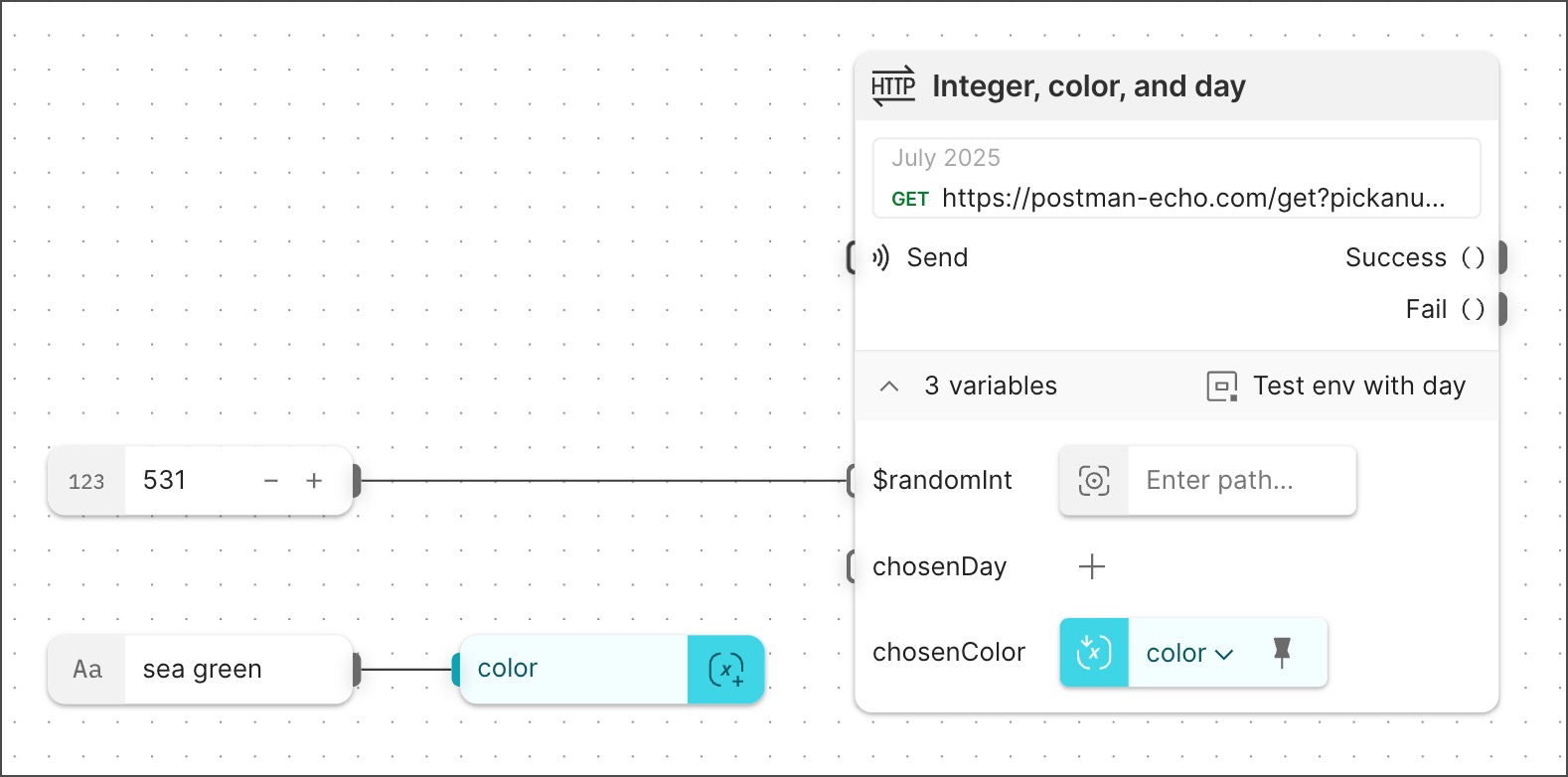 In the example, the request URL is:
```javascript
https://postman-echo.com/get?pickanumber={{$randomInt}}&pickacolor={{chosenColor}}&pickaday={{chosenDay}}
```
The query parameters obtain their values as follows:
* `pickanumber` would get its value from the dynamic variable `{{$randomInt}}`, but the connected **Number** block overrides it with the value 531.
* `pickacolor` gets its value from the variable `{{chosenColor}}` in an inline **Get Variable** block that references a **Create Variable** block. That **Create Variable** block gets its value (`sea green`) from a connected **String** block.
* `pickaday` gets its value (`Tuesday`) from the environment variable `{{chosenDay}}` that's set in the selected environment `Test env with day`.
This example shows how a flow stores and retrieves values with **Create Variable** and **Get Variable** blocks. You can also store values as [configurations](/docs/postman-flows/build-flows/configure/configure-values-actions/) and retrieve them with [**Get Configuration** blocks](/docs/postman-flows/reference/blocks/get-configuration/).
### Create a new request
To create new and edit existing requests, you can use the Postman Flows request editor that's built into the **HTTP Request** block. To create a request in the **HTTP Request** block, do the following:
1. Click **Find or create new request** to open a dropdown list showing the collections in your workspace.
2. Select a collection and click **Create a new request**. If you don't have any collections, click **Create a new request**. The Postman Flows request editor opens.
In the example, the request URL is:
```javascript
https://postman-echo.com/get?pickanumber={{$randomInt}}&pickacolor={{chosenColor}}&pickaday={{chosenDay}}
```
The query parameters obtain their values as follows:
* `pickanumber` would get its value from the dynamic variable `{{$randomInt}}`, but the connected **Number** block overrides it with the value 531.
* `pickacolor` gets its value from the variable `{{chosenColor}}` in an inline **Get Variable** block that references a **Create Variable** block. That **Create Variable** block gets its value (`sea green`) from a connected **String** block.
* `pickaday` gets its value (`Tuesday`) from the environment variable `{{chosenDay}}` that's set in the selected environment `Test env with day`.
This example shows how a flow stores and retrieves values with **Create Variable** and **Get Variable** blocks. You can also store values as [configurations](/docs/postman-flows/build-flows/configure/configure-values-actions/) and retrieve them with [**Get Configuration** blocks](/docs/postman-flows/reference/blocks/get-configuration/).
### Create a new request
To create new and edit existing requests, you can use the Postman Flows request editor that's built into the **HTTP Request** block. To create a request in the **HTTP Request** block, do the following:
1. Click **Find or create new request** to open a dropdown list showing the collections in your workspace.
2. Select a collection and click **Create a new request**. If you don't have any collections, click **Create a new request**. The Postman Flows request editor opens.
 3. In the request editor, select a method from the dropdown list and enter a URL. Alternatively, you can copy a cURL command from your terminal and paste it here. Besides the URL, this add the parameters, headers, and body specified in your cURL command.
4. (Optional) Select and edit the request's name.
5. (Optional) Select and edit the request's parameters, headers, and body.
6. Click **Save**.
### Specify how to parse the response
The **HTTP Request** block can parse its response as JSON, XML, HTML, or text. By default, the **HTTP Request** block decides how to parse the response.
To choose your preferred way to parse the response, do the following:
1. Click the **HTTP Request** block.
2. Click
3. In the request editor, select a method from the dropdown list and enter a URL. Alternatively, you can copy a cURL command from your terminal and paste it here. Besides the URL, this add the parameters, headers, and body specified in your cURL command.
4. (Optional) Select and edit the request's name.
5. (Optional) Select and edit the request's parameters, headers, and body.
6. Click **Save**.
### Specify how to parse the response
The **HTTP Request** block can parse its response as JSON, XML, HTML, or text. By default, the **HTTP Request** block decides how to parse the response.
To choose your preferred way to parse the response, do the following:
1. Click the **HTTP Request** block.
2. Click  **Additional Settings**.
3. Next to
**Additional Settings**.
3. Next to  **Parse Response**, click **Auto** to view the dropdown list of formats.
4. Select a format from the dropdown list.
### Update environment variables with scripts
Requests can change [environment variables'](/docs/sending-requests/variables/environment-variables/) values with [scripts](/docs/tests-and-scripts/write-scripts/intro-to-scripts/). You can configure the [**HTTP Request**](/docs/postman-flows/reference/blocks/http-request/) block so that environment variable values changed by pre-request and post-request scripts persist or reset when the block's run completes. By default, script-changed values persist in new **HTTP Request** blocks. [Deployed flows](/docs/postman-flows/build-flows/structure/actions/) don't support persistent changed values for environment variables.
To turn persistent changes to environment variables on or off, do the following:
1. Click the **HTTP Request** block.
2. Click **Additional Settings**.
3. Next to **Allow persistent changes to environment values**, turn the toggle on or off.
**Parse Response**, click **Auto** to view the dropdown list of formats.
4. Select a format from the dropdown list.
### Update environment variables with scripts
Requests can change [environment variables'](/docs/sending-requests/variables/environment-variables/) values with [scripts](/docs/tests-and-scripts/write-scripts/intro-to-scripts/). You can configure the [**HTTP Request**](/docs/postman-flows/reference/blocks/http-request/) block so that environment variable values changed by pre-request and post-request scripts persist or reset when the block's run completes. By default, script-changed values persist in new **HTTP Request** blocks. [Deployed flows](/docs/postman-flows/build-flows/structure/actions/) don't support persistent changed values for environment variables.
To turn persistent changes to environment variables on or off, do the following:
1. Click the **HTTP Request** block.
2. Click **Additional Settings**.
3. Next to **Allow persistent changes to environment values**, turn the toggle on or off.  Left is off,
  right is on.
4. Select a format from the dropdown list.
## Example
To see the **HTTP Request** block in an example flow, check out [Flow Snippets: HTTP Request](https://www.postman.com/postman/flows-snippets/flow/6841fe03a0431d0031dfd5f2).
## Related blocks
The [**Select**](/docs/postman-flows/reference/blocks/select/) and [**Evaluate**](/docs/postman-flows/reference/blocks/evaluate/) blocks are often connected to the **HTTP Request** block. The **Select** block is useful for extracting specific information from a response. The **Evaluate** block is useful for transforming response data and creating conditions to route data in your flow based on a response.
## Related pages
For tutorials that use the **HTTP Request** block, see the following:
* [Automate repetitive tasks using Postman Flows](/docs/postman-flows/tutorials/advanced/automate-repetitive-tasks/)
* [Create a list-based loop with the For block](/docs/postman-flows/tutorials/beginner/create-list-based-loop/)
* [Create a dashboard using Postman Flows](/docs/postman-flows/tutorials/advanced/create-a-dashboard-in-flows/)
* [Send information from one system to another using Postman Flows](/docs/postman-flows/tutorials/advanced/send-information-from-one-system-to-another/)
* [Send a request with the HTTP Request block](/docs/postman-flows/tutorials/beginner/send-request/)
* [Run requests in sequence using Postman Flows](/docs/postman-flows/tutorials/advanced/run-requests-in-sequence/)
right is on.
4. Select a format from the dropdown list.
## Example
To see the **HTTP Request** block in an example flow, check out [Flow Snippets: HTTP Request](https://www.postman.com/postman/flows-snippets/flow/6841fe03a0431d0031dfd5f2).
## Related blocks
The [**Select**](/docs/postman-flows/reference/blocks/select/) and [**Evaluate**](/docs/postman-flows/reference/blocks/evaluate/) blocks are often connected to the **HTTP Request** block. The **Select** block is useful for extracting specific information from a response. The **Evaluate** block is useful for transforming response data and creating conditions to route data in your flow based on a response.
## Related pages
For tutorials that use the **HTTP Request** block, see the following:
* [Automate repetitive tasks using Postman Flows](/docs/postman-flows/tutorials/advanced/automate-repetitive-tasks/)
* [Create a list-based loop with the For block](/docs/postman-flows/tutorials/beginner/create-list-based-loop/)
* [Create a dashboard using Postman Flows](/docs/postman-flows/tutorials/advanced/create-a-dashboard-in-flows/)
* [Send information from one system to another using Postman Flows](/docs/postman-flows/tutorials/advanced/send-information-from-one-system-to-another/)
* [Send a request with the HTTP Request block](/docs/postman-flows/tutorials/beginner/send-request/)
* [Run requests in sequence using Postman Flows](/docs/postman-flows/tutorials/advanced/run-requests-in-sequence/)