# The If block
 The **If** block is a logical gate that routes data through one of two output ports based on the result of an evaluation. The **If** block can process and evaluate data using [TypeScript](/docs/postman-flows/typescript/typescript-overview/) or [Flows Query Language](/docs/postman-flows/flows-query-language/introduction-to-fql/) (FQL) expressions.
The **If** block is one of two blocks you can use to do branching logic in a flow. The other one - the [**Condition** block](/docs/postman-flows/reference/blocks/condition/) - supports a wider variety of use cases than the **If** block. Use the **If** block only if the your flow's logic must branch into exactly two logical paths, based on a single condition.
One common use for the **If** block is to [find and filter data](/docs/postman-flows/build-flows/structure/find-and-filter-data/#contains).
## Inputs
**variable** - Connect a block to this input port to evaluate its data with TypeScript or FQL. Click
The **If** block is a logical gate that routes data through one of two output ports based on the result of an evaluation. The **If** block can process and evaluate data using [TypeScript](/docs/postman-flows/typescript/typescript-overview/) or [Flows Query Language](/docs/postman-flows/flows-query-language/introduction-to-fql/) (FQL) expressions.
The **If** block is one of two blocks you can use to do branching logic in a flow. The other one - the [**Condition** block](/docs/postman-flows/reference/blocks/condition/) - supports a wider variety of use cases than the **If** block. Use the **If** block only if the your flow's logic must branch into exactly two logical paths, based on a single condition.
One common use for the **If** block is to [find and filter data](/docs/postman-flows/build-flows/structure/find-and-filter-data/#contains).
## Inputs
**variable** - Connect a block to this input port to evaluate its data with TypeScript or FQL. Click  **Add data blocks** to [insert](/docs/postman-flows/reference/blocks/overview/#insert-data-blocks-into-other-blocks) a data block into your **If** block. You can change an inserted block to a different data block by selecting the inserted block's icon and choosing a block from the dropdown list.
**Text box** - Enter TypeScript (the default) or FQL code to create true/false expressions here. To switch between TypeScript and FQL, select from the dropdown list at the top of the block.
**Data** - Data received by this input port will be routed through either the **Then** or **Else** output port depending on whether the expression in the text box is true or false. If you don't need to pass any data through to those outputs, connect a **Bool** block to the **Data** input. (This avoids having the **If** block fail because the **Data** input has received no data.)
## Outputs
When the expression in the text box is true, the block routes data received by the **Data** input through the **Then** output port. Otherwise, the data is routed through the **Else** output.
The data sent through either port is only what the **Data** input receives, not the variables (if any) that you added as inputs to the evaluation expression.
## Setup
1. To receive and evaluate data from another block in your flow, connect the **variable** input port to the other block's output port.
2. To [insert](/docs/postman-flows/reference/blocks/overview/#insert-data-blocks-into-other-blocks) a block and evaluate its data, click **Add data blocks**, then select a block from the dropdown list. You can reference the inserted block's value as a variable in your true/false expression. To rename the variable, select the inserted block's name and enter a new name.
3. Enter TypeScript (the default) or FQL code to create true/false expressions here. To switch between TypeScript and FQL, select from the dropdown list at the top of the block.
4. Enter your TypeScript or FQL expression in the text box.
## Example
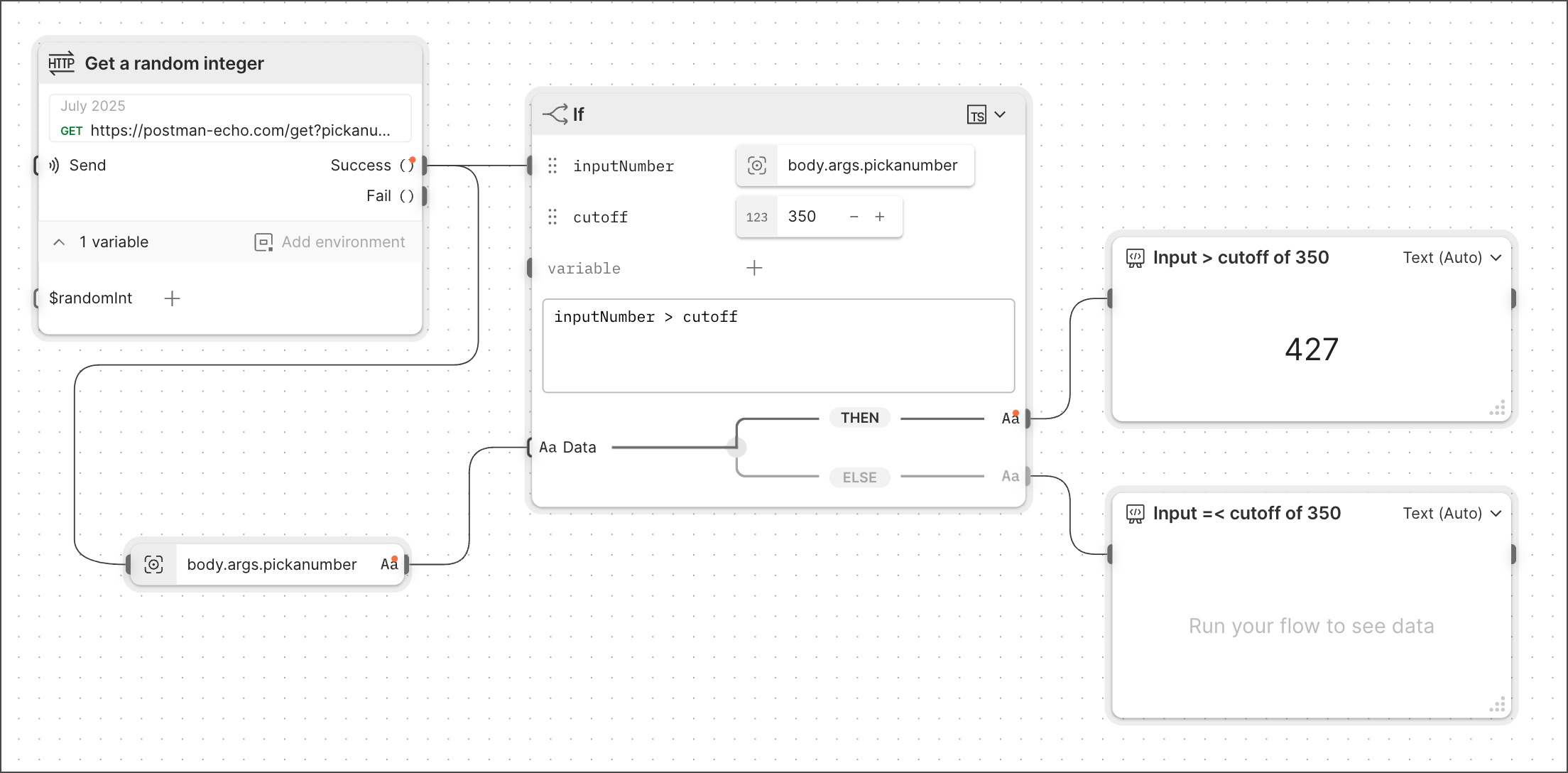
The following example flow uses an **If** block to compare a random integer to a cutoff set at 350. The flow follows one branch if the input value exceeds the cutoff, and follows the other branch if the input is less than or equal to the cutoff.
Note that for the integer to appear in the **Display** blocks connected to the `THEN` and `ELSE` branches, it was necessary to send that data to the **Data** input. Sending it to an input for the text box didn't suffice, because data in the text box isn't available to the `THEN` and `ELSE` branches.
**Add data blocks** to [insert](/docs/postman-flows/reference/blocks/overview/#insert-data-blocks-into-other-blocks) a data block into your **If** block. You can change an inserted block to a different data block by selecting the inserted block's icon and choosing a block from the dropdown list.
**Text box** - Enter TypeScript (the default) or FQL code to create true/false expressions here. To switch between TypeScript and FQL, select from the dropdown list at the top of the block.
**Data** - Data received by this input port will be routed through either the **Then** or **Else** output port depending on whether the expression in the text box is true or false. If you don't need to pass any data through to those outputs, connect a **Bool** block to the **Data** input. (This avoids having the **If** block fail because the **Data** input has received no data.)
## Outputs
When the expression in the text box is true, the block routes data received by the **Data** input through the **Then** output port. Otherwise, the data is routed through the **Else** output.
The data sent through either port is only what the **Data** input receives, not the variables (if any) that you added as inputs to the evaluation expression.
## Setup
1. To receive and evaluate data from another block in your flow, connect the **variable** input port to the other block's output port.
2. To [insert](/docs/postman-flows/reference/blocks/overview/#insert-data-blocks-into-other-blocks) a block and evaluate its data, click **Add data blocks**, then select a block from the dropdown list. You can reference the inserted block's value as a variable in your true/false expression. To rename the variable, select the inserted block's name and enter a new name.
3. Enter TypeScript (the default) or FQL code to create true/false expressions here. To switch between TypeScript and FQL, select from the dropdown list at the top of the block.
4. Enter your TypeScript or FQL expression in the text box.
## Example
The following example flow uses an **If** block to compare a random integer to a cutoff set at 350. The flow follows one branch if the input value exceeds the cutoff, and follows the other branch if the input is less than or equal to the cutoff.
Note that for the integer to appear in the **Display** blocks connected to the `THEN` and `ELSE` branches, it was necessary to send that data to the **Data** input. Sending it to an input for the text box didn't suffice, because data in the text box isn't available to the `THEN` and `ELSE` branches.
 To run this flow, clone it from [Flow Snippets: If](https://www.postman.com/postman/flows-snippets/flow/63bcba94f3155f2e86b54eb0).
## Related blocks
The blocks you can insert into the **If** block to provide data for the evaluation that it runs include the [**String**](/docs/postman-flows/reference/blocks/string/), [**Bool**](/docs/postman-flows/reference/blocks/bool/), [**Number**](/docs/postman-flows/reference/blocks/number/), [**Null**](/docs/postman-flows/reference/blocks/null/), [**Select**](/docs/postman-flows/reference/blocks/select/), [**Now**](/docs/postman-flows/reference/blocks/now/), [**Date**](/docs/postman-flows/reference/blocks/date/), [**Date & Time**](/docs/postman-flows/reference/blocks/date-and-time/), [**List**](/docs/postman-flows/reference/blocks/list/), [**Record**](/docs/postman-flows/reference/blocks/record/), and [**Get Variable**](/docs/postman-flows/reference/blocks/get-variable/) blocks.
## Related pages
For tutorials that use the **If** block, see the following:
* [Automate repetitive tasks using Postman Flows](/docs/postman-flows/tutorials/advanced/automate-repetitive-tasks/)
* [Send information from one system to another using Postman Flows](/docs/postman-flows/tutorials/advanced/send-information-from-one-system-to-another/)
To run this flow, clone it from [Flow Snippets: If](https://www.postman.com/postman/flows-snippets/flow/63bcba94f3155f2e86b54eb0).
## Related blocks
The blocks you can insert into the **If** block to provide data for the evaluation that it runs include the [**String**](/docs/postman-flows/reference/blocks/string/), [**Bool**](/docs/postman-flows/reference/blocks/bool/), [**Number**](/docs/postman-flows/reference/blocks/number/), [**Null**](/docs/postman-flows/reference/blocks/null/), [**Select**](/docs/postman-flows/reference/blocks/select/), [**Now**](/docs/postman-flows/reference/blocks/now/), [**Date**](/docs/postman-flows/reference/blocks/date/), [**Date & Time**](/docs/postman-flows/reference/blocks/date-and-time/), [**List**](/docs/postman-flows/reference/blocks/list/), [**Record**](/docs/postman-flows/reference/blocks/record/), and [**Get Variable**](/docs/postman-flows/reference/blocks/get-variable/) blocks.
## Related pages
For tutorials that use the **If** block, see the following:
* [Automate repetitive tasks using Postman Flows](/docs/postman-flows/tutorials/advanced/automate-repetitive-tasks/)
* [Send information from one system to another using Postman Flows](/docs/postman-flows/tutorials/advanced/send-information-from-one-system-to-another/)