# The List block
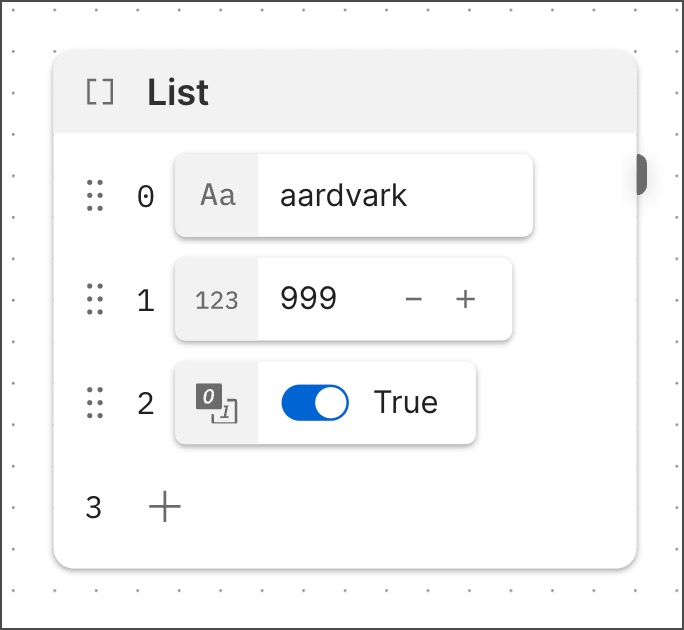 The **List** block sends an array in your flow. You can define the items in the array by [inserting](/docs/postman-flows/reference/blocks/overview/#insert-data-blocks-into-other-blocks) data blocks into the **List** block. A **List** block can output an array where different items have different data types. For example, you could insert a **Now** block, a **Bool** block, and a **String** block into the **List** block. Each item in the **List** block has an index number next to it, indicating the item's position in the array. The first index number in the list is **0**.
You can connect the **List** block to another block whose output you want to select information from to use as an item in the **List** block's output array. Insert a **Select** block into the **List** block and use it to select the desired information.
For example, when you want to add API response information to the array, connect the **List** block to an **HTTP Request** block. Then use a **Select** block to extract the desired element from the response.
[Loops created with the **For** block](/docs/postman-flows/build-flows/structure/loops/overview/#loops-with-the-for-block) often use a **List** block.
## Input
The **List** block has no input port by default. When you insert a **Select** block into the **List** block, an input port appears where the inserted **Select** block can receive data from another block. You can then use the inserted **Select** block to choose a specific piece of data to be added to the **List** block's array. See [Setup](#setup) for more details. You can also insert **List** blocks into **List** blocks to create nested arrays.
## Output
The **List** block has a single output port that sends an array when the block runs.
## Setup
When you create a **List** block, it contains an empty array (`[]`). It has an index number, **0**, but no items. To add items to the **List** block's array, click
The **List** block sends an array in your flow. You can define the items in the array by [inserting](/docs/postman-flows/reference/blocks/overview/#insert-data-blocks-into-other-blocks) data blocks into the **List** block. A **List** block can output an array where different items have different data types. For example, you could insert a **Now** block, a **Bool** block, and a **String** block into the **List** block. Each item in the **List** block has an index number next to it, indicating the item's position in the array. The first index number in the list is **0**.
You can connect the **List** block to another block whose output you want to select information from to use as an item in the **List** block's output array. Insert a **Select** block into the **List** block and use it to select the desired information.
For example, when you want to add API response information to the array, connect the **List** block to an **HTTP Request** block. Then use a **Select** block to extract the desired element from the response.
[Loops created with the **For** block](/docs/postman-flows/build-flows/structure/loops/overview/#loops-with-the-for-block) often use a **List** block.
## Input
The **List** block has no input port by default. When you insert a **Select** block into the **List** block, an input port appears where the inserted **Select** block can receive data from another block. You can then use the inserted **Select** block to choose a specific piece of data to be added to the **List** block's array. See [Setup](#setup) for more details. You can also insert **List** blocks into **List** blocks to create nested arrays.
## Output
The **List** block has a single output port that sends an array when the block runs.
## Setup
When you create a **List** block, it contains an empty array (`[]`). It has an index number, **0**, but no items. To add items to the **List** block's array, click  **Add data blocks**, then select a block from the dropdown list. The embedded block's data becomes an item in the **List** block's array. The item's index number appears next to the embedded block.
If you insert a **Select** block, it adds an input port to the **List** block. You can then connect another block's output port to the inserted **Select** block's input port, and select a specific piece of information from the incoming dat. The selected information becomes an item in the **List** block's array.
## Example
To see the **List** block in an example flow, check out [Flow Snippets: List](https://www.postman.com/postman/flows-snippets/flow/63bc9412ead4e97c45493eb0).
## Related blocks
You can insert another block into the **List** block to add its data as an item in the array. The blocks you can insert like this include the **List** block itself and the [**String**](/docs/postman-flows/reference/blocks/string/), [**Bool**](/docs/postman-flows/reference/blocks/bool/), [**Number**](/docs/postman-flows/reference/blocks/number/), [**Null**](/docs/postman-flows/reference/blocks/null/), [**Select**](/docs/postman-flows/reference/blocks/select/), [**Now**](/docs/postman-flows/reference/blocks/now/), [**Date**](/docs/postman-flows/reference/blocks/date/), [**Date & Time**](/docs/postman-flows/reference/blocks/date-and-time/), [**List**](/docs/postman-flows/reference/blocks/list/), [**Record**](/docs/postman-flows/reference/blocks/record/), and [**Get Variable**](/docs/postman-flows/reference/blocks/get-variable/) blocks.
Several blocks allow you to [insert](/docs/postman-flows/reference/blocks/overview/#insert-data-blocks-into-other-blocks) the **List** block inline, including the **List** block itself and the [**Evaluate**](/docs/postman-flows/reference/blocks/evaluate/), [**If**](/docs/postman-flows/reference/blocks/if/), and [**Record**](/docs/postman-flows/reference/blocks/record/), and blocks.
## Related pages
For tutorials that use the **List** block, see the following:
* [Create a dashboard using Postman Flows](/docs/postman-flows/tutorials/advanced/create-a-dashboard-in-flows/)
* [Create a list-based loop with the For block](/docs/postman-flows/tutorials/beginner/create-list-based-loop/)
**Add data blocks**, then select a block from the dropdown list. The embedded block's data becomes an item in the **List** block's array. The item's index number appears next to the embedded block.
If you insert a **Select** block, it adds an input port to the **List** block. You can then connect another block's output port to the inserted **Select** block's input port, and select a specific piece of information from the incoming dat. The selected information becomes an item in the **List** block's array.
## Example
To see the **List** block in an example flow, check out [Flow Snippets: List](https://www.postman.com/postman/flows-snippets/flow/63bc9412ead4e97c45493eb0).
## Related blocks
You can insert another block into the **List** block to add its data as an item in the array. The blocks you can insert like this include the **List** block itself and the [**String**](/docs/postman-flows/reference/blocks/string/), [**Bool**](/docs/postman-flows/reference/blocks/bool/), [**Number**](/docs/postman-flows/reference/blocks/number/), [**Null**](/docs/postman-flows/reference/blocks/null/), [**Select**](/docs/postman-flows/reference/blocks/select/), [**Now**](/docs/postman-flows/reference/blocks/now/), [**Date**](/docs/postman-flows/reference/blocks/date/), [**Date & Time**](/docs/postman-flows/reference/blocks/date-and-time/), [**List**](/docs/postman-flows/reference/blocks/list/), [**Record**](/docs/postman-flows/reference/blocks/record/), and [**Get Variable**](/docs/postman-flows/reference/blocks/get-variable/) blocks.
Several blocks allow you to [insert](/docs/postman-flows/reference/blocks/overview/#insert-data-blocks-into-other-blocks) the **List** block inline, including the **List** block itself and the [**Evaluate**](/docs/postman-flows/reference/blocks/evaluate/), [**If**](/docs/postman-flows/reference/blocks/if/), and [**Record**](/docs/postman-flows/reference/blocks/record/), and blocks.
## Related pages
For tutorials that use the **List** block, see the following:
* [Create a dashboard using Postman Flows](/docs/postman-flows/tutorials/advanced/create-a-dashboard-in-flows/)
* [Create a list-based loop with the For block](/docs/postman-flows/tutorials/beginner/create-list-based-loop/)