***
title: The Display block
updated: 2025-07-30T00:00:00.000Z
topictype: reference
slug: docs/postman-flows/reference/blocks/output-display
max-toc-depth: 2
----------------
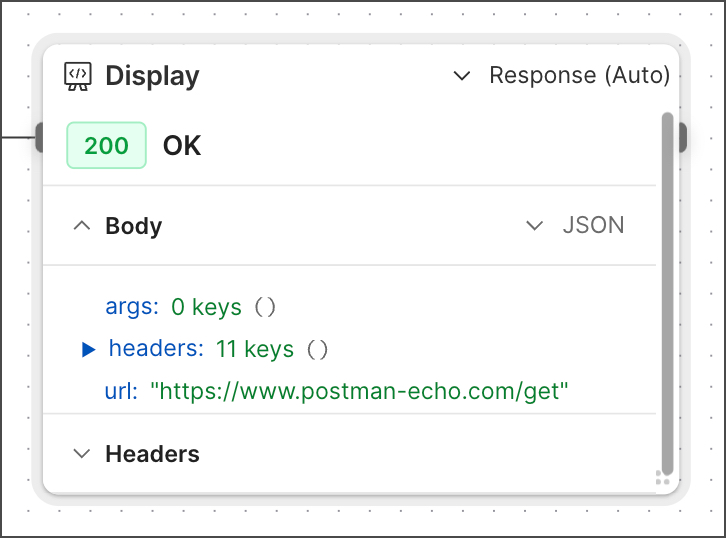 The **Display** block shows data from other blocks in one of several formats, including images, text, numbers, and charts. It automatically detects the best format for incoming data, or you can select a format from a dropdown list. See [Visualize data in Postman Flows](/docs/postman-flows/build-flows/analyze/visualize-data/#visualization-types) for a complete list of display formats.
The **Display** block has an output port, so you can send the data to another block. The **Display** block doesn't transform the data when it visualizes it, and the data remains in its original format when it's passed through. The **Display** block is useful in many situations, including troubleshooting your flow, analyzing different blocks' output, and visualizing data in dashboards.
The **Display** block was previously named **Output**. A different [**Output**](/docs/postman-flows/reference/blocks/output-module/) block is available.
## Input
The **Display** block has a single input port that accepts data from any other block.
## Output
The **Display** block's output port sends the data it receives without altering it.
## Setup
Connect a block's output port to the **Display** block's input port. You can optionally connect the **Display** block's output port to another block's input port to send the same data it received.
The **Display** block automatically detects the incoming data's format, or you can select a format from the dropdown list. If the format is **Text**, you can adjust the text size by clicking the **Display** block, then clicking
The **Display** block shows data from other blocks in one of several formats, including images, text, numbers, and charts. It automatically detects the best format for incoming data, or you can select a format from a dropdown list. See [Visualize data in Postman Flows](/docs/postman-flows/build-flows/analyze/visualize-data/#visualization-types) for a complete list of display formats.
The **Display** block has an output port, so you can send the data to another block. The **Display** block doesn't transform the data when it visualizes it, and the data remains in its original format when it's passed through. The **Display** block is useful in many situations, including troubleshooting your flow, analyzing different blocks' output, and visualizing data in dashboards.
The **Display** block was previously named **Output**. A different [**Output**](/docs/postman-flows/reference/blocks/output-module/) block is available.
## Input
The **Display** block has a single input port that accepts data from any other block.
## Output
The **Display** block's output port sends the data it receives without altering it.
## Setup
Connect a block's output port to the **Display** block's input port. You can optionally connect the **Display** block's output port to another block's input port to send the same data it received.
The **Display** block automatically detects the incoming data's format, or you can select a format from the dropdown list. If the format is **Text**, you can adjust the text size by clicking the **Display** block, then clicking  **Additional Settings > Text size**.
## Example
To see the various formats the **Display** block can produce, check out [Visualize data in Postman Flows](/docs/postman-flows/build-flows/analyze/visualize-data/).
## Related pages
For tutorials that use the **Display** block, see the following:
* [Automate repetitive tasks using Postman Flows](/docs/postman-flows/tutorials/advanced/automate-repetitive-tasks/)
* [Calculate the years since a milestone](/docs/postman-flows/tutorials/beginner/calculate-years-since-milestone/)
* [Create a count-based loop with the Repeat block](/docs/postman-flows/tutorials/beginner/create-count-based-loop/)
* [Create a dashboard using Postman Flows](/docs/postman-flows/tutorials/advanced/create-a-dashboard-in-flows/)
* [Create a list-based loop with the For block](/docs/postman-flows/tutorials/beginner/create-list-based-loop/)
* [Send a request with the HTTP Request block](/docs/postman-flows/tutorials/beginner/send-request/)
**Additional Settings > Text size**.
## Example
To see the various formats the **Display** block can produce, check out [Visualize data in Postman Flows](/docs/postman-flows/build-flows/analyze/visualize-data/).
## Related pages
For tutorials that use the **Display** block, see the following:
* [Automate repetitive tasks using Postman Flows](/docs/postman-flows/tutorials/advanced/automate-repetitive-tasks/)
* [Calculate the years since a milestone](/docs/postman-flows/tutorials/beginner/calculate-years-since-milestone/)
* [Create a count-based loop with the Repeat block](/docs/postman-flows/tutorials/beginner/create-count-based-loop/)
* [Create a dashboard using Postman Flows](/docs/postman-flows/tutorials/advanced/create-a-dashboard-in-flows/)
* [Create a list-based loop with the For block](/docs/postman-flows/tutorials/beginner/create-list-based-loop/)
* [Send a request with the HTTP Request block](/docs/postman-flows/tutorials/beginner/send-request/)