***
title: The Output block
updated: 2026-01-14T00:00:00.000Z
topictype: reference
slug: docs/postman-flows/reference/blocks/output-module
max-toc-depth: 2
----------------
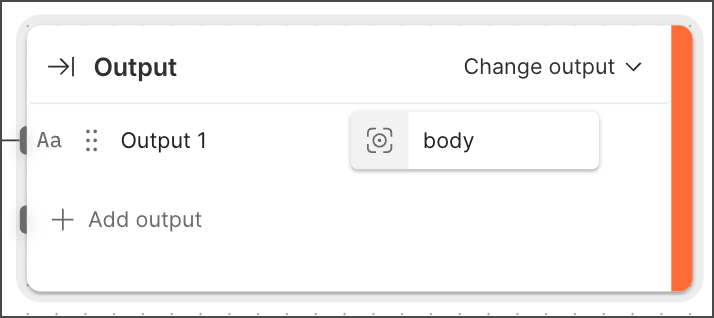 This **Output** block is different from the previous version of the **Output** block, which became the [**Display**](/docs/postman-flows/reference/blocks/output-display/) block.
The **Output** block receives data in one flow and sends that data to a [**Flow**](/docs/postman-flows/reference/blocks/flow-module/) block in a different flow. The **Flow** block then sends the result from its output port. A flow can't have more than one **Output** block.
## Inputs and outputs
The **Output** block's inputs are referred to as *outputs* because they send data to a **Flow** block in a different flow. Each output can receive data through its corresponding input port. The **Output** block has no output ports. When a **Flow** block references the **Output** block's flow, the **Flow** block sends the **Output** block's data from its own output port.
* If the **Output** block has no outputs, the **Flow** block that references its flow will have no output port.
* If the **Output** block has one or more outputs, the **Flow** block that references its flow will have the same number of output ports.
## Setup
When you add an **Output** block to your flow, it has one input port and no outputs. A flow can't have more than one **Output** block.
To add an output to an **Output** block, do the following:
1. Click
This **Output** block is different from the previous version of the **Output** block, which became the [**Display**](/docs/postman-flows/reference/blocks/output-display/) block.
The **Output** block receives data in one flow and sends that data to a [**Flow**](/docs/postman-flows/reference/blocks/flow-module/) block in a different flow. The **Flow** block then sends the result from its output port. A flow can't have more than one **Output** block.
## Inputs and outputs
The **Output** block's inputs are referred to as *outputs* because they send data to a **Flow** block in a different flow. Each output can receive data through its corresponding input port. The **Output** block has no output ports. When a **Flow** block references the **Output** block's flow, the **Flow** block sends the **Output** block's data from its own output port.
* If the **Output** block has no outputs, the **Flow** block that references its flow will have no output port.
* If the **Output** block has one or more outputs, the **Flow** block that references its flow will have the same number of output ports.
## Setup
When you add an **Output** block to your flow, it has one input port and no outputs. A flow can't have more than one **Output** block.
To add an output to an **Output** block, do the following:
1. Click  **Add output**. A new output named **Output \** appears.
2. Connect another block's output port to the **Output** block's input port. The icon next to the output changes to indicate the connected block's data type.
3. (Optional) Click the output's name to edit it.
4. (Optional) If the incoming data has more than one item, click **Enter path...** to specify which item to assign to the output.
## Example
To see the **Output** block in an example flow, check out [Flow Snippets: Output](https://www.postman.com/postman/flows-snippets/flow/6827a04b38266c0031de1e3c).
**Add output**. A new output named **Output \** appears.
2. Connect another block's output port to the **Output** block's input port. The icon next to the output changes to indicate the connected block's data type.
3. (Optional) Click the output's name to edit it.
4. (Optional) If the incoming data has more than one item, click **Enter path...** to specify which item to assign to the output.
## Example
To see the **Output** block in an example flow, check out [Flow Snippets: Output](https://www.postman.com/postman/flows-snippets/flow/6827a04b38266c0031de1e3c).