# The Record block
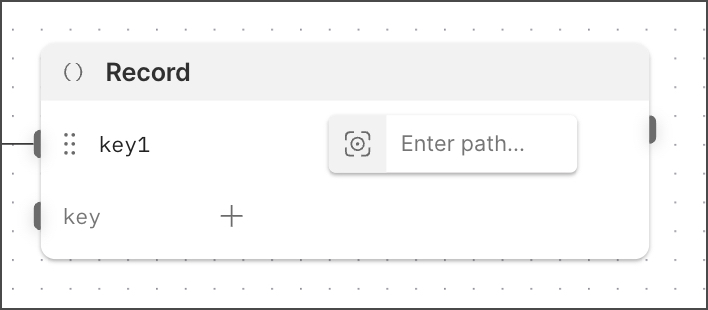 The **Record** block creates key-value pairs from received data and sends them as a JSON object. The **Record** block is useful for structuring and transforming data in your flow. For example, you can use it to construct API request payloads or to merge data from multiple responses.
## Input
Each input port receives data from a connected or [inserted](/docs/postman-flows/reference/blocks/overview/#insert-data-blocks-into-other-blocks) block and creates a key-value pair. The name of the input port is the key, and the data it receives is the value. All keys in the block must be unique.
A new **Record** block has one input port by default. To add another input port, connect a block to an existing input port or click
The **Record** block creates key-value pairs from received data and sends them as a JSON object. The **Record** block is useful for structuring and transforming data in your flow. For example, you can use it to construct API request payloads or to merge data from multiple responses.
## Input
Each input port receives data from a connected or [inserted](/docs/postman-flows/reference/blocks/overview/#insert-data-blocks-into-other-blocks) block and creates a key-value pair. The name of the input port is the key, and the data it receives is the value. All keys in the block must be unique.
A new **Record** block has one input port by default. To add another input port, connect a block to an existing input port or click  **Add data blocks**.
When you connect another block's output port to a **Record** block's input port, a **Select** block is automatically inserted. Click **Enter path...** to select data for the key-value pair's value. You can also insert blocks into the **Record** block to use their data in the key-value pair.
## Output
The **Record** block has a single output port that sends a JSON object containing the key-value pairs defined in the block.
## Setup
To set up a **Record** block, do the following:
1. Connect a block's output port to the **Record** block's input port, or click **Add data blocks** to insert a block.
2. Enter or select a value.
3. Click **key\** and enter a name for the key.
## Example
To see the **Record** block in an example flow, see [Flow Snippets: Record](https://www.postman.com/postman/flows-snippets/flow/63bc6eacead4e97c45493e9c).
## Related pages
For a tutorial that uses the **Record** block, see [Calculate the years since a milestone](/docs/postman-flows/tutorials/beginner/calculate-years-since-milestone/).
**Add data blocks**.
When you connect another block's output port to a **Record** block's input port, a **Select** block is automatically inserted. Click **Enter path...** to select data for the key-value pair's value. You can also insert blocks into the **Record** block to use their data in the key-value pair.
## Output
The **Record** block has a single output port that sends a JSON object containing the key-value pairs defined in the block.
## Setup
To set up a **Record** block, do the following:
1. Connect a block's output port to the **Record** block's input port, or click **Add data blocks** to insert a block.
2. Enter or select a value.
3. Click **key\** and enter a name for the key.
## Example
To see the **Record** block in an example flow, see [Flow Snippets: Record](https://www.postman.com/postman/flows-snippets/flow/63bc6eacead4e97c45493e9c).
## Related pages
For a tutorial that uses the **Record** block, see [Calculate the years since a milestone](/docs/postman-flows/tutorials/beginner/calculate-years-since-milestone/).