# The Request block
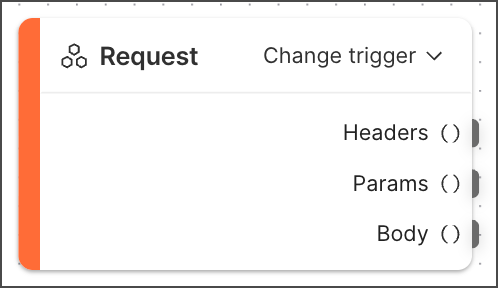 The **Request** block is a special block that's required to create a [deployable flow](/docs/postman-flows/reference/flows-actions-overview/) that runs in the Postman cloud. The **Request** block takes request data sent to a flow's URL and routes the data through its **Headers**, **Params**, and **Body** output ports. The only way to add a **Request** block to a flow is to change the [**Start** block's](/docs/postman-flows/reference/blocks/start/) trigger to **Request**. The **Request** block can't be deleted.
You can change a **Request** block to a **Schedule** block to run the flow at regular intervals or at specific times. To learn how, see [Schedule a deployed flow to run automatically](/docs/postman-flows/build-flows/structure/actions/#schedule-a-flow-to-run-automatically).
Prior to a flow being deployed to the cloud, the **Request** block gets values for headers, parameters, and the request body from [scenarios](/docs/postman-flows/build-flows/configure/scenarios/). By running different scenarios, you can test how your flow will behave once it's running in the cloud. Testing with scenarios is necessary because the flow won't have a URL until you deploy it to the cloud.
The **Request** block can ingest input data of up to 5 megabytes if you've [purchased the Flows add-on](https://www.postman.com/pricing/), or 1 megabyte if you're using Flows for free.
## Outputs
* **Headers** - Sends the request headers to the flow's URL.
* **Params** - Sends the request's query parameters to the flow's URL.
* **Body** - Sends the request body to the flow's URL. Actions support JSON, `form-data`, and `x-www-form-urlencoded` formats.
## Setup
All deployable flows require either one **Request** block or one **Schedule** block. Flows with a **Request** block require at least one [**Response** block](/docs/postman-flows/reference/blocks/response/).
To add a **Request** block to a flow, do the following:
1. [Create a new flow](/docs/postman-flows/get-started/build-your-first-flow/).
2. In the **Start** block, click **Change trigger** and select
The **Request** block is a special block that's required to create a [deployable flow](/docs/postman-flows/reference/flows-actions-overview/) that runs in the Postman cloud. The **Request** block takes request data sent to a flow's URL and routes the data through its **Headers**, **Params**, and **Body** output ports. The only way to add a **Request** block to a flow is to change the [**Start** block's](/docs/postman-flows/reference/blocks/start/) trigger to **Request**. The **Request** block can't be deleted.
You can change a **Request** block to a **Schedule** block to run the flow at regular intervals or at specific times. To learn how, see [Schedule a deployed flow to run automatically](/docs/postman-flows/build-flows/structure/actions/#schedule-a-flow-to-run-automatically).
Prior to a flow being deployed to the cloud, the **Request** block gets values for headers, parameters, and the request body from [scenarios](/docs/postman-flows/build-flows/configure/scenarios/). By running different scenarios, you can test how your flow will behave once it's running in the cloud. Testing with scenarios is necessary because the flow won't have a URL until you deploy it to the cloud.
The **Request** block can ingest input data of up to 5 megabytes if you've [purchased the Flows add-on](https://www.postman.com/pricing/), or 1 megabyte if you're using Flows for free.
## Outputs
* **Headers** - Sends the request headers to the flow's URL.
* **Params** - Sends the request's query parameters to the flow's URL.
* **Body** - Sends the request body to the flow's URL. Actions support JSON, `form-data`, and `x-www-form-urlencoded` formats.
## Setup
All deployable flows require either one **Request** block or one **Schedule** block. Flows with a **Request** block require at least one [**Response** block](/docs/postman-flows/reference/blocks/response/).
To add a **Request** block to a flow, do the following:
1. [Create a new flow](/docs/postman-flows/get-started/build-your-first-flow/).
2. In the **Start** block, click **Change trigger** and select  **Request**.
You can change a **Request** block to a **Schedule** block to run flows at specified times and intervals. To change a **Request** block to a **Schedule** block, in the **Request** block, click **Change trigger** and select
**Request**.
You can change a **Request** block to a **Schedule** block to run flows at specified times and intervals. To change a **Request** block to a **Schedule** block, in the **Request** block, click **Change trigger** and select  **Schedule**. To learn more, see [The Schedule block](/docs/postman-flows/reference/blocks/schedule/).
To change a **Request** block back to a **Start** block, click **Change trigger** and select
**Schedule**. To learn more, see [The Schedule block](/docs/postman-flows/reference/blocks/schedule/).
To change a **Request** block back to a **Start** block, click **Change trigger** and select  **Start**.
## Related blocks
Deployable flows require one **Request** or [**Schedule**](/docs/postman-flows/reference/blocks/schedule/) block. Deployable flows that have a **Request** block require at least one [**Response**](/docs/postman-flows/reference/blocks/response/) block.
**Start**.
## Related blocks
Deployable flows require one **Request** or [**Schedule**](/docs/postman-flows/reference/blocks/schedule/) block. Deployable flows that have a **Request** block require at least one [**Response**](/docs/postman-flows/reference/blocks/response/) block.