***
title: The Response block
updated: 2026-01-14T00:00:00.000Z
topictype: reference
slug: docs/postman-flows/reference/blocks/response
max-toc-depth: 2
----------------
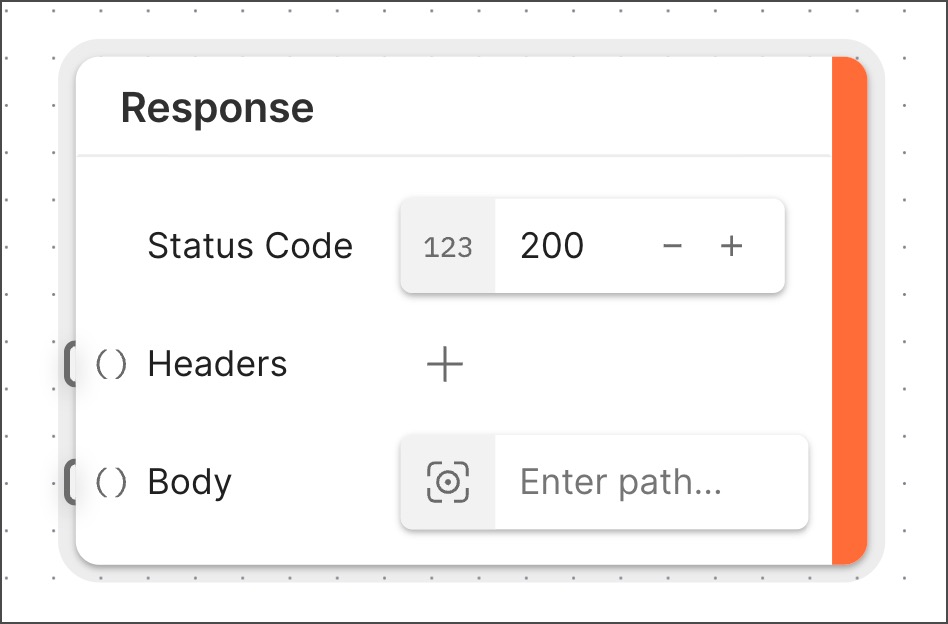 The **Response** block is a special block that's required to create a [deployable flow](/docs/postman-flows/reference/flows-actions-overview/). The **Response** block sends data back to a request made to a flow's URL. It receives data from other blocks in the flow that are connected to its input ports. You can add multiple **Response** blocks to a flow, but there can only be one **Response** block for each branch of the flow's logic. You must design the logic such that whatever happens in the flow, only one **Response** block will be triggered.
The **Response** block only returns a response when the flow starts with a [**Request** block](/docs/postman-flows/reference/blocks/request/).
## Inputs
* **Status Code** - When an HTTP request is sent to a flow's URL, the flow determines what [HTTP status code](https://developer.mozilla.org/en-US/docs/Web/HTTP/Reference/Status/) to send in the response. Every flow with a **Request** block requires at least one **Response** block that sends a 200 ("success") status code. This **Response** block, situated at the end of the flow's sequence of blocks, confirms that the flow completed its work.
* **Headers** (optional) - Add a key-value pair for every [HTTP header](https://developer.mozilla.org/en-US/docs/Web/HTTP/Reference/Headers) that you want the flow's HTTP response to send. You can connect the **Headers** input to another block, if desired.
* **Body** - Specify an [HTTP response body](https://developer.mozilla.org/en-US/docs/Web/HTTP/Guides/Messages#response_body) that you want the flow's HTTP response to send. The response body can be an empty string.
The **Response** block can accommodate the requirements of a variety of use cases besides those covered by these defaults. For details, see the [Setup](#setup) section.
## Setup
* **Status Code** - As described in the [Inputs](#inputs) section, the **Response** block sends a 200 status code by default. If you need a **Response** block to send a different status code, edit the number field.
More advanced options for HTTP status codes and **Response** blocks include the following:
* A flow can send success status codes from more than one **Response** block. For example, in addition to the **Response** block at the end of the sequence, you can connect another **Response** block to the **Request** block, near the beginning. This sends a success response at the moment an HTTP request reaches the flow's URL -- a useful data point for some testing and automation workflows.
* While you can add **Response** blocks to send 4xx ("failure") status codes, not every flow needs to do this. By default, when a flow running in the cloud fails, it automatically sends a 400 Bad Request code and records the failure in [Flows analytics](/docs/postman-flows/build-flows/analyze/analytics/). This suffices for many internal automation use cases.
To include data from the flow in the response headers or body, connect one or more blocks to the corresponding input port. This is optional for the **Headers** input port and required for the **Body** input port:
* **Headers** - Deployed flows aren't required to send response headers. Use cases where you'll need them include those where you want to the deployed flow's client to be aware of the [content type](https://developer.mozilla.org/en-US/docs/Web/HTTP/Reference/Headers/Content-Type) being sent.
* **Body** - It's a best practice to always connect the **Body** input to another block. Consider the following options:
* If you want the flow's response body to replicate the incoming request body, connect the **Response** block's **Body** input to the **Request** block's **Body** output.
* If you want the flow to send a message immediately upon receiving a request, connect a **Template** or **Record** block with the desired "request received" message to the **Body** output of the **Request** block. Then connect the **Response** block's **Body** input to the **Template** or **Record** block.
* If you want the flow to send an empty response body, connect a **Template** block with no content in its text box to the **Body** output of the **Request** block. Then connect the **Response** block's **Body** input to the **Template** block.
## Example
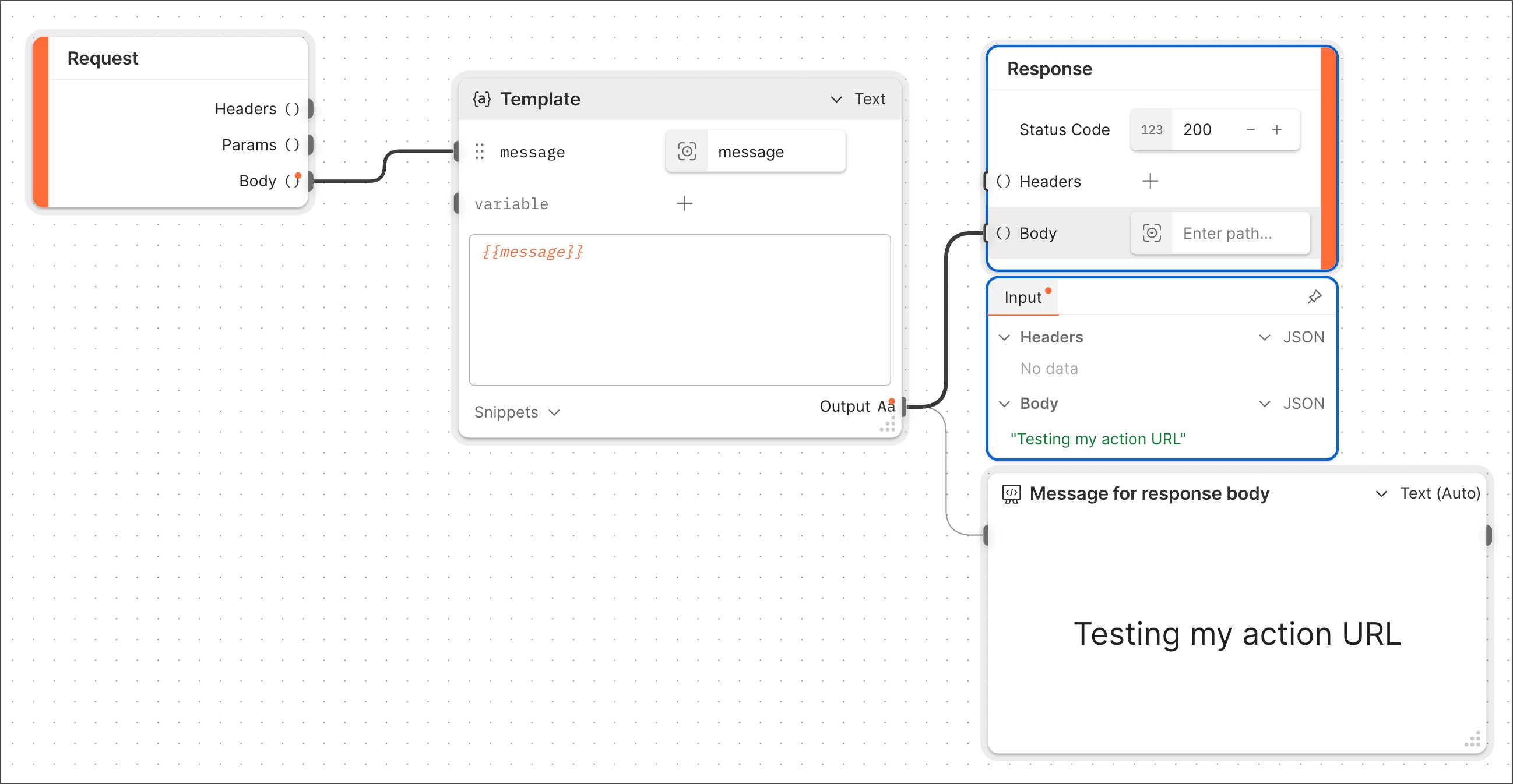
Here's an example that shows how content sent to the **Response** block's **Body** input port (in this case, a message) appears in the response body. To make it clear that the message ("Testing my flow URL") is present, the **Response** block's output is selected in the example. There's also a **Display** block to show that the **Template** block's output is what's being sent to the **Response** block.
The **Response** block is a special block that's required to create a [deployable flow](/docs/postman-flows/reference/flows-actions-overview/). The **Response** block sends data back to a request made to a flow's URL. It receives data from other blocks in the flow that are connected to its input ports. You can add multiple **Response** blocks to a flow, but there can only be one **Response** block for each branch of the flow's logic. You must design the logic such that whatever happens in the flow, only one **Response** block will be triggered.
The **Response** block only returns a response when the flow starts with a [**Request** block](/docs/postman-flows/reference/blocks/request/).
## Inputs
* **Status Code** - When an HTTP request is sent to a flow's URL, the flow determines what [HTTP status code](https://developer.mozilla.org/en-US/docs/Web/HTTP/Reference/Status/) to send in the response. Every flow with a **Request** block requires at least one **Response** block that sends a 200 ("success") status code. This **Response** block, situated at the end of the flow's sequence of blocks, confirms that the flow completed its work.
* **Headers** (optional) - Add a key-value pair for every [HTTP header](https://developer.mozilla.org/en-US/docs/Web/HTTP/Reference/Headers) that you want the flow's HTTP response to send. You can connect the **Headers** input to another block, if desired.
* **Body** - Specify an [HTTP response body](https://developer.mozilla.org/en-US/docs/Web/HTTP/Guides/Messages#response_body) that you want the flow's HTTP response to send. The response body can be an empty string.
The **Response** block can accommodate the requirements of a variety of use cases besides those covered by these defaults. For details, see the [Setup](#setup) section.
## Setup
* **Status Code** - As described in the [Inputs](#inputs) section, the **Response** block sends a 200 status code by default. If you need a **Response** block to send a different status code, edit the number field.
More advanced options for HTTP status codes and **Response** blocks include the following:
* A flow can send success status codes from more than one **Response** block. For example, in addition to the **Response** block at the end of the sequence, you can connect another **Response** block to the **Request** block, near the beginning. This sends a success response at the moment an HTTP request reaches the flow's URL -- a useful data point for some testing and automation workflows.
* While you can add **Response** blocks to send 4xx ("failure") status codes, not every flow needs to do this. By default, when a flow running in the cloud fails, it automatically sends a 400 Bad Request code and records the failure in [Flows analytics](/docs/postman-flows/build-flows/analyze/analytics/). This suffices for many internal automation use cases.
To include data from the flow in the response headers or body, connect one or more blocks to the corresponding input port. This is optional for the **Headers** input port and required for the **Body** input port:
* **Headers** - Deployed flows aren't required to send response headers. Use cases where you'll need them include those where you want to the deployed flow's client to be aware of the [content type](https://developer.mozilla.org/en-US/docs/Web/HTTP/Reference/Headers/Content-Type) being sent.
* **Body** - It's a best practice to always connect the **Body** input to another block. Consider the following options:
* If you want the flow's response body to replicate the incoming request body, connect the **Response** block's **Body** input to the **Request** block's **Body** output.
* If you want the flow to send a message immediately upon receiving a request, connect a **Template** or **Record** block with the desired "request received" message to the **Body** output of the **Request** block. Then connect the **Response** block's **Body** input to the **Template** or **Record** block.
* If you want the flow to send an empty response body, connect a **Template** block with no content in its text box to the **Body** output of the **Request** block. Then connect the **Response** block's **Body** input to the **Template** block.
## Example
Here's an example that shows how content sent to the **Response** block's **Body** input port (in this case, a message) appears in the response body. To make it clear that the message ("Testing my flow URL") is present, the **Response** block's output is selected in the example. There's also a **Display** block to show that the **Template** block's output is what's being sent to the **Response** block.
 ## Related blocks
Deployable flows require one [**Request**](/docs/postman-flows/reference/blocks/request/) or [**Schedule**](/docs/postman-flows/reference/blocks/schedule/) block. Deployable flows that have a **Request** block require at least one **Response** block.
## Related blocks
Deployable flows require one [**Request**](/docs/postman-flows/reference/blocks/request/) or [**Schedule**](/docs/postman-flows/reference/blocks/schedule/) block. Deployable flows that have a **Request** block require at least one **Response** block.