# The Select block
 The **Select** block receives JSON data from another block and extracts an element that you specify. This can help you isolate and work with data from an **HTTP Request** block's response.
## Input
Connect this input port to any block that sends JSON data.
## Output
This output port sends the selected data. The symbol next to this output port changes depending on the type of data selected.
## Setup
If you want the **Select** block to operate on output data from an **HTTP Request** block:
1. Run the flow to make output available in the **HTTP Request** block. A red dot will appear at the **Success** output.
2. Click the **Success** output to open the block footer, then select the **Output** tab in the footer.
3. In the output, navigate to the field you want to populate the **Select** block.
4. Drag the desired field beyond the boundary of the **HTTP Request** block and drop it on the canvas. This will create a **Select** block whose output will be the field you chose.
Here's another way you can set up a **Select** block to operate on data from an **HTTP Request** block:
1. Run the flow to make output available in the **HTTP Request** block. A red dot will appear at the **Success** output.
2. Create a **Select** block [with the blocks list](/docs/postman-flows/build-flows/create/create-blocks/) and connect it to the **HTTP Request** block.
3. In the **Select** block, click **Enter path...** to show the **HTTP Request** block's output data.
4. Click the field you want to send from the **Select** block. Click the symbol next to the output port to preview the data being sent. If you change the selected field, you must run the flow to update the preview.
In addition to **HTTP Request** blocks, you can use **Display** or any of [several other blocks](#related-blocks) to provide input to **Select** blocks.
## Example
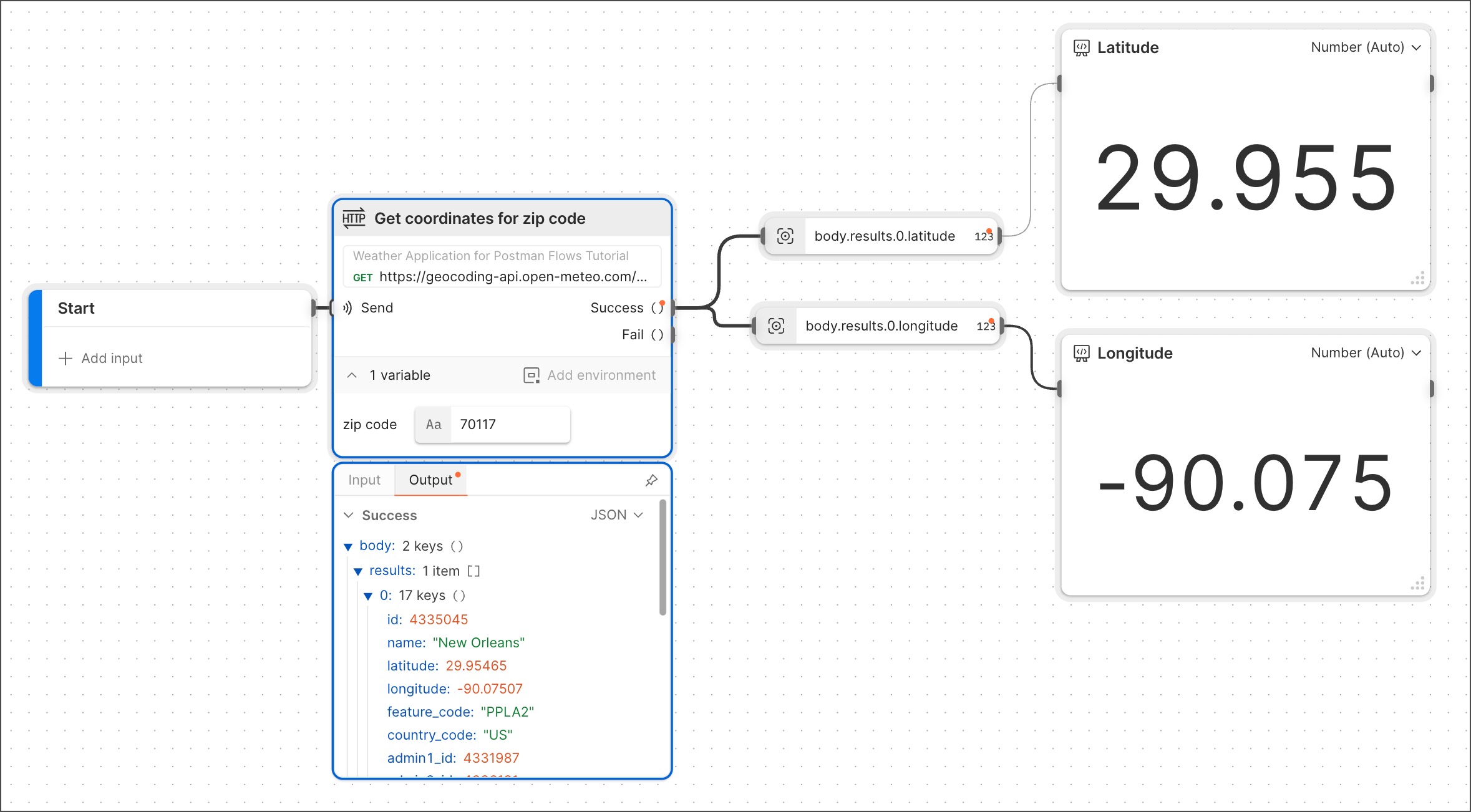
The example below shows the result of dragging and dropping two different fields from HTTP request output, one at a time. This created a **Select** block for each of the fields. Each **Select** block was then connected to a **Display** block renamed for its respective field.
The **Select** block receives JSON data from another block and extracts an element that you specify. This can help you isolate and work with data from an **HTTP Request** block's response.
## Input
Connect this input port to any block that sends JSON data.
## Output
This output port sends the selected data. The symbol next to this output port changes depending on the type of data selected.
## Setup
If you want the **Select** block to operate on output data from an **HTTP Request** block:
1. Run the flow to make output available in the **HTTP Request** block. A red dot will appear at the **Success** output.
2. Click the **Success** output to open the block footer, then select the **Output** tab in the footer.
3. In the output, navigate to the field you want to populate the **Select** block.
4. Drag the desired field beyond the boundary of the **HTTP Request** block and drop it on the canvas. This will create a **Select** block whose output will be the field you chose.
Here's another way you can set up a **Select** block to operate on data from an **HTTP Request** block:
1. Run the flow to make output available in the **HTTP Request** block. A red dot will appear at the **Success** output.
2. Create a **Select** block [with the blocks list](/docs/postman-flows/build-flows/create/create-blocks/) and connect it to the **HTTP Request** block.
3. In the **Select** block, click **Enter path...** to show the **HTTP Request** block's output data.
4. Click the field you want to send from the **Select** block. Click the symbol next to the output port to preview the data being sent. If you change the selected field, you must run the flow to update the preview.
In addition to **HTTP Request** blocks, you can use **Display** or any of [several other blocks](#related-blocks) to provide input to **Select** blocks.
## Example
The example below shows the result of dragging and dropping two different fields from HTTP request output, one at a time. This created a **Select** block for each of the fields. Each **Select** block was then connected to a **Display** block renamed for its respective field.
 ## Related blocks
Numerous blocks can send JSON data to the **Select** block, including the [**Record**](/docs/postman-flows/reference/blocks/record/), [**HTTP Request**](/docs/postman-flows/reference/blocks/http-request/), [**Display**](/docs/postman-flows/reference/blocks/output-display/), [**Template**](/docs/postman-flows/reference/blocks/template/), [**AI Request**](/docs/postman-flows/reference/blocks/ai-request/), [**AI Agent**](/docs/postman-flows/reference/blocks/ai-agent/), [**Create with AI**](/docs/postman-flows/reference/blocks/create-with-ai/), and [**Request**](/docs/postman-flows/reference/blocks/request/) blocks.
Numerous blocks enable you to [insert](/docs/postman-flows/reference/blocks/overview/#insert-data-blocks-into-other-blocks) the **Select** block inline, including the [**Create with AI**](/docs/postman-flows/reference/blocks/create-with-ai/), [**Evaluate**](/docs/postman-flows/reference/blocks/evaluate/), [**If**](/docs/postman-flows/reference/blocks/if/), [**List**](/docs/postman-flows/reference/blocks/list/), [**Record**](/docs/postman-flows/reference/blocks/record/), and [**Template**](/docs/postman-flows/reference/blocks/template/) blocks.
## Related pages
For tutorials that use the **Select** block, see the following:
* [Automate repetitive tasks using Postman Flows](/docs/postman-flows/tutorials/advanced/automate-repetitive-tasks/)
* [Calculate the years since a milestone](/docs/postman-flows/tutorials/beginner/calculate-years-since-milestone/)
* [Create a dashboard using Postman Flows](/docs/postman-flows/tutorials/advanced/create-a-dashboard-in-flows/)
* [Send information from one system to another using Postman Flows](/docs/postman-flows/tutorials/advanced/send-information-from-one-system-to-another/)
## Related blocks
Numerous blocks can send JSON data to the **Select** block, including the [**Record**](/docs/postman-flows/reference/blocks/record/), [**HTTP Request**](/docs/postman-flows/reference/blocks/http-request/), [**Display**](/docs/postman-flows/reference/blocks/output-display/), [**Template**](/docs/postman-flows/reference/blocks/template/), [**AI Request**](/docs/postman-flows/reference/blocks/ai-request/), [**AI Agent**](/docs/postman-flows/reference/blocks/ai-agent/), [**Create with AI**](/docs/postman-flows/reference/blocks/create-with-ai/), and [**Request**](/docs/postman-flows/reference/blocks/request/) blocks.
Numerous blocks enable you to [insert](/docs/postman-flows/reference/blocks/overview/#insert-data-blocks-into-other-blocks) the **Select** block inline, including the [**Create with AI**](/docs/postman-flows/reference/blocks/create-with-ai/), [**Evaluate**](/docs/postman-flows/reference/blocks/evaluate/), [**If**](/docs/postman-flows/reference/blocks/if/), [**List**](/docs/postman-flows/reference/blocks/list/), [**Record**](/docs/postman-flows/reference/blocks/record/), and [**Template**](/docs/postman-flows/reference/blocks/template/) blocks.
## Related pages
For tutorials that use the **Select** block, see the following:
* [Automate repetitive tasks using Postman Flows](/docs/postman-flows/tutorials/advanced/automate-repetitive-tasks/)
* [Calculate the years since a milestone](/docs/postman-flows/tutorials/beginner/calculate-years-since-milestone/)
* [Create a dashboard using Postman Flows](/docs/postman-flows/tutorials/advanced/create-a-dashboard-in-flows/)
* [Send information from one system to another using Postman Flows](/docs/postman-flows/tutorials/advanced/send-information-from-one-system-to-another/)