***
title: Create a list-based loop with the For block
updated: 2025-11-17T00:00:00.000Z
topictype: tutorial
max-toc-depth: 2
----------------
You can build a flow that loops over a list. For example, you can run a flow that loops over a list of email addresses and emails each person in the list.
This tutorial's goal is to teach you how to set up and use list-based loops. To achieve this goal, you'll build a flow that iterates over the first three letters of the alphabet.
## Create a new flow
You build flows in a workspace. Workspaces let you organize your API projects and collaborate with your team.
To create a new flow, do the following:
1. Choose an existing workspace or [create a new one](/docs/collaborating-in-postman/using-workspaces/create-workspaces/).
2. In the upper left corner, click **New** >  **Flow**.
## Add For and Collect blocks
With the **For** block, you can build a loop that iterates over a list. For example, if you want to run a loop that loops over a list of the alphabet, you connect the **For** block to such a list.
In the next procedure, you'll use the **List** block to define this list.
To add a **For** block, do the following:
1. From the canvas toolbar, click
**Flow**.
## Add For and Collect blocks
With the **For** block, you can build a loop that iterates over a list. For example, if you want to run a loop that loops over a list of the alphabet, you connect the **For** block to such a list.
In the next procedure, you'll use the **List** block to define this list.
To add a **For** block, do the following:
1. From the canvas toolbar, click  **Block**.
2. Select **For** from the list. If you want to search for the block, enter "for" in the search.
3. Click the location on the canvas where you want to place the **For** block.
4. A **Collect** block automatically appears on the canvas.
## Connect a List block
When you connect two blocks, you connect one block's input to another block's output. Inputs are on the block's left side and outputs are on its right side.
In this tutorial, you'll use the **List** block to define the list you want your loop to iterate over.
To connect a **List** block, do the following:
1. Hover over the **For** block's **List** input port. The pointer changes to a crosshair.
**Block**.
2. Select **For** from the list. If you want to search for the block, enter "for" in the search.
3. Click the location on the canvas where you want to place the **For** block.
4. A **Collect** block automatically appears on the canvas.
## Connect a List block
When you connect two blocks, you connect one block's input to another block's output. Inputs are on the block's left side and outputs are on its right side.
In this tutorial, you'll use the **List** block to define the list you want your loop to iterate over.
To connect a **List** block, do the following:
1. Hover over the **For** block's **List** input port. The pointer changes to a crosshair.
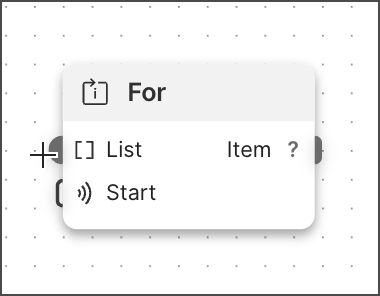 2. Decide where on the canvas you want to place the **List** block and drag the port to that location.
3. Select
2. Decide where on the canvas you want to place the **List** block and drag the port to that location.
3. Select  **List** from the list. If you want to search for the block, enter "list" in the search.
4. Click **Add data blocks** and select
**List** from the list. If you want to search for the block, enter "list" in the search.
4. Click **Add data blocks** and select  **String**. If you want to search for the block, enter "string" in the search.
5. Enter the string's value. For example, if you want to iterate over the first three letters of the alphabet, enter "a".
6. Repeat the previous two steps until you complete your list.
You can loop over any list. For example, you can get a list from an **HTTP Request** block's response or use the **Evaluate** block to generate a list.
As an alternative, replace the **List** block with an **Evaluate** block, switch to TypeScript (upper-right corner), and add the following code to the code editor:
```javascript
const alphabet = []
for (let i = 0; i < 26; i++) {
alphabet.push(String.fromCharCode(97 + i))
}
alphabet
```
This code creates an empty list, adds the letter "a" to it, and loops over the code until it adds all 26 letters of the alphabet to the list.
## Connect to the Collect block
The **Collect** block saves multiple outputs to a list. In this tutorial, your loop will run three times, output three values, and use this block to save these values to a list.
To connect the **Collect** block, do the following:
1. Hover over the **For** block's output port. The pointer changes to a crosshair.
2. Drag the **For** block's output port to the **Collect** block's input port.
## Connect a Display block
The **Display** block displays incoming data, such as the **Collect** block's outgoing list.
To connect a **Display** block, do the following:
1. Hover over the **Collect** block's **List** output port. The pointer changes to a crosshair.
2. Decide where on the canvas you want to place the **Display** block and drag the port to that location.
3. Select
**String**. If you want to search for the block, enter "string" in the search.
5. Enter the string's value. For example, if you want to iterate over the first three letters of the alphabet, enter "a".
6. Repeat the previous two steps until you complete your list.
You can loop over any list. For example, you can get a list from an **HTTP Request** block's response or use the **Evaluate** block to generate a list.
As an alternative, replace the **List** block with an **Evaluate** block, switch to TypeScript (upper-right corner), and add the following code to the code editor:
```javascript
const alphabet = []
for (let i = 0; i < 26; i++) {
alphabet.push(String.fromCharCode(97 + i))
}
alphabet
```
This code creates an empty list, adds the letter "a" to it, and loops over the code until it adds all 26 letters of the alphabet to the list.
## Connect to the Collect block
The **Collect** block saves multiple outputs to a list. In this tutorial, your loop will run three times, output three values, and use this block to save these values to a list.
To connect the **Collect** block, do the following:
1. Hover over the **For** block's output port. The pointer changes to a crosshair.
2. Drag the **For** block's output port to the **Collect** block's input port.
## Connect a Display block
The **Display** block displays incoming data, such as the **Collect** block's outgoing list.
To connect a **Display** block, do the following:
1. Hover over the **Collect** block's **List** output port. The pointer changes to a crosshair.
2. Decide where on the canvas you want to place the **Display** block and drag the port to that location.
3. Select  **Display** from the list. If you want to search for the block, enter "display" in search.
## Run the flow
From the canvas toolbar, click
**Display** from the list. If you want to search for the block, enter "display" in search.
## Run the flow
From the canvas toolbar, click  **Run**.
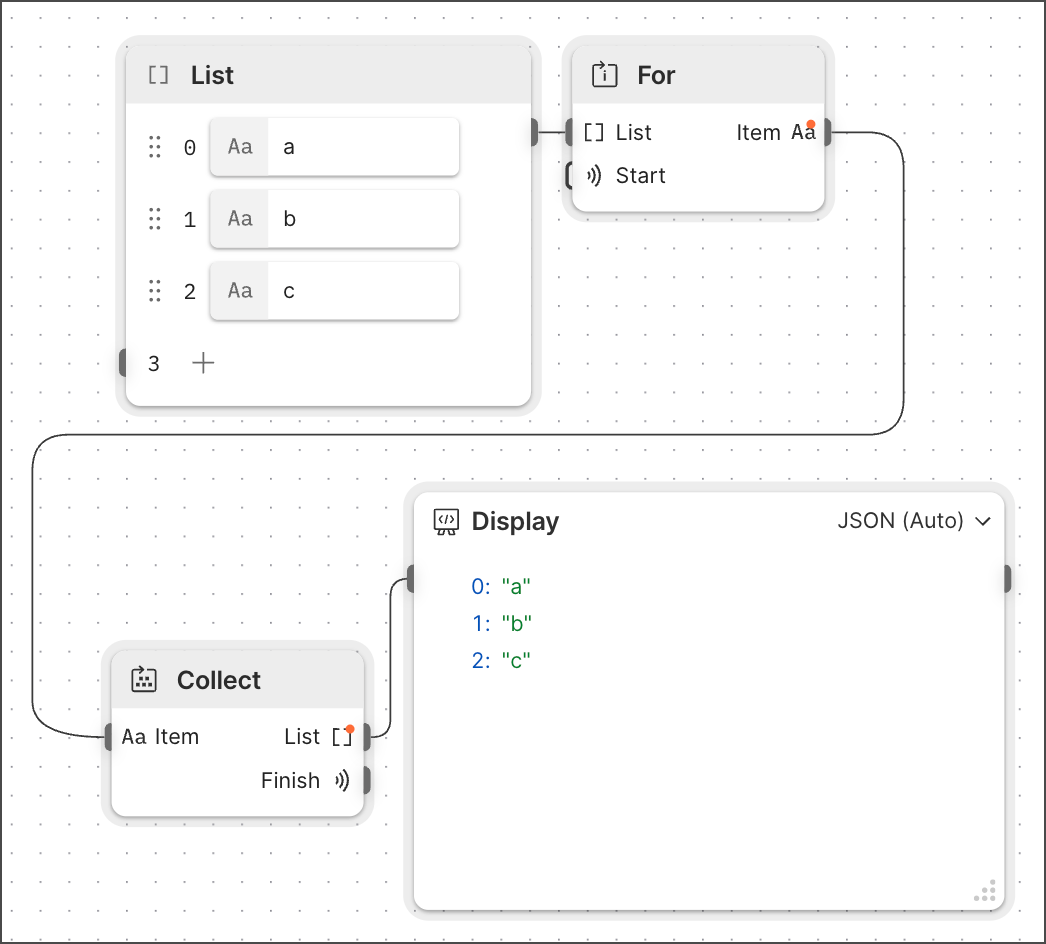
Congratulations! You created a list-based loop and displayed the result in a **Display** block.
**Run**.

Congratulations! You created a list-based loop and displayed the result in a **Display** block.