# Use TypeScript in Postman Flows
You can use [TypeScript](https://www.typescriptlang.org/) to enhance logic and functionality in the [logic blocks](/docs/postman-flows/reference/overview-logic-blocks/) of your Postman Flows. For example, with TypeScript you can write expressions that evaluate data informing your Flow's decisions, and functions that process data within your Flow.
 ## TypeScript compared to FQL
The [**If**](/docs/postman-flows/reference/blocks/if/), [**Condition**](/docs/postman-flows/reference/blocks/condition/), and [**Evaluate**](/docs/postman-flows/reference/blocks/evaluate/) logic blocks in Postman Flows support both TypeScript and [Flows Query Language](/docs/postman-flows/flows-query-language/introduction-to-fql/) (FQL). While FQL is designed for querying and transforming data, TypeScript offers the robustness and flexibility of a full programming language within your Postman Flows. This makes TypeScript more suitable for complex logic and large-scale projects. Also, if you're familiar with both, you may prefer using TypeScript over FQL.
## Restrictions and notes
Scripts written with TypeScript in Postman Flows have the following restrictions:
* Scripts can't import or require libraries.
* Scripts don't have file system access.
* Scripts can't make API calls (for example, `fetch` isn't available).
* The top level code must be an expression.
TypeScript in Postman Flows provides a range of cryptographic capabilities, including the [Web Crypto API](https://developer.mozilla.org/en-US/docs/Web/API/Web_Crypto_API), SHA-256 hashing, AES encryption, and secure random number generation.
You can use TypeScript to send console logs to the Postman Console using the following methods:
* `console.log`
* `console.error`
* `console.warn`
* `console.info`
## Use TypeScript in a Postman Flows decision block
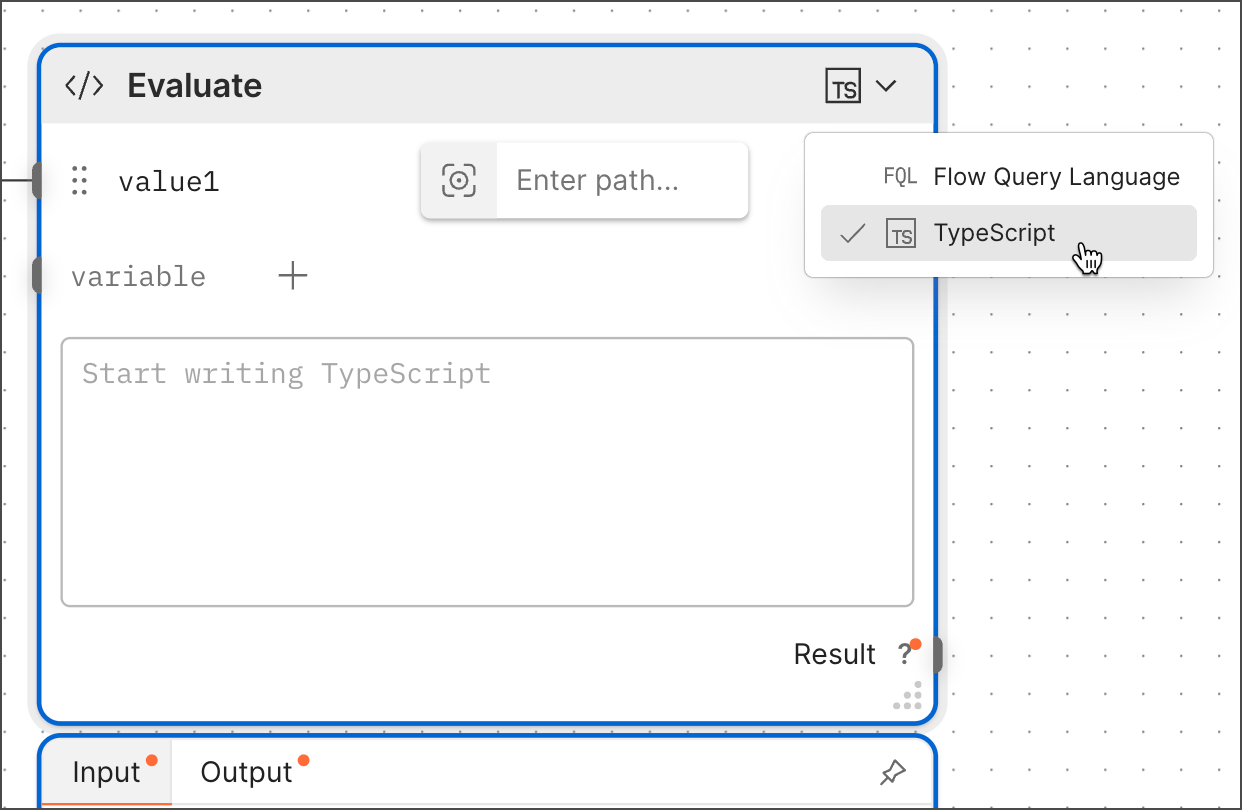
To use TypeScript in an **Evaluate** or **If** block, select **TypeScript** from the dropdown list and enter your code in the block.
## TypeScript compared to FQL
The [**If**](/docs/postman-flows/reference/blocks/if/), [**Condition**](/docs/postman-flows/reference/blocks/condition/), and [**Evaluate**](/docs/postman-flows/reference/blocks/evaluate/) logic blocks in Postman Flows support both TypeScript and [Flows Query Language](/docs/postman-flows/flows-query-language/introduction-to-fql/) (FQL). While FQL is designed for querying and transforming data, TypeScript offers the robustness and flexibility of a full programming language within your Postman Flows. This makes TypeScript more suitable for complex logic and large-scale projects. Also, if you're familiar with both, you may prefer using TypeScript over FQL.
## Restrictions and notes
Scripts written with TypeScript in Postman Flows have the following restrictions:
* Scripts can't import or require libraries.
* Scripts don't have file system access.
* Scripts can't make API calls (for example, `fetch` isn't available).
* The top level code must be an expression.
TypeScript in Postman Flows provides a range of cryptographic capabilities, including the [Web Crypto API](https://developer.mozilla.org/en-US/docs/Web/API/Web_Crypto_API), SHA-256 hashing, AES encryption, and secure random number generation.
You can use TypeScript to send console logs to the Postman Console using the following methods:
* `console.log`
* `console.error`
* `console.warn`
* `console.info`
## Use TypeScript in a Postman Flows decision block
To use TypeScript in an **Evaluate** or **If** block, select **TypeScript** from the dropdown list and enter your code in the block.
 ## Examples
To learn more, see the following TypeScript examples:
* [Rename headers with TypeScript in Flows](/docs/postman-flows/typescript/typescript-rename-headers/)
* [Detect a session id cookie with TypeScript in Flows](/docs/postman-flows/typescript/typescript-check-for-session-cookie/)
* [Route response data with TypeScript in Flows](/docs/postman-flows/typescript/typescript-health-performance-routing/)
## Examples
To learn more, see the following TypeScript examples:
* [Rename headers with TypeScript in Flows](/docs/postman-flows/typescript/typescript-rename-headers/)
* [Detect a session id cookie with TypeScript in Flows](/docs/postman-flows/typescript/typescript-check-for-session-cookie/)
* [Route response data with TypeScript in Flows](/docs/postman-flows/typescript/typescript-health-performance-routing/)