***
title: Access Postman Vault
updated: 2026-01-15T00:00:00.000Z
max-toc-depth: 2
----------------
When you [open Postman Vault](#open-postman-vault) for the first time, Postman [generates a vault key](#save-your-vault-key) for you to save in a secure location. Use your vault key to open Postman Vault each time you sign in to Postman. Your vault key isn't synced to the Postman cloud. You can [reset your vault key](#reset-your-vault-key) if you lose it.
{/* vale postman-style-guide.Headings = NO */}
## Open Postman Vault
{/* vale postman-style-guide.Headings = YES */}
To open Postman Vault, open a workspace then click  **Vault** in the Postman footer. You can also press **Control+Shift+V** or **Ctrl+Shift+V**.
Postman generates a vault key the first time you open Postman Vault. Learn how to [save your vault key](#save-your-vault-key) to a secure location and [enter your vault key](#enter-your-vault-key) when you sign in to Postman.
## Save your vault key
Save or download your vault key to a secure location so you can access Postman Vault later. Your vault key isn't synced to the Postman cloud. You can store your vault key in your system's password manager, such as [Keychain Access on macOS](https://support.apple.com/guide/keychain-access/welcome/mac), so Postman automatically enters your vault key when you sign in. Once your vault key is generated, you'll [enter your vault key](#enter-your-vault-key) to access Postman Vault when you sign in.
Vault secrets aren't preserved in your Postman Local Vault when you sign out of Postman, switch between the Postman desktop and web apps, or switch to a different machine. Your vault secrets can't be recovered with your vault key. To save your vault secrets for later, learn how to [export and import vault secrets](/docs/sending-requests/postman-vault/import-export-vault-secrets/).
{/* If you choose not to store your vault key in your system's password manager, you must manually enter your vault key each time you sign in to Postman. */}
To save your vault key, do the following:
1. When you [open Postman Vault](#open-postman-vault) for the first time, save or download your vault key to a secure location. You can do the following to save your vault key:
* Click
**Vault** in the Postman footer. You can also press **Control+Shift+V** or **Ctrl+Shift+V**.
Postman generates a vault key the first time you open Postman Vault. Learn how to [save your vault key](#save-your-vault-key) to a secure location and [enter your vault key](#enter-your-vault-key) when you sign in to Postman.
## Save your vault key
Save or download your vault key to a secure location so you can access Postman Vault later. Your vault key isn't synced to the Postman cloud. You can store your vault key in your system's password manager, such as [Keychain Access on macOS](https://support.apple.com/guide/keychain-access/welcome/mac), so Postman automatically enters your vault key when you sign in. Once your vault key is generated, you'll [enter your vault key](#enter-your-vault-key) to access Postman Vault when you sign in.
Vault secrets aren't preserved in your Postman Local Vault when you sign out of Postman, switch between the Postman desktop and web apps, or switch to a different machine. Your vault secrets can't be recovered with your vault key. To save your vault secrets for later, learn how to [export and import vault secrets](/docs/sending-requests/postman-vault/import-export-vault-secrets/).
{/* If you choose not to store your vault key in your system's password manager, you must manually enter your vault key each time you sign in to Postman. */}
To save your vault key, do the following:
1. When you [open Postman Vault](#open-postman-vault) for the first time, save or download your vault key to a secure location. You can do the following to save your vault key:
* Click  **Copy Vault key** to copy your vault key to your clipboard.
* Click
**Copy Vault key** to copy your vault key to your clipboard.
* Click  **Download Vault key** to download your vault key.
2. By default, Postman stores your vault key to your system's password manager. If you don't want to store your vault key in your system's password manager, clear the checkbox next to **Save this key to native password manager**.
If you're using the Postman web app, you must use the [Postman Desktop Agent](/docs/getting-started/basics/about-postman-agent/#postman-desktop-agent) to save your vault key to your system's password manager.
3. Click **Open Vault**.
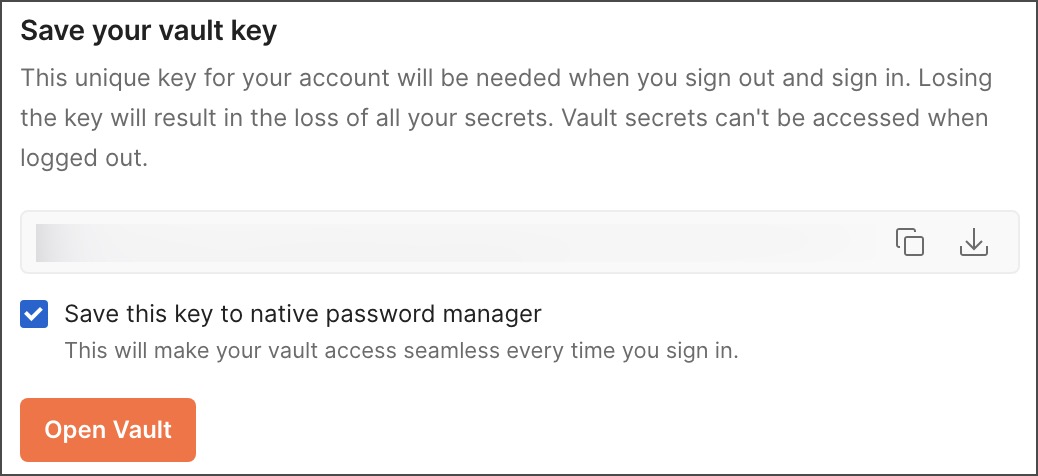
Once Postman Vault is open, you can copy and download your vault key again later. Click
**Download Vault key** to download your vault key.
2. By default, Postman stores your vault key to your system's password manager. If you don't want to store your vault key in your system's password manager, clear the checkbox next to **Save this key to native password manager**.
If you're using the Postman web app, you must use the [Postman Desktop Agent](/docs/getting-started/basics/about-postman-agent/#postman-desktop-agent) to save your vault key to your system's password manager.
3. Click **Open Vault**.

Once Postman Vault is open, you can copy and download your vault key again later. Click  **Settings** in the upper right of Postman Vault, then copy or download your vault key from the **Settings** tab.
## Enter your vault key
Each time you sign in to Postman, you must enter your vault key to access Postman Vault. You can enter your vault key in the following ways, depending on how you saved your vault key:
* If you stored your vault key in your system's password manager, Postman automatically retrieves and enters your vault key when you sign in. Make sure to use the [Postman Desktop Agent](/docs/getting-started/basics/about-postman-agent/#postman-desktop-agent) if you're using the Postman web app.
* If you stored your vault key to your own secure location, you must manually enter your vault key and click **Open Vault**.
Postman recommends you [use the latest version](/docs/getting-started/basics/about-postman-agent/#update-the-postman-desktop-agent) of the Postman Desktop Agent to receive recent changes and improvements to Postman Vault.
## Reset your vault key
You can reset your vault key if you lose it. Vault secrets are deleted from your Postman Local Vault when you reset your vault key.
To reset your vault key, do the following:
1. Sign out and sign back in to Postman.
2. [Open Postman Vault](#open-postman-vault), and click **Reset vault**.
3. Click **Reset Vault** to generate a new vault key.
4. [Save your vault key](#save-your-vault-key).
**Settings** in the upper right of Postman Vault, then copy or download your vault key from the **Settings** tab.
## Enter your vault key
Each time you sign in to Postman, you must enter your vault key to access Postman Vault. You can enter your vault key in the following ways, depending on how you saved your vault key:
* If you stored your vault key in your system's password manager, Postman automatically retrieves and enters your vault key when you sign in. Make sure to use the [Postman Desktop Agent](/docs/getting-started/basics/about-postman-agent/#postman-desktop-agent) if you're using the Postman web app.
* If you stored your vault key to your own secure location, you must manually enter your vault key and click **Open Vault**.
Postman recommends you [use the latest version](/docs/getting-started/basics/about-postman-agent/#update-the-postman-desktop-agent) of the Postman Desktop Agent to receive recent changes and improvements to Postman Vault.
## Reset your vault key
You can reset your vault key if you lose it. Vault secrets are deleted from your Postman Local Vault when you reset your vault key.
To reset your vault key, do the following:
1. Sign out and sign back in to Postman.
2. [Open Postman Vault](#open-postman-vault), and click **Reset vault**.
3. Click **Reset Vault** to generate a new vault key.
4. [Save your vault key](#save-your-vault-key).