***
title: Use scripts in collection runs
updated: 2025-11-06T00:00:00.000Z
topictype: reference
slug: docs/tests-and-scripts/write-scripts/postman-sandbox-reference/pm-execution
max-toc-depth: 2
----------------
The `pm.execution` object provides information and context about requests and their responses during a [collection run](/docs/collections/running-collections/intro-to-collection-runs/), such as sending requests or which request is running, its position in a collection, and run-related metadata.
## pm.execution.runRequest method
Use the `pm.execution.runRequest` method in a pre-request or post-response script to send HTTP requests stored in your collections.
A *referenced request* is the request referenced in the method. A *root request* is the request or collection where you call the method. You can call the method a maximum of 10 times from each script.
To write a request directly in your script, use the [`pm.sendRequest`](/docs/tests-and-scripts/write-scripts/postman-sandbox-reference/pm-send-request/#pmsendrequest) method.
Consider the following when using this method:
* The `pm.execution.runRequest` method isn't supported with Newman or the Postman VS Code extension.
* The `pm.execution.setNextRequest` and [`pm.visualizer`](/docs/tests-and-scripts/write-scripts/postman-sandbox-reference/pm-visualizer/) methods won't run in the referenced request.
* The referenced request won't run if it uses the `pm.execution.skipRequest` method in its pre-request script. The `pm.execution.runRequest` method returns a `null` value in the response.
* If the referenced request uses [`pm.vault`](/docs/tests-and-scripts/write-scripts/postman-sandbox-reference/pm-vault/) methods and the root request is in a different collection, you're prompted to [grant the script access](/docs/tests-and-scripts/write-scripts/postman-sandbox-reference/pm-vault/#grant-scripts-access-to-your-vault-secrets) to your vault secrets.
* If the referenced request uses [`pm.cookies.jar`](/docs/tests-and-scripts/write-scripts/postman-sandbox-reference/pm-cookies/), make sure the referenced request's URL is added to the root request's [domain allowlist](/docs/sending-requests/response-data/cookies/#access-cookies-in-scripts).
Request IDs aren't preserved when you [export a collection](/docs/getting-started/importing-and-exporting/exporting-data/). If you import a collection with requests referenced using the `pm.execution.runRequest` method, you'll need to update the request IDs in the root request.
### Variable resolution
When resolving variables, the `pm.execution.runRequest` method uses the following order, from lowest to highest priority:
* Global variables
* The root request's collection variables
* The referenced request's collection variables
* Environment variables
* Data variables
* Local variables
* Variable overrides provided by the `pm.execution.runRequest` method's second argument
For information about Postman's resolution precedence for variables, see [Variable scopes](/docs/sending-requests/variables/variables/#variable-scopes).
### Arguments
The `pm.execution.runRequest` method accepts the following arguments:
* As its first argument, the `pm.execution.runRequest` method accepts the request ID of the referenced request. The request dropdown list displays when you enter the argument. Enter the request or collection's name, then select a request from the dropdown list. The dropdown list shows requests in the current workspace and any workspace you have access to. You can also enter the request ID or [link to the request](/docs/getting-started/basics/navigating-postman/#renaming-and-linking-elements). The argument displays the referenced request's method and name, and you can click this to update the argument.
To get a request's ID, click  **Info** in the [right sidebar](/docs/getting-started/basics/navigating-postman/#right-sidebar) of a request, then click
  **Copy request ID**.
* As the second argument, the method accepts an options object that overrides variables referenced in the request. Learn about the order the method follows to [resolve variables](#variable-resolution).
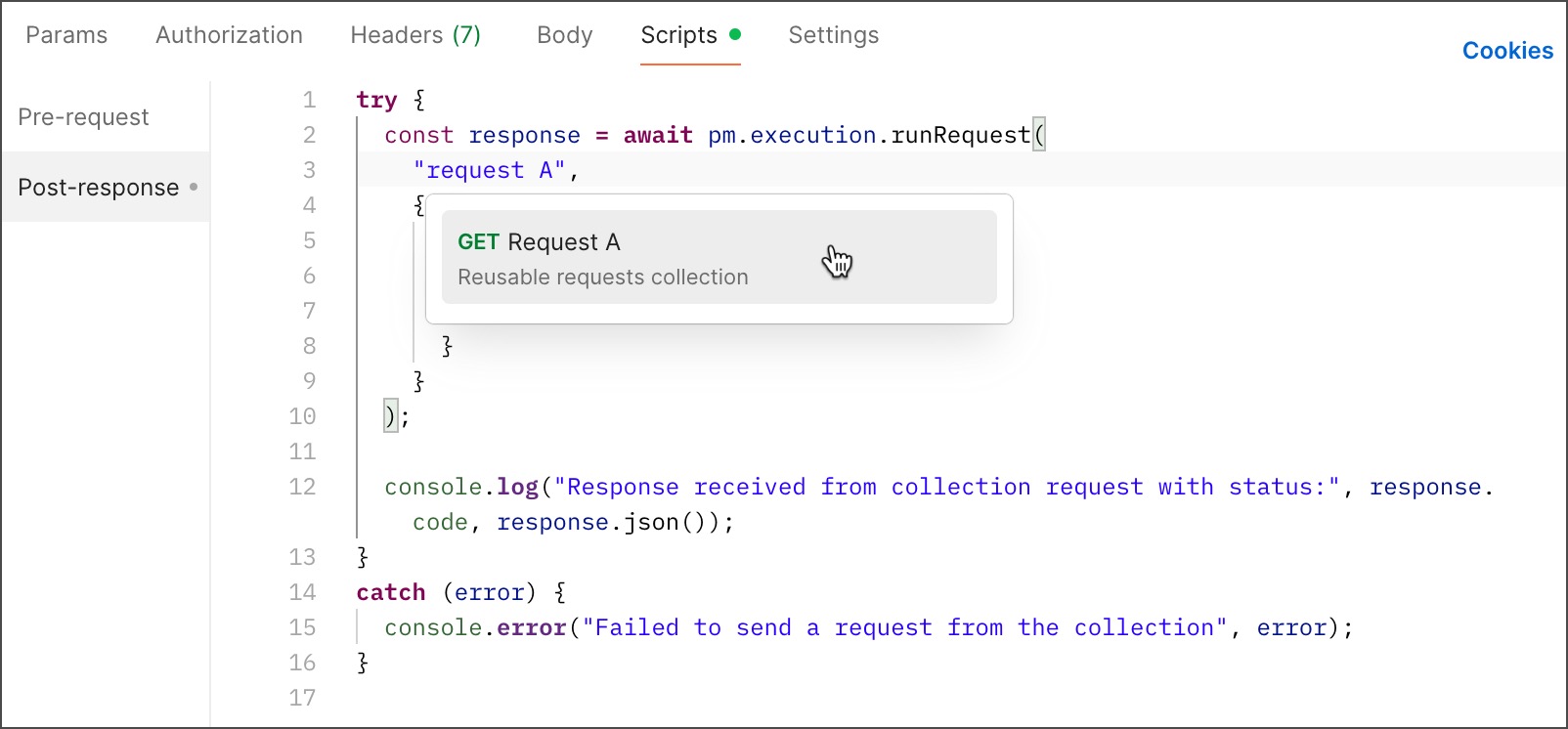
When you send the root request, the referenced request runs as it's configured in its collection. This includes defined parameters, headers, variables, test scripts, and more. As an example, if the referenced request has [test assertions](/docs/tests-and-scripts/write-scripts/postman-sandbox-reference/pm-test-expect#pmtest) in its scripts, the test results display in the root request where you called the method. As another example, if the referenced request references variables defined in one of its parent elements, these variable values are used when you send the root request.
The method runs asynchronously in your scripts and returns a Promise object that represents the completion or failure of the method. Add the `await` operator before the method to wait for the Promise and its resulting value. The method may run in your script without the `await` operator, but it may not behave as expected.
### Examples
Use the syntax shown in the following example:
```js
try {
const response = await pm.execution.runRequest(
"12345678-12345ab-1234-1ab2-1ab2-ab1234112a12",
{
variables: {
base_url: "https://example.com",
vip: "123"
}
}
);
console.log("Response received from collection request with status:", response.code, response.json());
}
catch (error) {
console.error("Failed to send a request from the collection", error);
}
```
## pm.execution.skipRequest
The `pm.execution.skipRequest` method enables you to stop the run of a request from a [pre-request script](/docs/tests-and-scripts/write-scripts/pre-request-scripts/).
```js
pm.execution.skipRequest()
```
You can use the `pm.execution.skipRequest` method in the **Pre-request** tab of a request, collection, or folder. When `pm.execution.skipRequest()` is encountered, the request isn't sent. Any remaining scripts in the **Pre-request** tab are skipped, and no tests are run.
In the [Collection Runner](/docs/collections/running-collections/running-collections-overview/), when `pm.execution.skipRequest()` is encountered, Postman skips running the current request (including its post-response scripts) and moves to the next request in order. The run results will show no response and no tests found for the request. This same behavior also applies to [Postman Flows](/docs/postman-flows/overview/), [Newman](/docs/collections/using-newman-cli/command-line-integration-with-newman/), and [the Postman CLI](/docs/postman-cli/postman-cli-overview/).
Using the `pm.execution.skipRequest` method isn't supported in the **Post-response** tab of a request, collection, or folder and will have no effect there. You will also get a `TypeError: pm.execution.skipRequest isn't a function` Console error.
### Examples
Skip a request if an authentication token isn't present:
```js
if (!pm.environment.get('token')) {
pm.execution.skipRequest()
}
```
## pm.execution.setNextRequest
You can use the `pm.execution.setNextRequest` method for building request workflows when you use the [Collection Runner](/docs/collections/running-collections/building-workflows/) or [Newman](/docs/collections/using-newman-cli/command-line-integration-with-newman/).
`setNextRequest` has no effect when you run requests using **Send**. It only has an effect when you run a collection.
When you run a collection with the Collection Runner or Newman, Postman runs your requests in a default order or an order you specify when you set up the run. However, you can override this run order using `pm.execution.setNextRequest` to specify which request to run next.
### Examples
Run the specified request after this one (where `requestName` is the name of the collection's request, for example "Get customers"):
```bash
pm.execution.setNextRequest(requestName:String):Function
```
Run the specified request after this one (where `requestId` is the request ID returned by `pm.info.requestId`):
```js
//script in another request calls:
//pm.environment.set('next', pm.info.requestId)
pm.execution.setNextRequest(pm.environment.get('next'));
```
## pm.execution.location
The `pm.execution.location` property enables you to get a request's complete path, including its parent folder and collection, in array format.
You can use the `pm.execution.location` and `pm.execution.location.current` properties in your scripts to understand which items run when a request is sent. This information enables you to implement logic and actions in your scripts tailored to the current location within your API testing or collection structure.
### Examples
For a request named **R1** in folder **F1** in the **C1** collection, the following post-response script code returns the `["C1", "F1", "R1"]` array:
```js
console.log(pm.execution.location);
```
To get the name of the current element, use the `pm.execution.location.current` property. For example, if you add the following code to the pre-request script of a folder named **F1**, it returns `F1`:
```js
console.log(pm.execution.location.current);
```
**Copy request ID**.
* As the second argument, the method accepts an options object that overrides variables referenced in the request. Learn about the order the method follows to [resolve variables](#variable-resolution).

When you send the root request, the referenced request runs as it's configured in its collection. This includes defined parameters, headers, variables, test scripts, and more. As an example, if the referenced request has [test assertions](/docs/tests-and-scripts/write-scripts/postman-sandbox-reference/pm-test-expect#pmtest) in its scripts, the test results display in the root request where you called the method. As another example, if the referenced request references variables defined in one of its parent elements, these variable values are used when you send the root request.
The method runs asynchronously in your scripts and returns a Promise object that represents the completion or failure of the method. Add the `await` operator before the method to wait for the Promise and its resulting value. The method may run in your script without the `await` operator, but it may not behave as expected.
### Examples
Use the syntax shown in the following example:
```js
try {
const response = await pm.execution.runRequest(
"12345678-12345ab-1234-1ab2-1ab2-ab1234112a12",
{
variables: {
base_url: "https://example.com",
vip: "123"
}
}
);
console.log("Response received from collection request with status:", response.code, response.json());
}
catch (error) {
console.error("Failed to send a request from the collection", error);
}
```
## pm.execution.skipRequest
The `pm.execution.skipRequest` method enables you to stop the run of a request from a [pre-request script](/docs/tests-and-scripts/write-scripts/pre-request-scripts/).
```js
pm.execution.skipRequest()
```
You can use the `pm.execution.skipRequest` method in the **Pre-request** tab of a request, collection, or folder. When `pm.execution.skipRequest()` is encountered, the request isn't sent. Any remaining scripts in the **Pre-request** tab are skipped, and no tests are run.
In the [Collection Runner](/docs/collections/running-collections/running-collections-overview/), when `pm.execution.skipRequest()` is encountered, Postman skips running the current request (including its post-response scripts) and moves to the next request in order. The run results will show no response and no tests found for the request. This same behavior also applies to [Postman Flows](/docs/postman-flows/overview/), [Newman](/docs/collections/using-newman-cli/command-line-integration-with-newman/), and [the Postman CLI](/docs/postman-cli/postman-cli-overview/).
Using the `pm.execution.skipRequest` method isn't supported in the **Post-response** tab of a request, collection, or folder and will have no effect there. You will also get a `TypeError: pm.execution.skipRequest isn't a function` Console error.
### Examples
Skip a request if an authentication token isn't present:
```js
if (!pm.environment.get('token')) {
pm.execution.skipRequest()
}
```
## pm.execution.setNextRequest
You can use the `pm.execution.setNextRequest` method for building request workflows when you use the [Collection Runner](/docs/collections/running-collections/building-workflows/) or [Newman](/docs/collections/using-newman-cli/command-line-integration-with-newman/).
`setNextRequest` has no effect when you run requests using **Send**. It only has an effect when you run a collection.
When you run a collection with the Collection Runner or Newman, Postman runs your requests in a default order or an order you specify when you set up the run. However, you can override this run order using `pm.execution.setNextRequest` to specify which request to run next.
### Examples
Run the specified request after this one (where `requestName` is the name of the collection's request, for example "Get customers"):
```bash
pm.execution.setNextRequest(requestName:String):Function
```
Run the specified request after this one (where `requestId` is the request ID returned by `pm.info.requestId`):
```js
//script in another request calls:
//pm.environment.set('next', pm.info.requestId)
pm.execution.setNextRequest(pm.environment.get('next'));
```
## pm.execution.location
The `pm.execution.location` property enables you to get a request's complete path, including its parent folder and collection, in array format.
You can use the `pm.execution.location` and `pm.execution.location.current` properties in your scripts to understand which items run when a request is sent. This information enables you to implement logic and actions in your scripts tailored to the current location within your API testing or collection structure.
### Examples
For a request named **R1** in folder **F1** in the **C1** collection, the following post-response script code returns the `["C1", "F1", "R1"]` array:
```js
console.log(pm.execution.location);
```
To get the name of the current element, use the `pm.execution.location.current` property. For example, if you add the following code to the pre-request script of a folder named **F1**, it returns `F1`:
```js
console.log(pm.execution.location.current);
```