> For clean Markdown content of this page, append .md to this URL. For the complete documentation index, see https://learning.postman.com/llms.txt.
# Use Agent Automations
Postman's agent automations let you create persistent cloud agents that run automatically based on triggers you define, including GitHub pull request and branch activity, and deliver their output to a destination you choose, such as Slack or pull request comments. Use automations to run API governance tasks continuously as part of your development workflow: design review, breaking change detection, and recurring audits. View the team's automations and their run history in the **Team** tab.
An automation is made up of the following key parts: a **trigger** (what starts it), **agent instructions** (what the agent does), and a **delivery target** (where the output goes).
You can [start from scratch](#create-an-automation) or [use one of the templates](#start-from-a-template) featured on the **Automations** page.
 ## Create an automation
To create an automation from scratch, do the following:
1. From
## Create an automation
To create an automation from scratch, do the following:
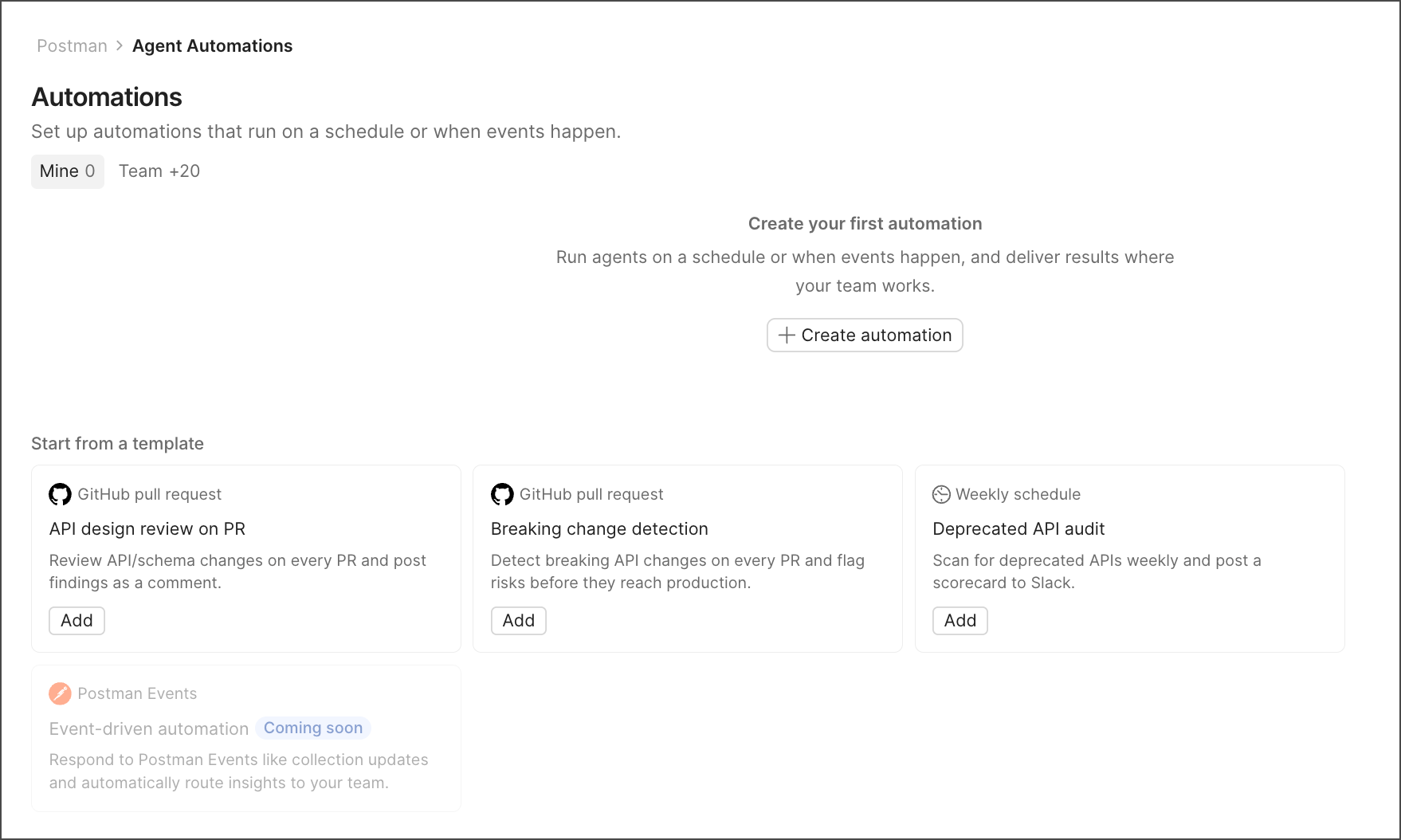
1. From  **Home**, go to **Agent Automations** and select **Create automation**.
2. Give the automation a name.
3. Choose a **Trigger**. (See [Triggers](#triggers).) Each automation supports one trigger.
4. Write **Agent instructions** describing what the agent should do. You can reference specific APIs, workspaces, and collections in your instructions.
5. Choose **Delivery targets** for the output. (See [Delivery targets](#delivery-targets).)
**Home**, go to **Agent Automations** and select **Create automation**.
2. Give the automation a name.
3. Choose a **Trigger**. (See [Triggers](#triggers).) Each automation supports one trigger.
4. Write **Agent instructions** describing what the agent should do. You can reference specific APIs, workspaces, and collections in your instructions.
5. Choose **Delivery targets** for the output. (See [Delivery targets](#delivery-targets).)
 ## Start from a template
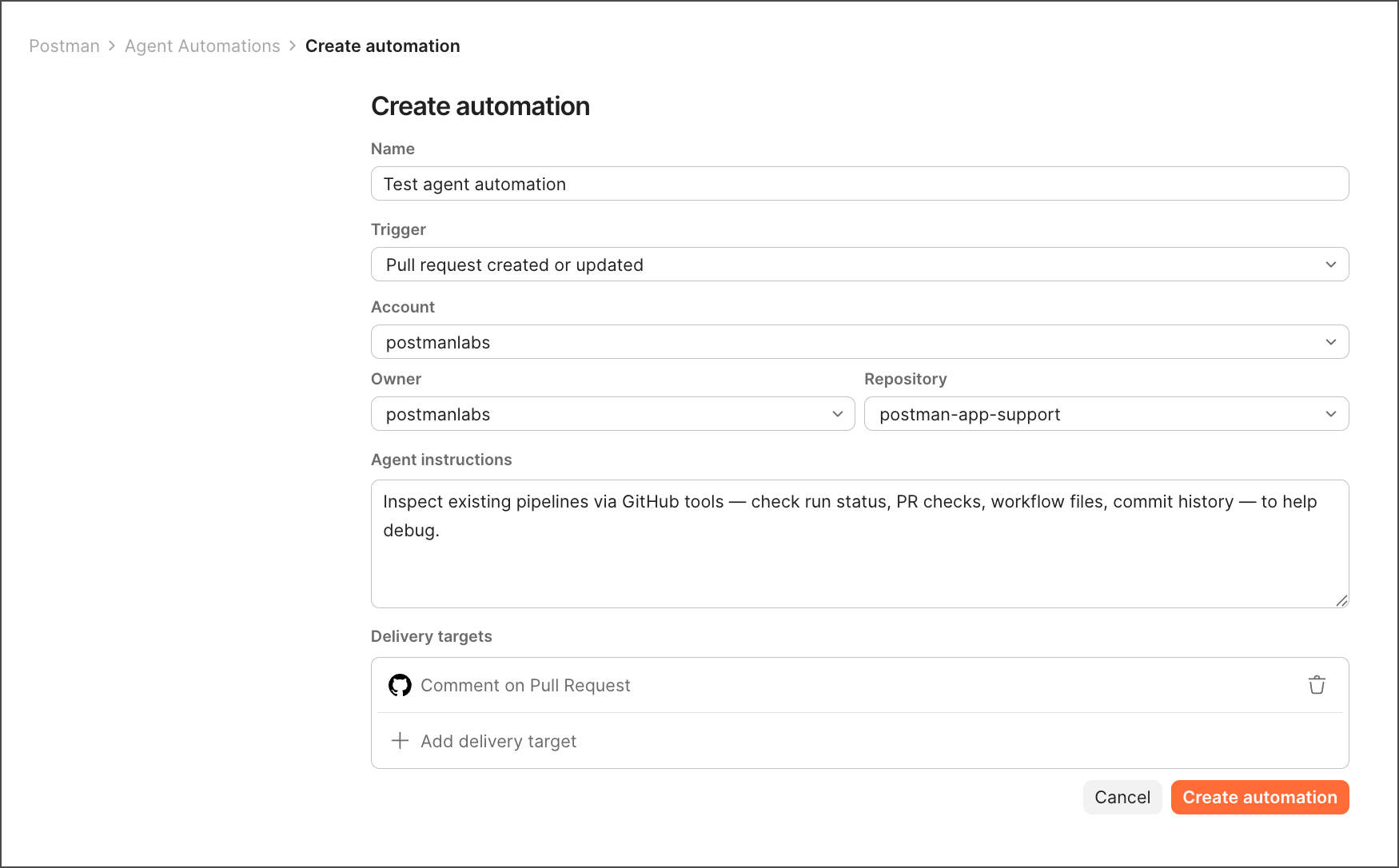
Rather than building an automation from scratch, you can start from one of the templates featured on the **Automations** page. Each template comes pre-filled with a trigger, name, and prompt for a common use case, such as a deprecated API audit or a design review workflow. Select a template tile to open the create flow with those fields already populated, then adjust as needed.
## Triggers
An automation runs when its trigger condition is met. Available trigger types:
| Trigger | Description |
| -------------------------------------------- | --------------------------------------------------------------------------------------------------------------------------------------------------------------- |
| (Schedule) **Every hour** | Runs on a recurring hourly basis. One-hour granularity is the minimum interval. |
| (Schedule) **Every day** | Runs once a day at a time and timezone you select. |
| (Schedule) **Every month** | Runs once a month on a day, time, and timezone you select. |
| (GitHub) **Pull request opened** | Runs when a new pull request is opened in a connected repository. Requires selecting the account, owner, and repository. |
| (GitHub) **Pull request pushed** | Runs when a new commit is pushed to an existing pull request in a connected repository. Requires selecting the account, owner, and repository. |
| (GitHub) **Pull request created or updated** | Runs when a new pull request is opened or an existing pull request is updated in a connected repository. Requires selecting the account, owner, and repository. |
| (GitHub) **Pull request merged** | Runs when a pull request is merged. Requires selecting the account, owner, and repository. |
| (GitHub) **New push to branch** | Runs when code is pushed to a branch in a connected repository. Requires selecting the account, owner, and repository, branch. |
## Delivery targets
After an automation runs, its output can be delivered to one or both of the following:
* **Comment on a pull request** — The agent posts its output directly as a comment on the triggering pull request, so reviewers see it immediately.
* **Send to Slack** — The output is delivered to a Slack channel once the run completes (not streamed mid-run). You must authorize Slack before you can select a channel.
## Manage automations
Click the **Team** tab to see every automation your team created, showing the name, status, trigger, time of last successful run, and creator.
## Start from a template
Rather than building an automation from scratch, you can start from one of the templates featured on the **Automations** page. Each template comes pre-filled with a trigger, name, and prompt for a common use case, such as a deprecated API audit or a design review workflow. Select a template tile to open the create flow with those fields already populated, then adjust as needed.
## Triggers
An automation runs when its trigger condition is met. Available trigger types:
| Trigger | Description |
| -------------------------------------------- | --------------------------------------------------------------------------------------------------------------------------------------------------------------- |
| (Schedule) **Every hour** | Runs on a recurring hourly basis. One-hour granularity is the minimum interval. |
| (Schedule) **Every day** | Runs once a day at a time and timezone you select. |
| (Schedule) **Every month** | Runs once a month on a day, time, and timezone you select. |
| (GitHub) **Pull request opened** | Runs when a new pull request is opened in a connected repository. Requires selecting the account, owner, and repository. |
| (GitHub) **Pull request pushed** | Runs when a new commit is pushed to an existing pull request in a connected repository. Requires selecting the account, owner, and repository. |
| (GitHub) **Pull request created or updated** | Runs when a new pull request is opened or an existing pull request is updated in a connected repository. Requires selecting the account, owner, and repository. |
| (GitHub) **Pull request merged** | Runs when a pull request is merged. Requires selecting the account, owner, and repository. |
| (GitHub) **New push to branch** | Runs when code is pushed to a branch in a connected repository. Requires selecting the account, owner, and repository, branch. |
## Delivery targets
After an automation runs, its output can be delivered to one or both of the following:
* **Comment on a pull request** — The agent posts its output directly as a comment on the triggering pull request, so reviewers see it immediately.
* **Send to Slack** — The output is delivered to a Slack channel once the run completes (not streamed mid-run). You must authorize Slack before you can select a channel.
## Manage automations
Click the **Team** tab to see every automation your team created, showing the name, status, trigger, time of last successful run, and creator.
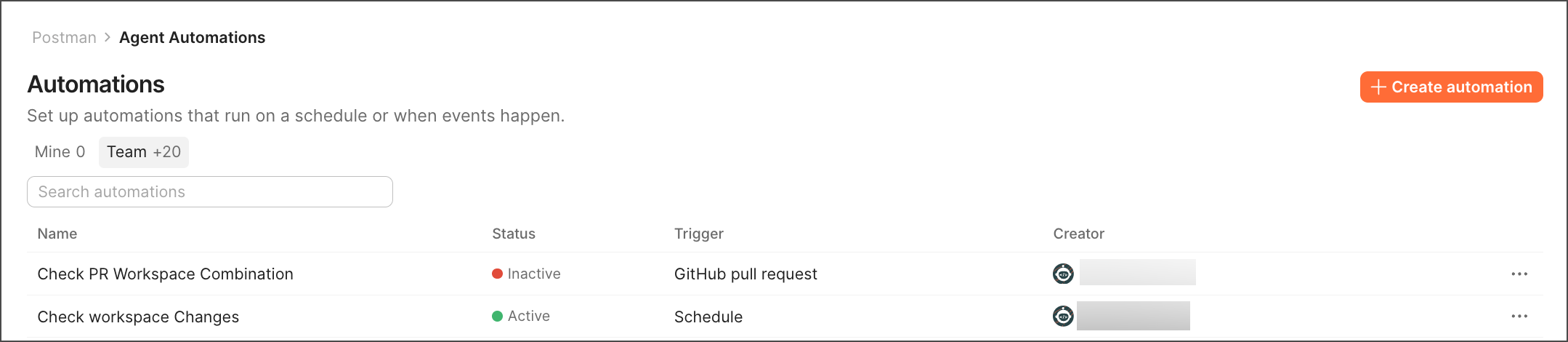 From this list, you can click an automation to view the run history and check the settings.
Each automation's run history shows the trigger, start time, status, and duration of each run.
You can copy the run and task ID to reference them in support requests. You can also click **Refresh** to see the latest run history.
From this list, you can click an automation to view the run history and check the settings.
Each automation's run history shows the trigger, start time, status, and duration of each run.
You can copy the run and task ID to reference them in support requests. You can also click **Refresh** to see the latest run history.