> For clean Markdown content of this page, append .md to this URL. For the complete documentation index, see https://learning.postman.com/llms.txt.
# Share variable values
You can share global, environment, and collection variables, syncing the values with the Postman cloud. By default, variables have a local value that only you can access in your instance of Postman. When you [share a variable value](#create-a-shared-value), you create a separate, shared value your teammates can access. You can also [update a shared value](#update-a-shared-value) and [stop sharing a value](#stop-sharing-a-shared-value).
Shared values are also used with Postman features that run on the Postman cloud, like scheduled collection runs, monitors, the Postman CLI, and Newman.
Once the value is shared, you and your teammates can continue to [work with your own local values](#work-with-shared-values) during development and testing, without affecting the shared value. You can reset your local value back to the shared value, if you'd like.
For more information on working with variables as a team, see [Work with environments as a team in Postman](/docs/use/send-requests/variables/team-environments/).
You can also learn how to [share variable values from the VS Code extension](/docs/reference/vs-code-extension/send-requests/#store-variables).
### Create a shared value
You can create a shared value for a variable with Editor access to the element.
Be aware that the shared values of all variables are [published with your documentation](/docs/publishing-your-api/publishing-your-docs/). Make sure your shared values don't contain sensitive information such as passwords or tokens.
To share a variable with your teammates, do the following:
1. Create a [global](/docs/use/send-requests/variables/define-variables/#defining-global-variables), [environment](/docs/use/send-requests/variables/define-variables/#defining-environment-variables), or [collection](/docs/use/send-requests/variables/define-variables/#defining-collection-variables) variable.
2. Click  **Share** next to the variable's value you'd like to share.
If you've selected the
**Share** next to the variable's value you'd like to share.
If you've selected the  **More > Shared Value** view option, enter a value. The shared values automatically update.
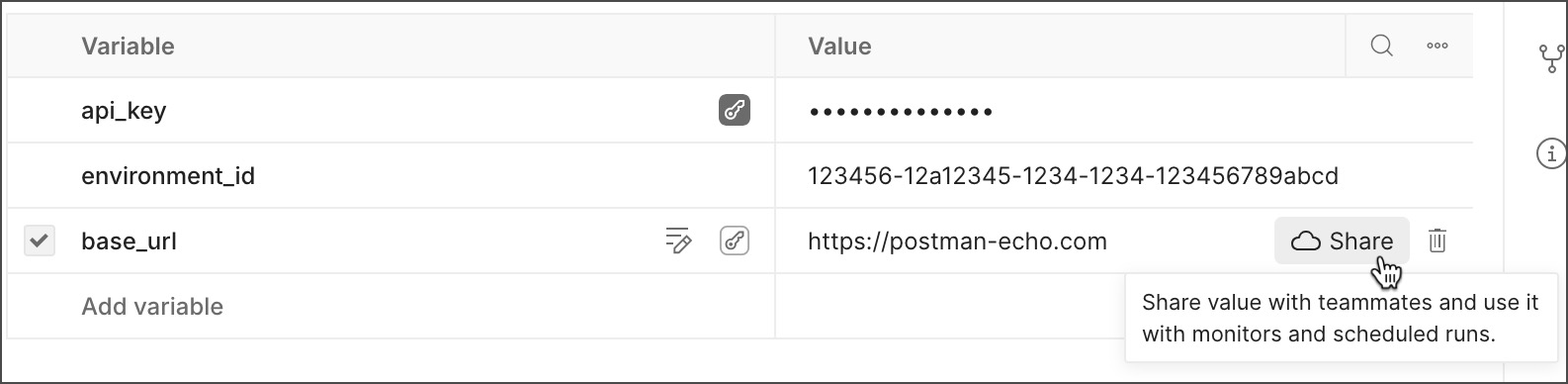
To share all values, click **More** and select **Share all**.
If you share a value that's [set as sensitive data](/docs/use/send-requests/variables/define-variables/#set-a-value-as-sensitive-data), Postman warns you that you're trying to share sensitive data. You can click **Share Value** to sync the value with the Postman cloud.
### Update a shared value
You can update a shared value for a variable with Editor access to the element. The shared value is updated based on your local value, sharing it with your teammates.
To update a shared value, do the following:
1. Open a [global](/docs/use/send-requests/variables/define-variables/#defining-global-variables), [environment](/docs/use/send-requests/variables/define-variables/#defining-environment-variables), or [collection](/docs/use/send-requests/variables/define-variables/#defining-collection-variables) variable.
2. Update your local value to differ from the shared value.
3. Click
**More > Shared Value** view option, enter a value. The shared values automatically update.

To share all values, click **More** and select **Share all**.
If you share a value that's [set as sensitive data](/docs/use/send-requests/variables/define-variables/#set-a-value-as-sensitive-data), Postman warns you that you're trying to share sensitive data. You can click **Share Value** to sync the value with the Postman cloud.
### Update a shared value
You can update a shared value for a variable with Editor access to the element. The shared value is updated based on your local value, sharing it with your teammates.
To update a shared value, do the following:
1. Open a [global](/docs/use/send-requests/variables/define-variables/#defining-global-variables), [environment](/docs/use/send-requests/variables/define-variables/#defining-environment-variables), or [collection](/docs/use/send-requests/variables/define-variables/#defining-collection-variables) variable.
2. Update your local value to differ from the shared value.
3. Click  next to a variable's value, then select **Update shared value**.
If you've selected the **More > Shared Value** view option, update that value. The shared values automatically update.
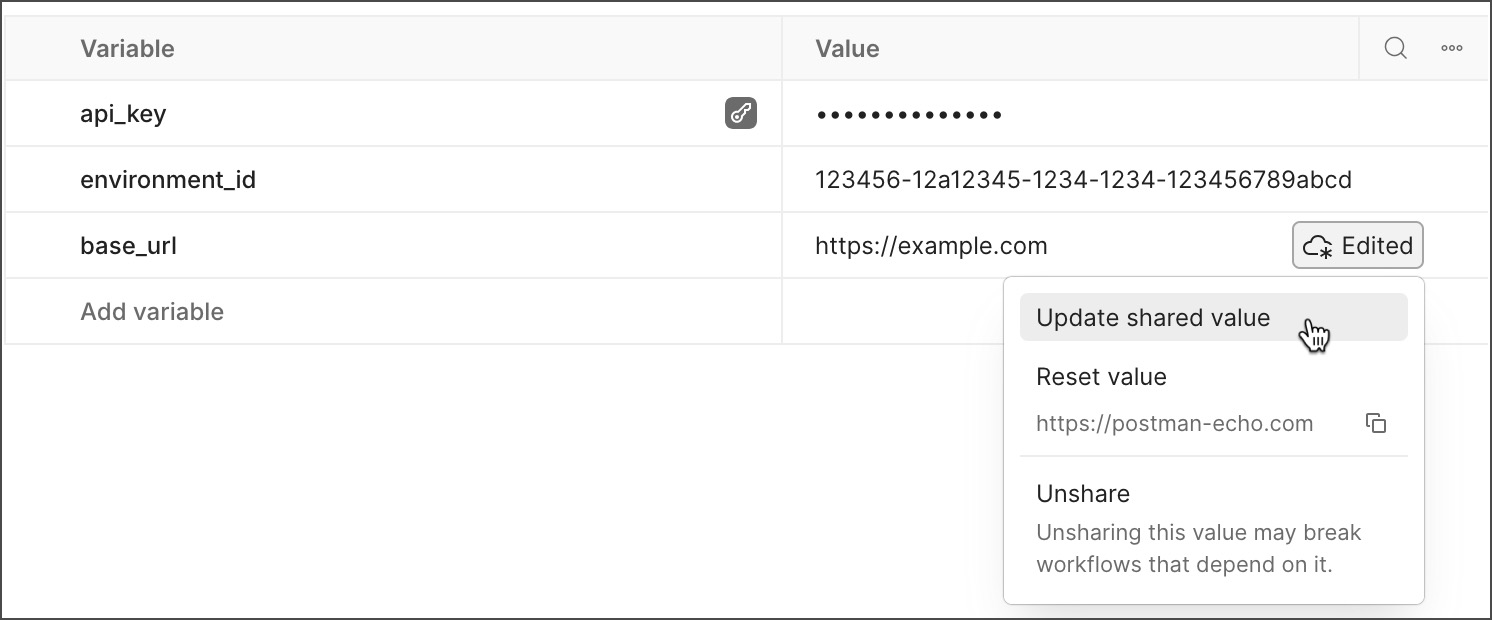
To update all shared values, click **More** and select **Update all shared values**.
To copy a shared value to your clipboard, click next to a variable's value, then select
next to a variable's value, then select **Update shared value**.
If you've selected the **More > Shared Value** view option, update that value. The shared values automatically update.

To update all shared values, click **More** and select **Update all shared values**.
To copy a shared value to your clipboard, click next to a variable's value, then select  . Or, copy it if you've selected the **More > Shared Value** view option.
You can also update a shared value from a [variable reference](/docs/use/send-requests/variables/use-variables/) or the [variables pane](/docs/use/send-requests/variables/view-variables/) in a Postman element. Hover over the variable, update the local value, click and select **Update shared value**.
### Stop sharing a shared value
You can also stop sharing a shared value, removing it from the Postman cloud.
When you stop sharing a value, you may break API workflows that rely on it.
To stop sharing a variable with your teammates, do the following:
1. Open a [global](/docs/use/send-requests/variables/define-variables/#defining-global-variables), [environment](/docs/use/send-requests/variables/define-variables/#defining-environment-variables), or [collection](/docs/use/send-requests/variables/define-variables/#defining-collection-variables) variable.
2. Choose one of the following:
* If your local value and the shared value are the same, click
. Or, copy it if you've selected the **More > Shared Value** view option.
You can also update a shared value from a [variable reference](/docs/use/send-requests/variables/use-variables/) or the [variables pane](/docs/use/send-requests/variables/view-variables/) in a Postman element. Hover over the variable, update the local value, click and select **Update shared value**.
### Stop sharing a shared value
You can also stop sharing a shared value, removing it from the Postman cloud.
When you stop sharing a value, you may break API workflows that rely on it.
To stop sharing a variable with your teammates, do the following:
1. Open a [global](/docs/use/send-requests/variables/define-variables/#defining-global-variables), [environment](/docs/use/send-requests/variables/define-variables/#defining-environment-variables), or [collection](/docs/use/send-requests/variables/define-variables/#defining-collection-variables) variable.
2. Choose one of the following:
* If your local value and the shared value are the same, click  next to the variable's value, then click **Unshare** to confirm.
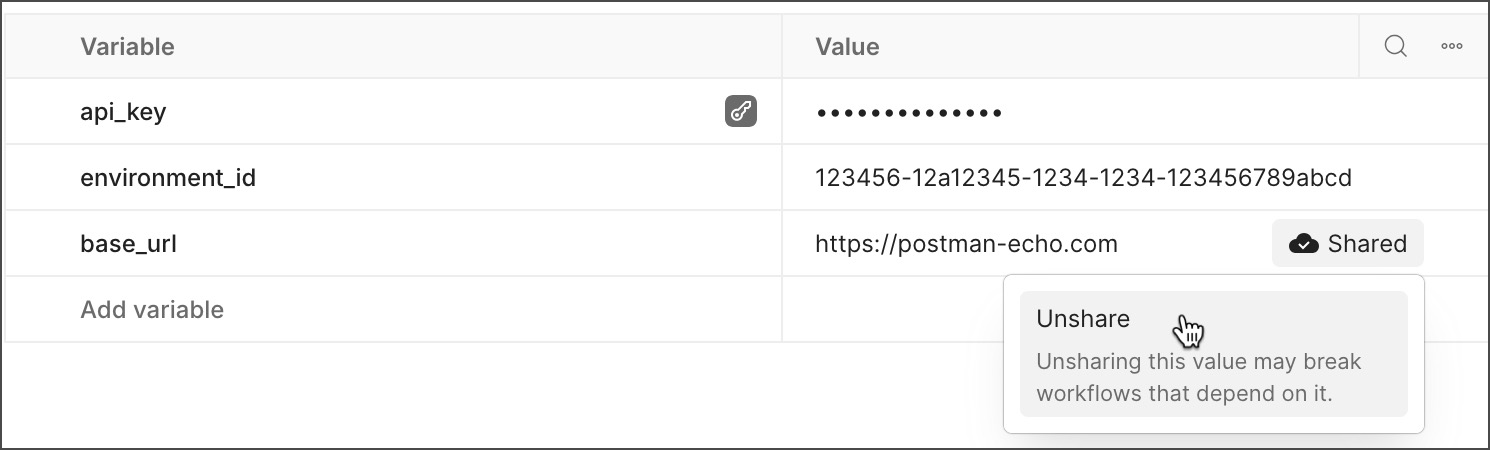
* If your local value and the shared value are different, click next to the variable's value, then select **Unshare**.
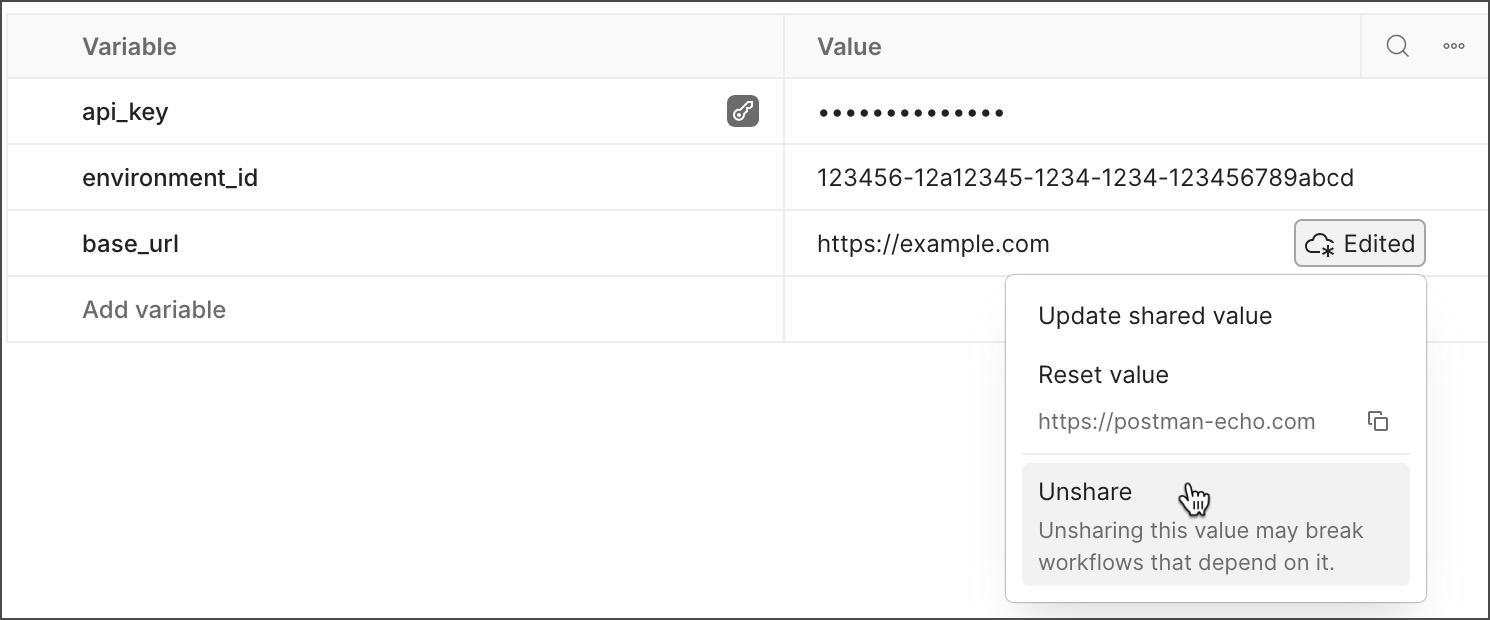
* If you've selected the **More > Shared Value** view option, remove the value.
To stop sharing all values, click **More** and select **Unshare all**.
### Work with shared values
Once the variable has a [shared value](#create-a-shared-value), you can continue to update the local value, without affecting the shared value. Local values enable you to develop and test using private credentials or experimental values, without risk of exposing sensitive data to others on your team.
To reset your variable's value, do the following:
1. Open a [global](/docs/use/send-requests/variables/define-variables/#defining-global-variables), [environment](/docs/use/send-requests/variables/define-variables/#defining-environment-variables), or [collection](/docs/use/send-requests/variables/define-variables/#defining-collection-variables) variable.
2. Update your local value to differ from the shared value.
3. Click next to a variable's value, then select **Reset value**. Your local value is updated to match the shared value.
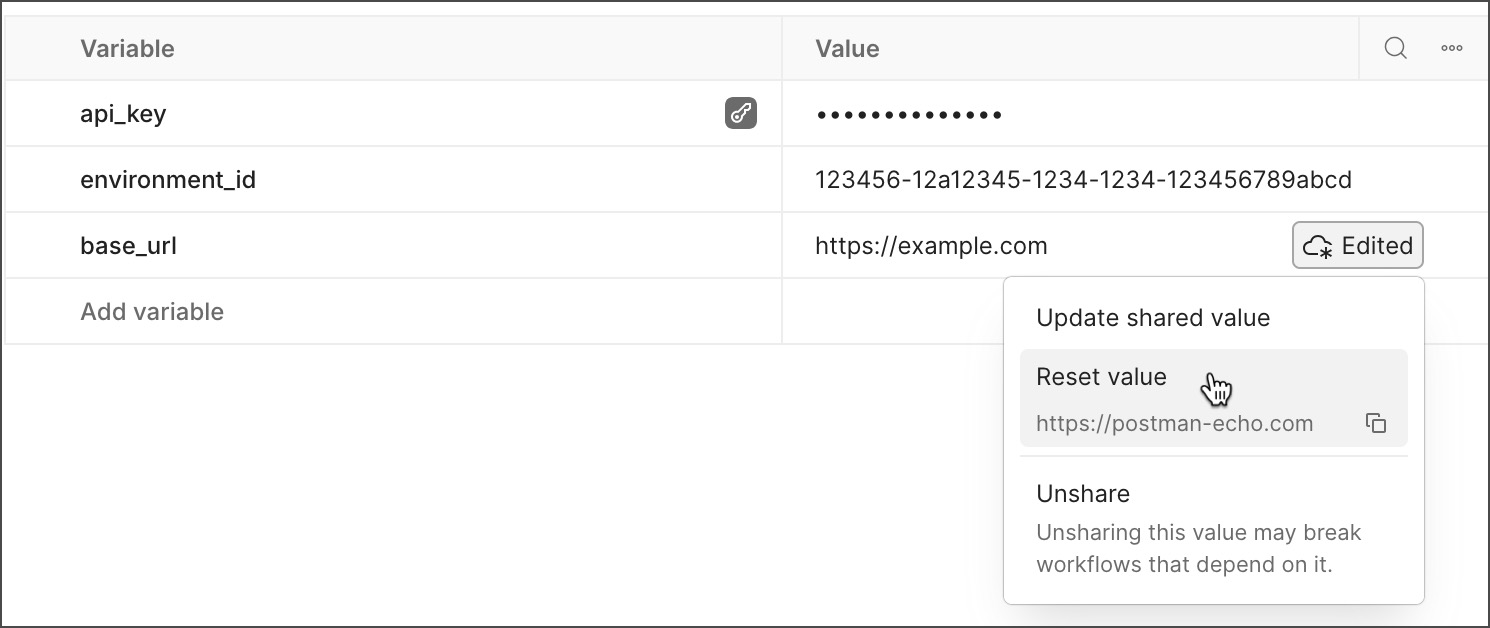
To reset all shared values, click **More** and select **Reset all shared values**.
next to the variable's value, then click **Unshare** to confirm.

* If your local value and the shared value are different, click next to the variable's value, then select **Unshare**.

* If you've selected the **More > Shared Value** view option, remove the value.
To stop sharing all values, click **More** and select **Unshare all**.
### Work with shared values
Once the variable has a [shared value](#create-a-shared-value), you can continue to update the local value, without affecting the shared value. Local values enable you to develop and test using private credentials or experimental values, without risk of exposing sensitive data to others on your team.
To reset your variable's value, do the following:
1. Open a [global](/docs/use/send-requests/variables/define-variables/#defining-global-variables), [environment](/docs/use/send-requests/variables/define-variables/#defining-environment-variables), or [collection](/docs/use/send-requests/variables/define-variables/#defining-collection-variables) variable.
2. Update your local value to differ from the shared value.
3. Click next to a variable's value, then select **Reset value**. Your local value is updated to match the shared value.

To reset all shared values, click **More** and select **Reset all shared values**.