For AI agents: a documentation index is available at the root level at /llms.txt and /llms-full.txt. Append /llms.txt to any URL for a page-level index, or .md for the markdown version of any page.
Postman
PricingEnterprise
Contact SalesSign InSign Up for Free
HomeDocs
HomeDocs
      • Overview
        • Overview
        • Get started with Postman AI
        • Run tasks with AI Skills
        • Agent Mode settings
        • Troubleshoot Agent Mode
Postman API Platform

Product

  • Postman Overview
  • Enterprise
  • Spec Hub
  • Flows
  • Agent Mode
  • API Catalog
  • Fern
  • Postman CLI
  • Integrations
  • Workspaces
  • Plans and pricing

API Network

  • App Security
  • Artificial Intelligence
  • Communication
  • Data Analytics
  • Database
  • Developer Productivity
  • DevOps
  • Ecommerce
  • eSignature
  • Financial Services
  • Payments
  • Travel

Resources

  • Postman Docs
  • Academy
  • Community
  • Templates
  • Intergalactic
  • Videos
  • MCP Servers

Legal and Security

  • Legal Terms Hub
  • Terms of Service
  • Postman Product Terms
  • Security
  • Website Terms of Use

Company

  • About
  • Careers and culture
  • Contact us
  • Partner program
  • Customer stories
  • Student programs
  • Press and media
Twitter iconLinkedIn iconGithub iconYouTube iconInstagram iconDiscord icon
Download Postman
Privacy Policy

© 2026 Postman, Inc.

Postman AIPostman Agent Mode

Troubleshoot Agent Mode

||View as Markdown|
Was this page helpful?
Previous

Agent Mode settings

Next

Create AI requests and add them to your collections

Built with

If you get stuck, click Add icon in the upper right corner to start a new chat. You can also view and continue any previous conversation by clicking History icon.

Your feedback and insights are valuable to Postman. Your input directly shapes the evolution of Agent Mode.

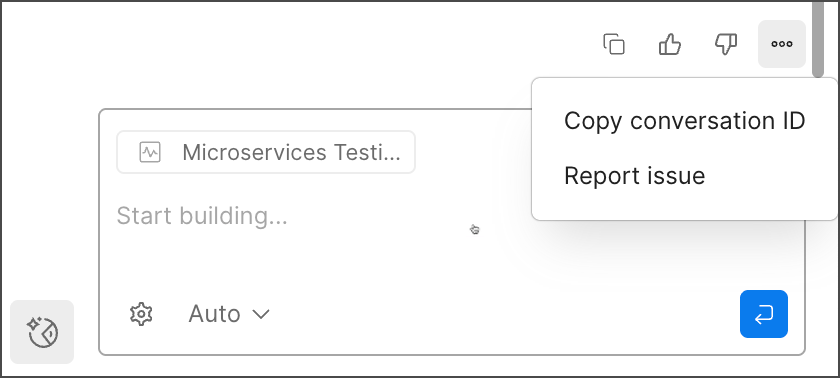
To report an issue, under results select Options icon and Report issue.

Agent Mode feedback

You can also use Thumbs up icon thumbs up or Thumbs down icon thumbs down to provide feedback. Thumbs down opens a dialog for you to describe and submit your issue with Agent Mode.