Set up a runner to use a proxy server
This feature is available on Postman Enterprise plans. For more information, see the pricing page.
You can configure a runner to route HTTP and HTTPS traffic generated during monitor runs through a proxy server that enforces outbound request policies. When you start a runner with the Postman CLI, you can specify an external proxy server URL your organization already uses. Instead, you can use Postman’s built-in proxy server with a runner authorization service you’ve configured to decide which requests from the runner are allowed or blocked. If required by your external proxy server or runner authorization service, you can add custom CA certificates.
Learn more about the postman runner start command and its supported options.
External proxy server
You can use your organization’s existing external proxy server to route and inspect outbound traffic generated by monitor runs. This is useful if your organization already operates a proxy for enforcing outbound network policies, such as allowlisting destinations.
To use an external proxy server, start the runner with the Postman CLI and use the --proxy option to specify the external proxy server URL.
Instead of specifying the --proxy option, you can define the proxy server URL using the HTTP_PROXY and HTTPS_PROXY environment variables.
Built-in proxy server
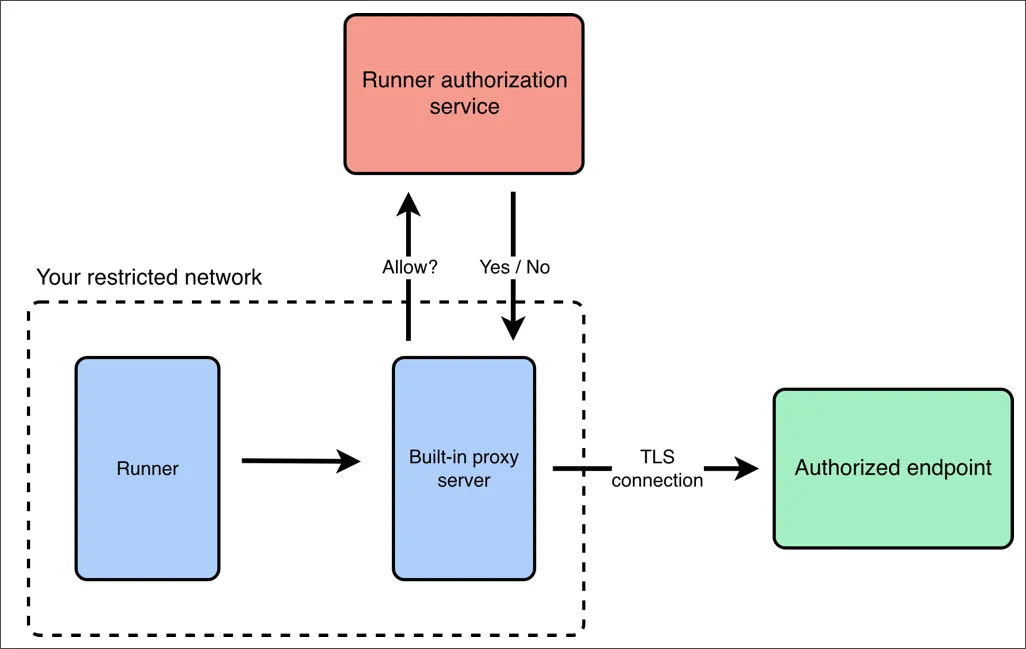
You can use the built-in proxy server to route and inspect outbound traffic generated by monitor runs using rules defined in your runner authorization service. This is useful when you need to enforce outbound access controls, such as restricting allowed domains or methods, without deploying or managing your own proxy server.
To use the built-in proxy server, first set up a runner authorization service with rules that determine which outbound requests are allowed or blocked. Once the authorization service is deployed and running, start the runner with the Postman CLI. Use the --egress-proxy option to enable the built-in proxy server, and the --egress-proxy-authz-url option to specify the URL of your runner authorization service. For more details, see Start a runner with the built-in proxy server.
Instead of specifying the --egress-proxy-authz-url option, you can define the runner authorization service URL using the POSTMAN_RUNNER_AUTHZ_URL environment variable.
When the built-in proxy is enabled, the following happens:
- The runner routes all outbound HTTP and HTTPS traffic through the built-in proxy.
- For each outbound request, the proxy references a runner authorization service that determines if the request is allowed or blocked.
- The proxy only forwards approved requests to their final destination.
- All traffic remains end-to-end encrypted, including HTTPS traffic. The proxy inspects outbound traffic and enforces policies defined by your runner authorization service.
Custom CA certificates
You can specify custom CA certificates if your external proxy server or runner authorization service require them. Use the --ssl-extra-ca-certs option to specify a path to the file in PEM format. Note that the PEM file can have multiple certificates.