Introduction to Flows Query Language
You can use Flows Query Language (FQL) to parse and transform JSON data to get the fields and structure you want.
FQL compared to TypeScript
The logic blocks in Postman Flows (If, Condition, and Evaluate) support both FQL and TypeScript. While FQL is designed for querying and transforming data, TypeScript offers the robustness and flexibility of a full programming language within your Postman Flows. This makes TypeScript more suitable for complex logic and large-scale projects. Also, if you are familiar with both the JavaScript and TypeScript ecosystems, you may prefer using TypeScript over FQL.
Extract fields from data with FQL
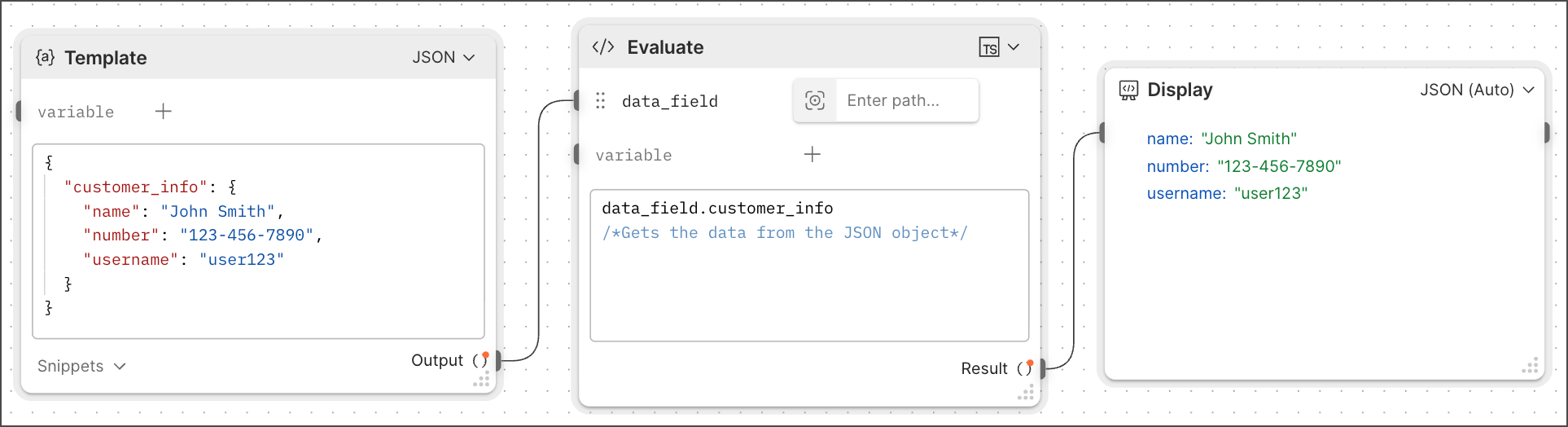
You can use FQL to extract specific fields from data passed between blocks. In this example, the Template block holds a customer_info JSON object. The variable data_field receives the formatted data and passes it into the Evaluate block where it can be queried with FQL. FQL in the Evaluate block prints out the values of customer_info. This example also includes a comment that uses the FQL /*comment*/ syntax.
Things you can do with FQL
The following pages show examples of things you can do with FQL:
Using Agent Mode with FQL
Not sure how to write an FQL statement for your flow? Use Agent Mode! Tell Agent Mode what you want to do using plain language, and it will generate a FQL statement for you.
In the Evaluate block, drag the Agent Mode icon  to the block’s text box or anywhere on the canvas to open Agent Mode. Enter your query as plain text in the Agent Mode text box and press the Return or Enter key. Agent Mode will suggest a query for you based on your prompt.
To learn more about how you can use Postman’s AI to help you use Flows, visit Agent Mode.
FQL reference
For a complete reference for all FQL functions, see the FQL function reference.