Blocks reference
A block is a fundamental unit of a flow. Each block stores information or performs a task. You can configure a block to fit your specific use case. Blocks may have input ports, output ports, or both. You can use these ports to connect your blocks and route information or trigger a flow that’s running in the Postman Cloud.
The blocks reference section contains a topic for each block describing its inputs, outputs, setup, and usage options. These topics also include links to example flows and related blocks.
The following types of blocks are available in Postman Flows:
- Actions - Used to perform actions like sending an HTTP request or referencing another flow.
- Trigger - Start the run of a flow or send data back to a request made to a deployed flow’s URL.
- AI - Use natural language to generate text and images, and send AI requests.
- Logic - Route data in a flow using conditions, evaluations, or branching logic.
- Looping - Repeat a set of blocks based on a count or list.
- Visualize - Display data as graphs, tables, or raw output.
- Data - Create and manipulate data types like strings, numbers, lists, and objects.
Block context menu
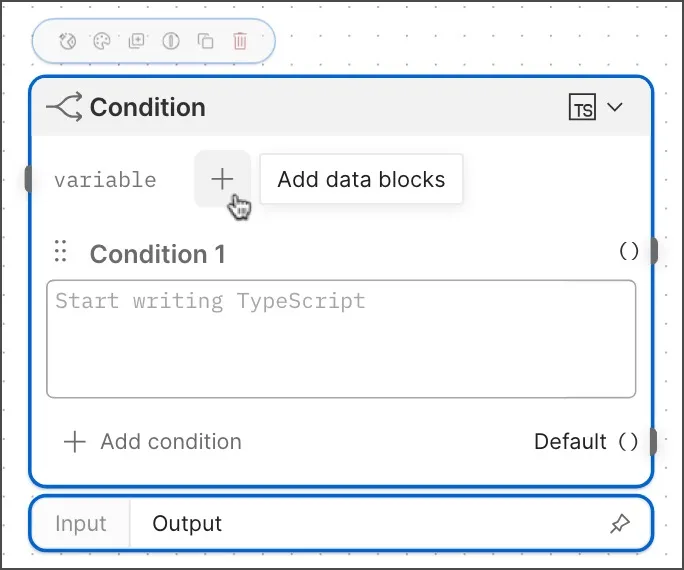
Hover over a block to open its context menu. The menu contains the following actions:
-
Open Agent Mode - Open the Agent Mode chat panel.
-
Change Color - Change the block’s color.
-
Duplicate - Create a copy of the block on the canvas, next to the original.
-
Pause on this block - Skip the block when you run the flow. When a block is paused, its title bar displays a yellow diagonal-striped pattern. To resume the block, hover over it and click the pause icon again.
-
Copy - Copy the block to your clipboard so you can paste it into the current flow, another flow, or another workspace.
-
Delete - Remove the block from the flow.
Insert data blocks into other blocks
Some blocks support inserting data blocks to access the data blocks’ values. For example, you can insert a String block into a List block to include the String block’s value as an item in the List block’s array.
To insert a block, click  Add data blocks and select a block from the dropdown list.