For AI agents: a documentation index is available at the root level at /llms.txt and /llms-full.txt. Append /llms.txt to any URL for a page-level index, or .md for the markdown version of any page.
Postman
PricingEnterprise
Contact SalesSign InSign Up for Free
HomeDocs
HomeDocs
      • Overview
      • Schemas
        • Overview
        • Create collections
        • Add requests to collections
        • Manage and organize collections
        • Collaborate with collections
        • View collection activity and elements
Postman API Platform

Product

  • Postman Overview
  • Enterprise
  • Spec Hub
  • Flows
  • Agent Mode
  • API Catalog
  • Fern
  • Postman CLI
  • Integrations
  • Workspaces
  • Plans and pricing

API Network

  • App Security
  • Artificial Intelligence
  • Communication
  • Data Analytics
  • Database
  • Developer Productivity
  • DevOps
  • Ecommerce
  • eSignature
  • Financial Services
  • Payments
  • Travel

Resources

  • Postman Docs
  • Academy
  • Community
  • Templates
  • Intergalactic
  • Videos
  • MCP Servers

Legal and Security

  • Legal Terms Hub
  • Terms of Service
  • Postman Product Terms
  • Security
  • Website Terms of Use

Company

  • About
  • Careers and culture
  • Contact us
  • Partner program
  • Customer stories
  • Student programs
  • Press and media
Twitter iconLinkedIn iconGithub iconYouTube iconInstagram iconDiscord icon
Download Postman
Privacy Policy

© 2026 Postman, Inc.

Postman CollectionsCreate and manage collections

View collection activity and elements with the Overview tab

||View as Markdown|
Was this page helpful?
Previous

Share and collaborate on Postman Collections

Next

Test your API functionality

Built with

A collection’s Overview tab provides a summary of the collection’s purpose, recent activity, and related elements. Collaborators can check this tab to view the collection’s description, recent changes, pinned environments, monitors, mocks, and more.
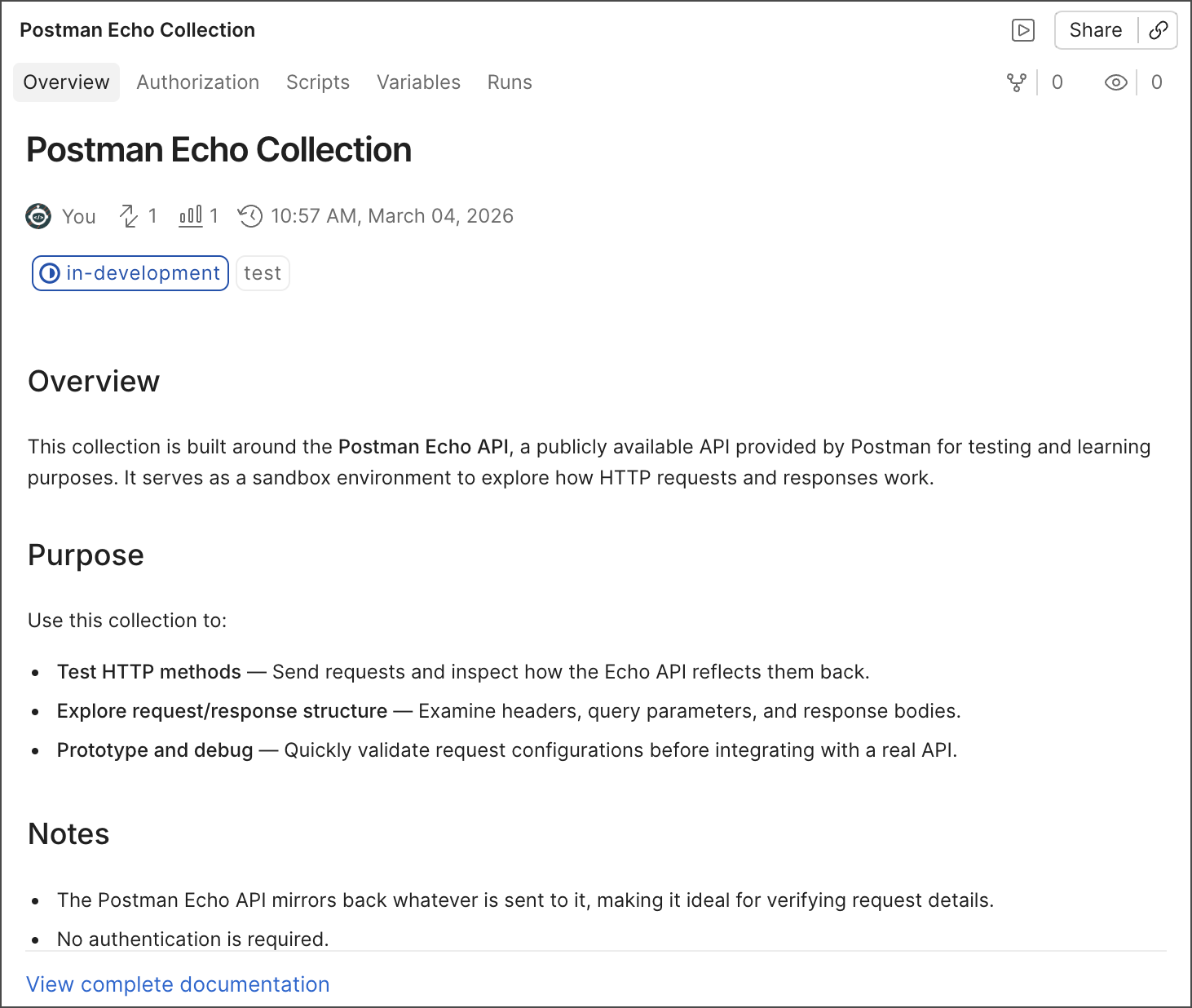
Collection Overview tab

On the Overview tab you can view the following collection information:

  • Description — Explains what the collection is and how it can be used. To learn more, see Add descriptions to a collection.

  • View complete documentation — Click to view the collection’s complete documentation.

  • Collection details — View information about the collection, including:

    • The user who created the collection.
    • The number of requests (Request icon) the collection contains.
    • How many views (Report icon) the collection has received.
    • The collection’s last updated date and time. Click the date to view the collection’s changelog.
    • The collection’s specification. Click the specification’s name to view the generated specification. To learn more, see Generate an API specification from your collection.
  • Status and Tags — Lists the collection’s assigned tags and status.