
Postman CLI spec commands (postman spec)
Postman CLI spec commands (postman spec)
This topic covers API governance commands for the Postman CLI.
API governance is the practice of applying a defined set of standards consistently across the API design and testing phases of your development process. The Postman CLI includes commands that checks your API specifications in Spec Hub against your team’s configured Postman API governance rules.
The postman spec list, get, create, and delete commands, and the postman spec file commands, accept the guest session that postman init creates, so you can run them without signing in first. You can also sign in with the postman login command or pass an --api-key. To learn more, see postman signup.
postman spec lint
This command runs syntax validation and governance rule checks against a single- or multi-file API specification in Spec Hub. Provide the local file path or ID for a specification that’s in OpenAPI (2.0, 3.0, or 3.1) or AsyncAPI (2.x or 3.x) format. If you’re providing the local file path for a multi-file specification, provide the path to the root file.
By default, if you provide a local file path for a specification, the command runs syntax validation and governance checks using the All workspaces governance group. Use the --workspace-id option to run governance checks using the rules from a specific workspace. To run syntax validation only, pass --issueType syntax, which skips governance checks.
Governance checks require signing in to Postman with the postman login command. If you aren’t signed in and you provide a local file path, the command stops with an error that tells you to sign in or pass --issueType syntax to lint syntax only. Providing a specification ID always requires signing in.
Lint results are reported to Postman by default. Reporting requires that the specification exist in Postman, so linting a standalone local file that isn’t synced to a Postman specification isn’t reported. When you run the command in a CI/CD pipeline, you can view the results in the API Catalog. Click Integrated services, click your service, open the Test tab, find your run in the CI Pipeline Runs table, and click View report. To opt out, pass --report-events=false.
You can find the specification ID in Postman. Click  Items tab, click Specs in the sidebar, and select a specification. Then click the
  Specification Info tab in the right sidebar to view or copy the specification ID.
Usage
The local file path to the API specification or the specification’s unique identifier.
Options
Triggers an exit failure code for rule violations at or higher than the specified severity level. The options, in order of lowest to highest severity, are HINT, INFO, WARNING, and ERROR.
Limits linting to the specified issue type. The only supported value is syntax, which runs syntax validation only and skips governance checks. If you omit this option, the command runs both syntax validation and governance checks.
Controls the output format for issues found in an OpenAPI or AsyncAPI specification. Accepts JSON or CSV. Defaults to table view if no output format is specified.
Run syntax validation and governance rule checks using the rules from a particular workspace by providing its ID. You can use this option if you provide the local file path for a specification. Learn how to get a workspace’s ID.
Lints against a local Spectral ruleset file instead of fetching governance rules from Postman. Applies to OpenAPI and AsyncAPI specifications, whether you pass a local specification file or a specification ID. Custom functions in the ruleset are supported. A top-level extends isn’t supported. The same sign-in and plan requirements apply as for linting with governance rules. You can’t use this option with --workspace-id or --issueType syntax.
Lint results are reported to Postman by default, whether you pass --report-events. To turn reporting off, pass --report-events=false. You can also use --no-report-events.
Examples
Learn more at API governance overview and Use the Postman CLI with GitHub Actions.
Output
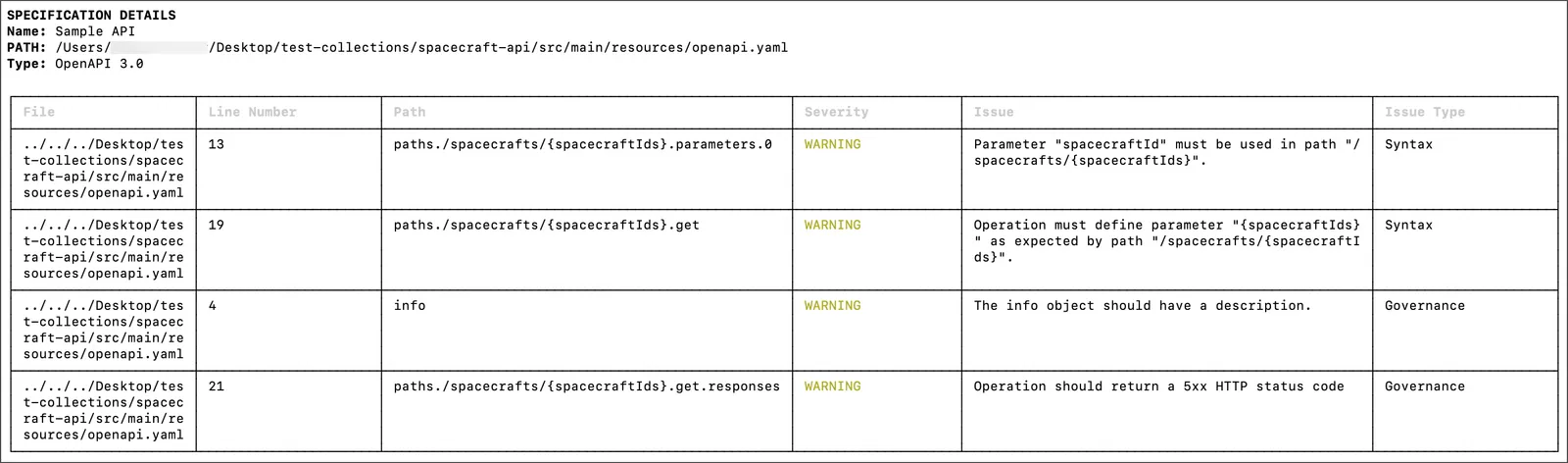
You can change the output of governance rule violations to JSON or CSV. If you don’t specify an output, it defaults to table view.
The following is an example of the output in table format (default):
The following is an example of the output in JSON format:
The following is an example of the output in CSV format:
postman spec list
This command lists API specifications in OpenAPI (2.0, 3.0, or 3.1) or AsyncAPI (2.x or 3.x) format. Pass a path to scan for local specification files on disk, or omit it to list the specifications in the linked Postman workspace. Use --workspace to target a specific workspace. The output includes their names, IDs, types, and root files.
Usage
Path to a local directory to scan for specification files. Omit it to list a workspace’s specifications instead.
Options
The ID of the Postman workspace to list specifications from. Defaults to the workspace linked in your .postman/resources.yaml file.
Your Postman API key. If omitted, the command uses the POSTMAN_API_KEY environment variable or your postman login session.
Prints the results as JSON for machine-readable output.
Examples
postman spec get
This command reads a specification’s full definition by ID or local file path, including every file in a multi-file specification. It prints a summary of the specification, including its name, type, file count, and root file. It also lists each file the specification contains, showing its path, type (root or supporting file), size, and content.
Usage
The ID or local file path of one or more specifications to read.
Options
Your Postman API key. If omitted, the command uses the POSTMAN_API_KEY environment variable or your postman login session.
Prints the full specification definition, including file contents, as JSON for machine-readable output.
Examples
postman spec create
This command creates an API specification. With a path, it scaffolds a minimal specification file on disk, which doesn’t require signing in. Without a path, it creates the specification in your Postman workspace, which requires signing in with the postman login command or an --api-key. It supports OpenAPI, AsyncAPI, GraphQL, protobuf, and Smithy formats. For OpenAPI and AsyncAPI, use --format to choose YAML or JSON.
Usage
The path to write a local specification file to. Omit it to create the specification in a Postman workspace instead.
Options
The specification’s name or title.
The specification type. Accepts openapi, asyncapi, graphql, protobuf, or smithy.
The specification version, for example 3.1 for OpenAPI or 3 for protobuf. For OpenAPI and AsyncAPI, you can also pass a full version such as 3.0.3, and the Postman CLI writes that exact version to the scaffolded file. Swagger 2.0 doesn’t support patch versions.
The file format, yaml or json. Applies to OpenAPI and AsyncAPI only.
The workspace to create the specification in when you omit the path. Defaults to the workspace linked in your .postman/resources.yaml file. If no workspace is linked there, you must provide one with --workspace.
Overwrites an existing local file. By default, if a file already exists at the path, the command stops without overwriting it.
Your Postman API key. If omitted, the command uses the POSTMAN_API_KEY environment variable or your postman login session.
Examples
postman spec delete
Deletes a specification by its ID in your Postman workspace or by the path to its local file or directory. This can’t be undone. The command prompts for confirmation unless you pass --yes, which is required when you run the command outside an interactive terminal.
Usage
The specification to delete, identified by its ID in your Postman workspace or by the path to its local file or directory.
Options
Skips the confirmation prompt. Required when you run the command outside an interactive terminal.
Your Postman API key, used with a specification ID. If omitted, the command uses the POSTMAN_API_KEY environment variable or your postman login session.
Examples
postman spec file add
This command adds a new file to a multi-file specification. Identify the specification by its ID in your Postman workspace or by the path to its local directory, then give the path of the file to add within the specification. Provide the file’s content with --content, or pipe it through standard input.
Usage
The specification to add the file to, identified by its ID in your Postman workspace or by the path to its local directory.
The path of the file to add, relative to the specification’s root.
Options
The file’s content. If omitted, the command reads the content from standard input.
Your Postman API key. If omitted, the command uses the POSTMAN_API_KEY environment variable or your postman login session.
Examples
postman spec file update
This command updates an existing file in a multi-file specification. Identify the specification by its ID in your Postman workspace or by the path to its local directory, then give the path of the file to update. Provide the new content with --content, or pipe it through standard input.
Usage
The specification that contains the file, identified by its ID in your Postman workspace or by the path to its local directory.
The path of the file to update, relative to the specification’s root.
Options
The new file content. If omitted, the command reads the content from standard input.
Your Postman API key. If omitted, the command uses the POSTMAN_API_KEY environment variable or your postman login session.
Examples
postman spec file rm
This command removes a file from a multi-file specification. Identify the specification by its ID in your Postman workspace or by the path to its local directory, then give the path of the file to remove. The command prompts for confirmation unless you pass --yes.
Usage
The specification that contains the file, identified by its ID in your Postman workspace or by the path to its local directory.
The path of the file to remove, relative to the specification’s root.
Options
Skips the confirmation prompt.
Your Postman API key. If omitted, the command uses the POSTMAN_API_KEY environment variable or your postman login session.
Examples
postman spec file get
This command prints the contents of a single file from a multi-file specification, without reading the whole specification. Identify the specification by its ID in your Postman workspace or by the path to its local directory, then give the path of the file to read. This command is read-only.
Usage
The specification that contains the file, identified by its ID in your Postman workspace or by the path to its local directory.
The path of the file to read, relative to the specification’s root.
Options
Prints the result as JSON, with the file’s path, type, content, and size in bytes. For a specification in your Postman workspace, the output also includes the file’s id.
Your Postman API key. If omitted, the command uses the POSTMAN_API_KEY environment variable or your postman login session.
Examples
postman spec generate collection
Generates a collection from an OpenAPI specification. Pass a local file path to generate the collection on disk in your local project, or a specification ID to generate it in the Postman Cloud. By default, the command groups requests into folders by the specification’s paths. Use --folder-strategy Tags to group them by tags instead. In local mode, if a collection already exists at the target path, the command stops without overwriting it and the scripts you added to it. Pass --force to overwrite it.
Generated example values respect the specification’s schema constraints, such as minimum, maximum, and enum, and are deterministic. Running the command twice on the same specification produces the same files, so you can rely on version control diffs and drift checks.
In local mode, the command records the link between the specification and the generated collection in .postman/workflows.yaml. You can later apply the specification’s changes to the collection with postman spec sync collection. To generate a specification from a collection instead, see postman collection generate spec.
Usage
The OpenAPI specification to generate a collection from, as a local file path or a specification ID.
Options
A name for the generated collection.
How to group requests into folders. Accepts Paths to group by the specification’s paths, or Tags to group by operation tags.
The ID of the workspace to generate the collection in. Use it to generate the collection in the Postman Cloud.
Your Postman API key. If omitted, the command uses the POSTMAN_API_KEY environment variable or your postman login session.
Overwrites an existing local collection at the target path, including any test scripts you added to it. Applies to local mode only. By default, the command stops without overwriting.
Examples
postman spec sync collection
Regenerates a collection from its linked specification, so the collection picks up the specification’s latest changes. Run postman spec generate collection first to create the link. Pass a local file path to sync a collection in your local project, or a specification ID to sync a collection in the Postman Cloud. For a local sync, the command writes only the collection files that don’t already match the specification.
By default, a local sync stops with exit code 8 and writes nothing when it would remove content that the specification doesn’t generate. That content includes scripts, headers, and descriptions. The error lists each affected file and what the sync would remove. Use --dry-run to preview a sync, or --force to overwrite the content anyway.
Usage
The specification whose linked collection to regenerate, as a local file path or a specification ID.
Options
Your Postman API key. If omitted, the command uses the POSTMAN_API_KEY environment variable or your postman login session.
The ID of the collection to sync. Required in cloud mode.
Syncs even when it would overwrite scripts, headers, or descriptions that the specification doesn’t generate. You can use this option only with a local specification file. Passing it with a specification ID stops the command with exit code 2.
Lists the files a sync would write, marks any content the specification doesn’t generate, and writes nothing. You can use this option only with a local specification file. Passing it with a specification ID stops the command with exit code 2.
Examples
postman api lint
The postman api lint command is only supported for API Builder objects in Postman v11. The Postman API Builder isn’t supported in Postman v12 and later. Learn about using the API Builder in Postman v11 and earlier.
This command runs validation checks for governance rules against the API specification provided in the Postman config file, a local file, or a UUID. The api lint command shows a warning if it’s unable to find the API ID to send data back to Postman.
This command supports APIs in the Postman API Builder that aren’t linked to Git.
To use this command, sign in to Postman with the postman login command.
Usage
The API definition file path or API UUID to lint.
Options
Specifies the integration ID for the report.
Triggers an exit failure code for rule violations at or higher than the specified severity level. The options, in order of lowest to highest severity, are HINT, INFO, WARN, and ERROR.
Specifies whether to override the default exit code for the current run.
Examples
Learn more at API governance overview.