Discover gateway policy plugins
The Plugin Catalog is where you discover and evaluate the policy descriptors available to your AI gateway. Think of it as the specification sheet for every plugin the gateway ships with. Before you attach a plugin to a route as a plugin instance, use the catalog to understand exactly what it does, when it runs, what data it touches, and how it behaves when something goes wrong.
Each entry in the catalog is a descriptor, a static definition of a plugin’s contract. Descriptors don’t do anything on their own. They become active only when you create a plugin instance from one and attach it to a route, service, or global scope. The catalog is read-only reference material, while configuration happens in Plugin instances.
Go to Policies > Plugin catalog in the left sidebar. The page header shows a live count of registered descriptors, which reflects the total number of plugin types your gateway currently recognizes, and not the number of active instances.
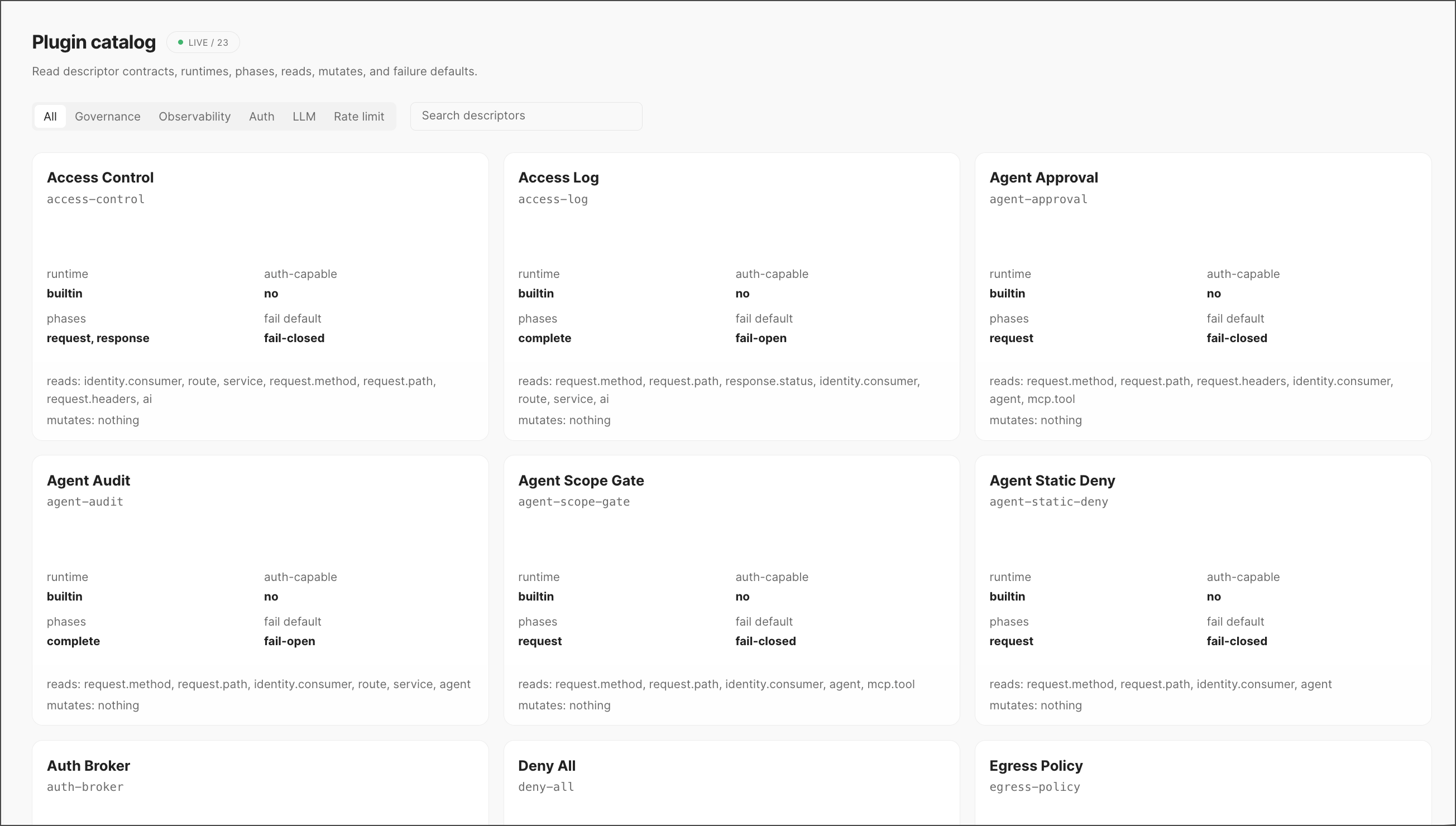
Filter the catalog
Descriptors are organized into categories, surfaced as tabs across the top of the page:
You can also use the Search descriptors field to jump directly to a plugin by name or slug, which is useful once your catalog grows beyond a couple dozen entries.
Every card in the catalog provides the following information:
- Name and identifier — The human-readable name (for example, Access Control) and the slug used to reference it programmatically (
access-control). - Runtime — Where the plugin runs.
builtinmeans it ships with the gateway itself, as opposed to a custom or externally hosted runtime. - Auth-capable — Whether the plugin is permitted to perform authentication as part of its execution. Most governance plugins are not auth-capable; they assume identity has already been established upstream.
- Phases — The lifecycle stage(s) of a request the plugin hooks into:
request(before it reaches the upstream service),response(before it’s returned to the caller), orcomplete(after the transaction has fully resolved, typically used for logging/audit). - Fail default — What happens if the plugin itself errors out:
fail-closedblocks the request (safe default for governance), whilefail-openallows it through (common for audit or observability plugins where availability matters more than strict enforcement). - Reads — The fields from the request context the plugin inspects to make its decision, such as
identity.consumer,request.path, oragent. - Mutates — Any fields the plugin modifies. Most governance plugins are read-only and list
nothinghere.
Next steps
- Head to Plugin instances to attach a descriptor from this catalog to a specific route or service.
- Use Explain to trace how an active policy evaluated a given request, field by field.