How to remove local data
If you’re trying to remove your local data to resolve an issue with the Postman Desktop app, first make sure your work is synced to your Postman account before removing the data.
You should also review your activity feed to verify that all recent changes have been captured.
If you’re using Postman locally without signing in to a Postman account, do not follow the steps below to remove your local data. This action will delete all your data. Instead, follow the instructions for renaming your Postman folder.
How to remove local data
Removing your local data from the Postman desktop app
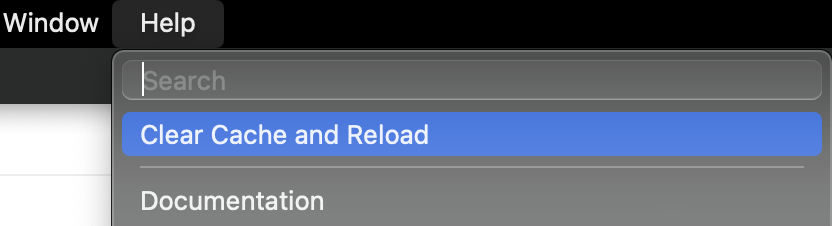
Go to the Help tab and select Clear Cache and Reload.
-
Note: If you cannot open the app, follow the steps below to remove the local data from your Postman folders.
Removing local Postman folders
-
Force quit all open instances of the Postman Desktop app.
-
If you are using Windows, uninstall Postman. Note: Ignore this step if you’re a macOS or Linux user.
-
Delete the Postman folder(s). The Postman folders will be located at different locations depending on your operating system:
-
If you’re using Windows, install the latest version of Postman. Note: Ignore this step if you’re a macOS or Linux user.
How to Locate Postman Folder
Locate my Postman folder on macOS
- Go to Finder (Cmd + Opt + Space)
- Go to Folder (Shift + Cmd + G)
- Paste
~/Library/Application Support - Select Go
Locate my Postman folder on Windows
- Open File Explorer
- Paste in the path field:
C:\Users\<user>\AppData\Local\PostmanC:\Users\<user>\AppData\Roaming\Postman
Note: You will find Postman folders at these two locations on Windows.
Path field for the Postman Enterprise app: C:\Users\<user>\AppData\Roaming\PostmanEnterprise
Locate my Postman folder on Linux
- Go to Files. Make sure to show hidden files.
- Open .config
How to rename your Postman folder
-
Force quit all open instances of the Postman Desktop app.
-
If you’re using Windows, uninstall Postman. Note: Ignore this step if you’re a macOS or Linux user.
-
Locate your Postman folder. The Postman folders will be located at different locations depending on your operating system:
-
Rename the Postman folder so you can differentiate it easily—for example, Postman old. If you’re using Windows, go to the Postman download page, install the latest version of Postman and open it. If you’re using macOS or Linux, open the Postman Desktop app. This will trigger the creation of a new Postman folder in your local data.
-
Quit the app.
-
Transfer the Partitions and the Storage file from the former Postman folder to the new Postman folder.
-
Open the Postman Desktop app. If the data populates as expected, delete the former Postman folder.
Have more questions? Submit a request