Postman is stuck on the load screen
You are experiencing one of the following issues
- Postman goes blank when starting the app.
- You see screen artifacts or glitches.
- Postman repeatedly crashes.
- Postman is causing the “blue screen of death” on your laptop.
- The app fails to launch.

How to unblock yourself
Try these troubleshooting workarounds to unblock yourself:
- Make sure you are using the latest version of Postman . If not, update your app to the latest version and then try to start the app again.
- If you can view and access the Postman menu (see screenshot below), disable hardware acceleration in the Postman menu in macOS or the Help menu in Windows or Linux .
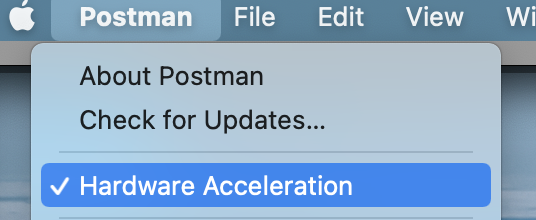
If the Postman menu noted above is unavailable, there might be one of these events making it unavailable:
- You’re using a version of the Postman app that is lower than v8.6.0 (the ability to disable hardware acceleration from the Postman menu is only available in v8.6.0 or higher).
- The issue causing the app to be stuck on the load screen also makes it impossible for you to see the Postman menu.
In either case, you can try to disable hardware acceleration from your GPU Software or run the following command in your command line: setx POSTMAN_DISABLE_GPU “true” /m
If you’re still facing this issue after updating Postman, disabling hardware acceleration and removing Postman’s local data, please submit a support request with the following information in the request:
- Indicate exactly which steps you’ve already tried.
- Share your app logs .
Have more questions? Submit a request