For AI agents: a documentation index is available at the root level at /llms.txt and /llms-full.txt. Append /llms.txt to any URL for a page-level index, or .md for the markdown version of any page.
Postman
PricingEnterprise
Contact SalesSign InSign Up for Free
HomeDocs
HomeDocs
      • Overview
      • Explore your services
Postman API Platform

Product

  • Postman Overview
  • Enterprise
  • Spec Hub
  • Flows
  • Agent Mode
  • API Catalog
  • Fern
  • Postman CLI
  • Integrations
  • Workspaces
  • Plans and pricing

API Network

  • App Security
  • Artificial Intelligence
  • Communication
  • Data Analytics
  • Database
  • Developer Productivity
  • DevOps
  • Ecommerce
  • eSignature
  • Financial Services
  • Payments
  • Travel

Resources

  • Postman Docs
  • Academy
  • Community
  • Templates
  • Intergalactic
  • Videos
  • MCP Servers

Legal and Security

  • Legal Terms Hub
  • Terms of Service
  • Postman Product Terms
  • Security
  • Website Terms of Use

Company

  • About
  • Careers and culture
  • Contact us
  • Partner program
  • Customer stories
  • Student programs
  • Press and media
Twitter iconLinkedIn iconGithub iconYouTube iconInstagram iconDiscord icon
Download Postman
Privacy Policy

© 2026 Postman, Inc.

On this page
  • What’s inside
  • Discover APIs and services
  • View the project
Postman API Catalog

About the API Catalog

||View as Markdown|
Was this page helpful?
Previous

Postman Flows snapshots and Flow blocks

Next

Connect API Catalog to your services

Built with

This feature is available on Postman Enterprise plans. For more information, see the pricing page.

The API Catalog is a centralized dashboard for monitoring, analyzing, and governing APIs across your organization. It aggregates runtime analytics from Postman CLI runs, CI/CD pipelines, and spec linting results into actionable insights. The API Catalog works with Agent Mode, so you can ask questions about your APIs and get help with fixes when something is broken.

To access the API Catalog, from Home icon Home, click API Catalog.

What’s inside

The API Catalog consists of these main components:

  • Catalog list
  • Governance groups
  • System environments

Catalog list

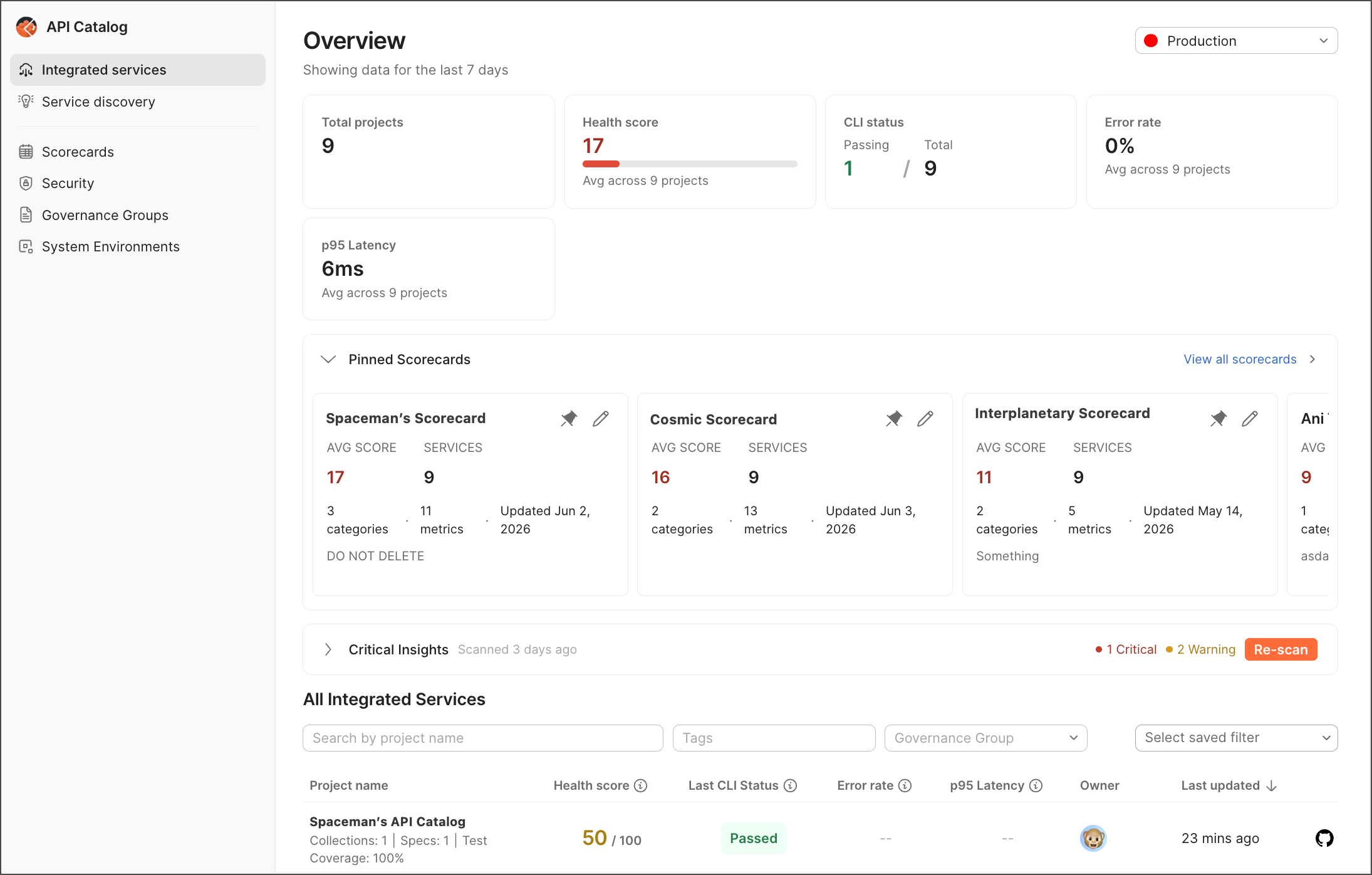
The API Catalog shows all of your discovered services. You can filter and sort your API list in different ways. Use tags to mark which APIs you want to manage. The catalog shows who owns each API. You can also see how APIs are connected to each other and check health metrics. The API Catalog also shows you which APIs aren’t properly managed with Postman Insights (if you have access).

You can do the following:

  • Make views with your filters and tags.
  • Show different information at once.
  • Jump to the views you need.
API Catalog list

Governance groups

Governance groups help you make and enforce rules for your API specs like OpenAPI. You can have different rules for different types of APIs, for example, one set of rules for public APIs and another for internal APIs.

This is how it works:

  • Developers using Postman can see these rules in the Postman app.
  • The Postman CLI can pull these rules and enforce them in the CI pipeline.
  • You can configure the Postman CLI to block releases or trigger warnings.
  • Rules help score how well your APIs follow your own standards.

System environments

System environments are your actual setups like production, staging, or beta. Setting these up helps Postman track your APIs correctly.

When you run tests on multiple APIs, for example, system environments help group the results so you can see how each API performs.

Discover APIs and services

The API Catalog automatically shows all of your Git-connected Postman workspaces. To add something to the catalog, connect your Postman workspace to your source code. The API Catalog also shows APIs from API gateways and APIs discovered through Postman Insights. You can also set up a Kubernetes cluster custom resource as a watcher. You can also add APIs manually.

To help get started quickly, the API Catalog provides the ability to discover services through multiple sources:

  • API Gateway integrations
  • Postman Insights
  • Existing Postman Workspaces
  • Cluster Watcher

Using these workflows, you can find APIs that aren’t managed in Postman yet and add them to the catalog. Postman sends a pull request to the API owner’s repository. When the PR is accepted, a Git-connected project workspace is created, and the API shows up in the API Catalog.

View the project

A project displays all the data Postman knows about that API across development, test, and production.

Customize your view

Click Options icon View more actions in the list header to customize which columns appear in your view. Then, click the Select saved filters dropdown to save your view for easy access later. You can also switch between different environments (for example, staging or production) using the environment selector. For more information on customizing your view, see Customize your project view.

Individual projects provide the following information about your APIs:

  • Workspace analytics — View performance metrics, error rates, and activity across workspaces.

  • Endpoint health monitoring — Track p95 latency, error rates (4xx/5xx), and request volumes per endpoint.

  • CI/CD integration — Monitor GitHub Actions, GitLab CI, Jenkins pipeline runs with PR-level insights.

  • Spec linting — Aggregate OpenAPI specification quality scores and violation tracking.

  • System environments — Classify and filter data by canonical environments (prod, staging, beta).

  • Ask Ai Chat icon chat — Ask Postman AI questions about your APIs and get help with fixes when something is broken.

To learn more, see Explore your services.