
Manage a multi-file API specification
With a multi-file API specification in Spec Hub, your specification can span across multiple files and folders, improving its organization and management. For example, you can separate your API specification into multiple files for each component, such as operations, schemas, and parameters. You can also create folders to group related files together.
Supported multi-file specification formats
Postman supports the following multi-file specifications in Spec Hub:
- OpenAPI 2.0, 3.0, and 3.1
- protobuf 2 and protobuf 3
About multi-file specifications
All files in a multi-file specification are considered the full API specification. Each multi-file specification has a root file that’s the top-level file in your specification where the root object is defined. The root file hosts the operations defined by the API and it can reference other files in your specification.
By default, when you create a new specification, Postman generates a single-file specification with a root index file.
When you create a multi-file specification or import a multi-file specification, Postman determines the root file based on the references across the files. Your specification can only have one root file.
You can use the Postman API to bundle all files in your multi-file specification into a single OpenAPI file. Provide the specification ID to get the bundled specification in the response. Learn how to bundle a multi-file specification with the Postman API.
Create a multi-file specification
Add one or more files to an OpenAPI or protobuf specification to turn it into a multi-file specification. Then you can add more files and folders to your specification.
To create a multi-file specification, do the following:
-
Select a specification in the sidebar.
If you don’t have a specification, click
 in the sidebar, select Spec, then select the type of specification you want to create. You can also import a specification.
 -
Next to your specification, select
 More actions > Add File. This adds a new file to the specification. Alternatively, click Add file or folder in the Files section of your specification.
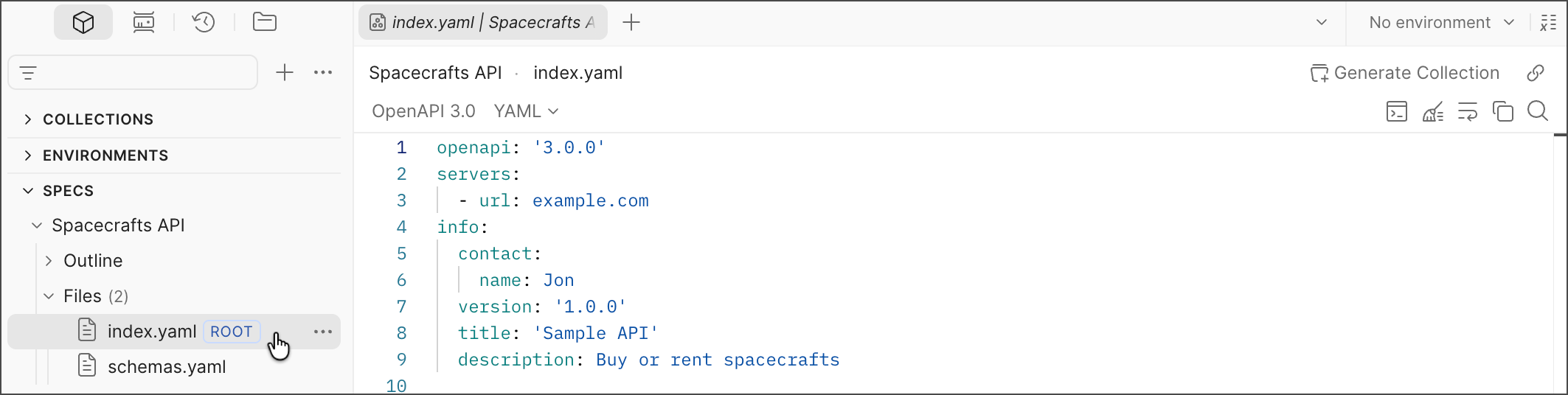
Add files and folders
After you’ve created or imported a multi-file OpenAPI or protobuf specification, you can add more files and folders and even search them by name. You can also rename and delete your files and folders.
To add more files and folders to your specification, do the following:
-
Select a multi-file specification.
-
In the Files section of the specification, click
Add file or folder, then select one of the following:- Add File — Adds a new file.
- Add Folder — Adds a new folder.
-
Next to a folder, you can also click
More actions and then select one of the following:- Add File — Adds a new file to the folder.
- Add Folder — Adds a new folder within the folder.
You can also take the following actions:
- To rename files and folders, select More actions > Rename. Update the name then press Return or Enter.
- To delete files and folders, select More actions > Delete. Then click Delete to confirm.
- To search files and folders by name, use the search bar in the sidebar.
Change the root file
Your multi-file specification can only have one root file that’s used to reference other files in your specification. You can change the root file in your OpenAPI or protobuf 2 and protobuf 3 multi-file specification at any time.
To change the root file in a multi-file specification, do the following:
- Click a multi-file specification in the sidebar.
- Next to a file, select More actions > Mark as Root file.
Make sure to update the new root file with the root OpenAPI object and references to other files in your specification. Otherwise, Postman can’t parse your specification.