
Add types to parameters and headers with an API collection
You can add types to parameters and headers to your HTTP collections. Types can include data type, format, default value, and possible values. You can also specify if a component is required. Details you add will appear in the collection’s documentation.
To add types to a parameter or header, do the following:
-
Open a request and click the Params or Headers tab. Add any parameters or headers as needed.
-
Hover over a query or path parameter or a header and click
 Type.
Type.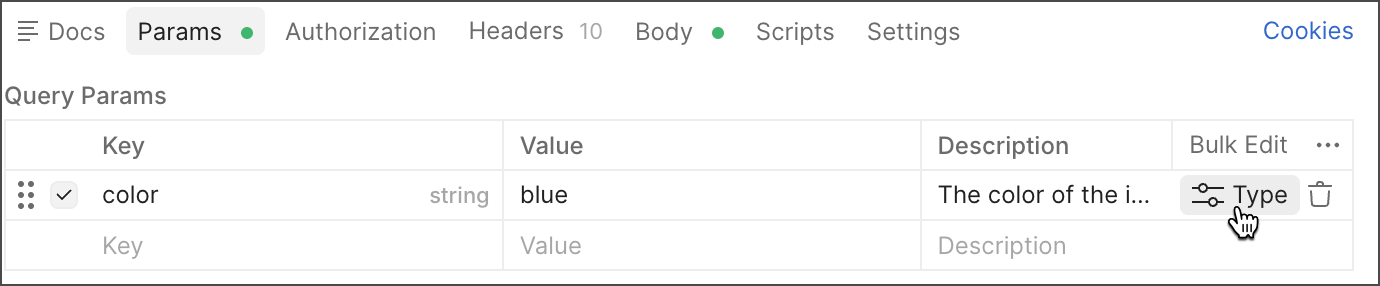
-
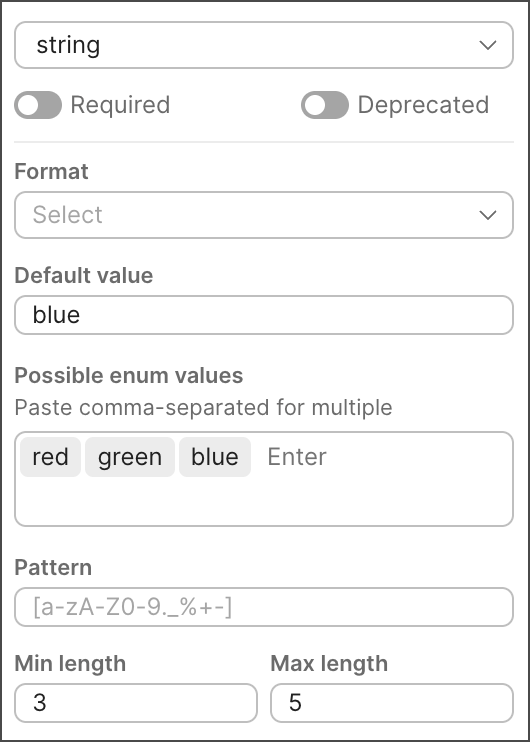
Specify details for the parameter or header:
- Type — Select the component’s data type (string, integer, number, or Boolean).
- Required — Turn on if the component is required, or turn off if it’s optional.
- Deprecated — Turn on if the component is deprecated. A deprecated parameter or header is still functional, but its usage is discouraged because support may be discontinued.
- Default value — Specify the default value for the component.
- Possible enum values — (All data types except Boolean) Enter the allowed values for the component (enumerations), and press Return or Enter after each item. You can also paste in a comma-separated list, such as “red,green,blue”, and Postman adds each value.
-
Specify optional details depending on the component type:
-
Type string:
- Format — Select the data format for the string (for example, date, time, or email).
- Pattern — Enter allowed data patterns for the component using regex (regular expressions). You can’t enter a pattern if you selected a format for the string.
- Min length — Enter the minimum length for the component.
- Max length — Enter the maximum length for the component.
-
Type integer or number:
- Min value — Enter the minimum value for the component.
- Max value — Enter the maximum value for the component.
-
-
Click
 Save to save the changes to your request.
If you generated a specification from a collection, make sure to update the specification once you’re done making changes.