For AI agents: a documentation index is available at the root level at /llms.txt and /llms-full.txt. Append /llms.txt to any URL for a page-level index, or .md for the markdown version of any page.
Postman
PricingEnterprise
Contact SalesSign InSign Up for Free
HomeDocs
HomeDocs
      • Overview
        • Overview
          • Overview
          • Store values in variables
          • Create and use environments
          • Set environment variables
          • Manage team environments
          • Environment colors
          • Pinned environments
Postman API Platform

Product

  • Postman Overview
  • Enterprise
  • Spec Hub
  • Flows
  • Agent Mode
  • API Catalog
  • Fern
  • Postman CLI
  • Integrations
  • Workspaces
  • Plans and pricing

API Network

  • App Security
  • Artificial Intelligence
  • Communication
  • Data Analytics
  • Database
  • Developer Productivity
  • DevOps
  • Ecommerce
  • eSignature
  • Financial Services
  • Payments
  • Travel

Resources

  • Postman Docs
  • Academy
  • Community
  • Templates
  • Intergalactic
  • Videos
  • MCP Servers

Legal and Security

  • Legal Terms Hub
  • Terms of Service
  • Postman Product Terms
  • Security
  • Website Terms of Use

Company

  • About
  • Careers and culture
  • Contact us
  • Partner program
  • Customer stories
  • Student programs
  • Press and media
Twitter iconLinkedIn iconGithub iconYouTube iconInstagram iconDiscord icon
Download Postman
Privacy Policy

© 2026 Postman, Inc.

On this page
  • Variables quick start
  • Create and switch environments
Use PostmanSend requestsVariables and environments

Reuse data with variables and environments in Postman

||View as Markdown|
Was this page helpful?
Previous

Debug API requests in Postman

Next

Store and reuse values using variables

Built with

A variable is a reusable value you can use in API requests and scripts. Postman uses the variable’s local value when running a request or script. You can group variables in an environment to make it easier to change variable values based on your work context.

Variables quick start

To create and use a variable, do the following:

  1. In the footer, click Globals.

  2. Add a variable named my_variable and give it a value of Hello.

  3. Open a new request tab and enter https://postman-echo.com/get?var={{my_variable}} as the URL. Hover over the variable name to inspect the variable’s value and scope.
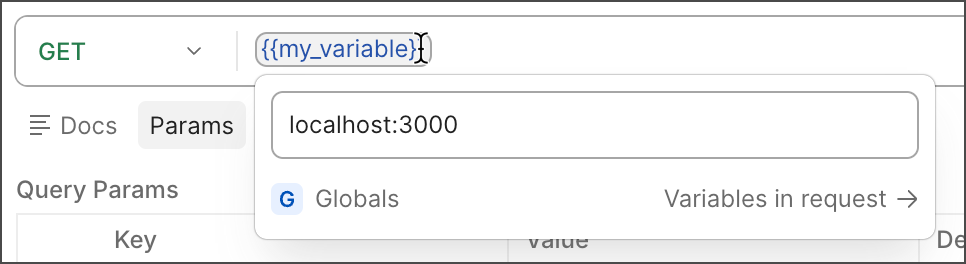
    View the variable value and scope
  4. Click Send and send the request. Inspect the response, which confirms that Postman sent the variable value to the API.

  5. Click Variable list icon Variables in the workbench to open the variables pane.

  6. Under Variables in request, change the value of my_variable and send the request again.

To learn more about using variables in Postman, go to Store and reuse values using variables.

Create and switch environments

With environments, you can create sets of variables for the various types of work you do in Postman. For example, you might want to use different values when sending requests to a test server or a production server.

To get started, learn how to create and switch between environments in Postman. You can then add and edit variables in each environment. You can also use environments to collaborate with your team and share and manage sensitive data.