For AI agents: a documentation index is available at the root level at /llms.txt and /llms-full.txt. Append /llms.txt to any URL for a page-level index, or .md for the markdown version of any page.
Postman
PricingEnterprise
Contact SalesSign InSign Up for Free
HomeDocs
HomeDocs
      • Overview
      • Onboarding checklist
      • Roles and permissions
      • System service accounts
      • Free and Solo experience
      • Team migration
        • Overview
        • Create an organization
        • Create teams
        • Manage user groups
          • Overview
          • Invite members
          • Manage roles
          • Manage your organization
          • Scale teams
        • Manage resources
        • Manage product access
        • Configure team settings
        • Manage API keys
        • BYOK Encryption
        • Audit logs
      • Admin FAQs
Postman API Platform

Product

  • Postman Overview
  • Enterprise
  • Spec Hub
  • Flows
  • Agent Mode
  • API Catalog
  • Fern
  • Postman CLI
  • Integrations
  • Workspaces
  • Plans and pricing

API Network

  • App Security
  • Artificial Intelligence
  • Communication
  • Data Analytics
  • Database
  • Developer Productivity
  • DevOps
  • Ecommerce
  • eSignature
  • Financial Services
  • Payments
  • Travel

Resources

  • Postman Docs
  • Academy
  • Community
  • Templates
  • Intergalactic
  • Videos
  • MCP Servers

Legal and Security

  • Legal Terms Hub
  • Terms of Service
  • Postman Product Terms
  • Security
  • Website Terms of Use

Company

  • About
  • Careers and culture
  • Contact us
  • Partner program
  • Customer stories
  • Student programs
  • Press and media
Twitter iconLinkedIn iconGithub iconYouTube iconInstagram iconDiscord icon
Download Postman
Privacy Policy

© 2026 Postman, Inc.

Administer PostmanTeam managementManage members

Membership overview

||View as Markdown|
Was this page helpful?
Previous

Organize users into Postman groups

Next

Invite members to your Postman team

Built with

Some organization and team options are only available with Postman Team or Enterprise plans. For more information, see the pricing page.

To use Postman to collaborate on APIs within your organization and teams effectively, ensure all the relevant stakeholders are involved. Add them to your Postman teams by updating their roles and permissions, and by organizing them in groups at any time.

As an Admin or Super Admin, you have complete visibility into the roles team members are assigned directly or using specific groups from the organization or team settings page.

To open your organization’s or team’s settings page to manage membership tasks, click your profile icon in the header, then click your organization name. Click Members in the left sidebar.
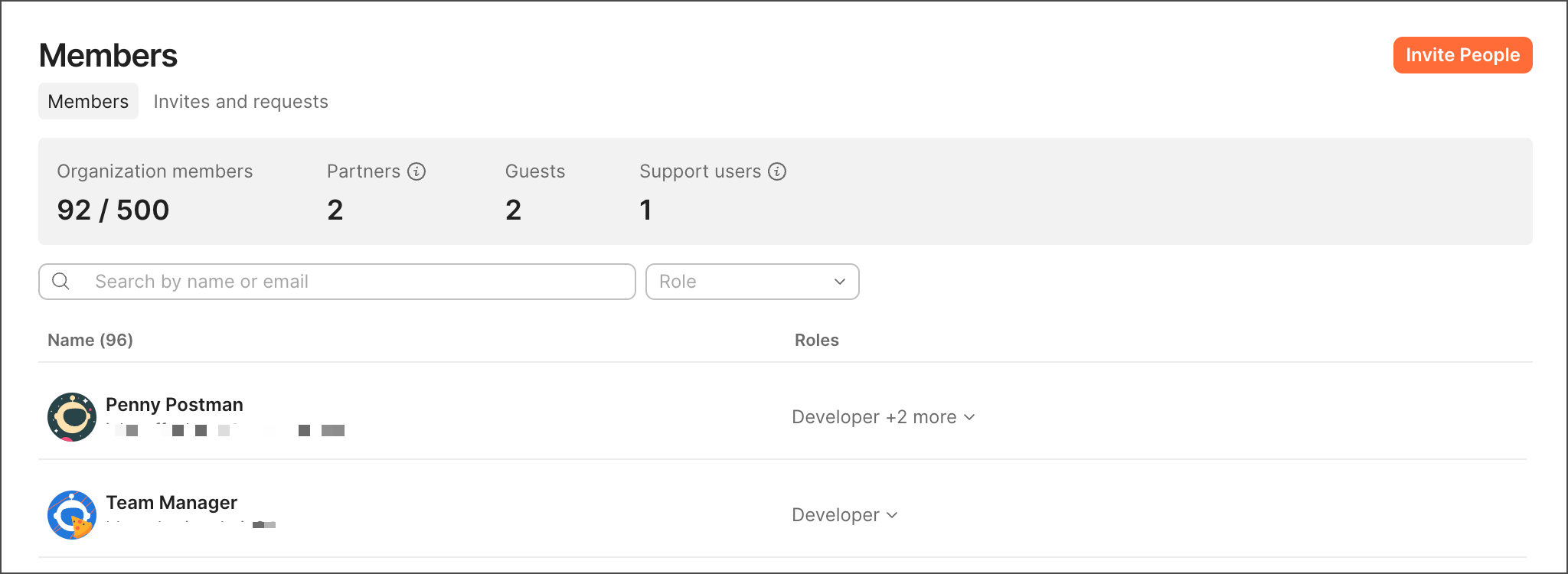
Manage members

From the Members page, you can manage the following membership tasks:

  • Manage invites to your internal and external collaborators.
  • Manage user roles for workspaces and elements, Super Admins, Partners, Guests, and user groups.
  • Manage your organization in a centralized or delegated way.
  • With the Billing role, you can also change your team’s size to accommodate more collaborators at any time in your billing cycle.
  • Remove members as needed.