For AI agents: a documentation index is available at the root level at /llms.txt and /llms-full.txt. Append /llms.txt to any URL for a page-level index, or .md for the markdown version of any page.
Postman
PricingEnterprise
Contact SalesSign InSign Up for Free
HomeDocs
HomeDocs
      • Overview
        • Overview
        • Create a specification
        • Import a specification
        • Edit a specification
        • Add files to a specification
        • Validate a specification
        • View live documentation
        • Reuse components
        • Generate collections
      • Sync collections and specifications reference
      • Migrate from API Builder to Spec Hub
      • Develop APIs with the API Builder
      • Simulate real-world conditions
Postman API Platform

Product

  • Postman Overview
  • Enterprise
  • Spec Hub
  • Flows
  • Agent Mode
  • API Catalog
  • Fern
  • Postman CLI
  • Integrations
  • Workspaces
  • Plans and pricing

API Network

  • App Security
  • Artificial Intelligence
  • Communication
  • Data Analytics
  • Database
  • Developer Productivity
  • DevOps
  • Ecommerce
  • eSignature
  • Financial Services
  • Payments
  • Travel

Resources

  • Postman Docs
  • Academy
  • Community
  • Templates
  • Intergalactic
  • Videos
  • MCP Servers

Legal and Security

  • Legal Terms Hub
  • Terms of Service
  • Postman Product Terms
  • Security
  • Website Terms of Use

Company

  • About
  • Careers and culture
  • Contact us
  • Partner program
  • Customer stories
  • Student programs
  • Press and media
Twitter iconLinkedIn iconGithub iconYouTube iconInstagram iconDiscord icon
Download Postman
Privacy Policy

© 2026 Postman, Inc.

Design and build APIsDesign APIs with specifications

View live documentation for your API specification

||View as Markdown|
Was this page helpful?
Previous

Validate an API specification

Next

Reuse specification components with the Component Library in Postman

Built with

Postman displays a live preview of your API’s documentation if you’re editing an OpenAPI or AsyncAPI specification. The documentation preview is updated as you edit the specification. You can use the preview to help you visualize your changes as you work.

As you edit an OpenAPI specification with multiple files and folders, a live preview also displays for your the root and non-root files.

To show the documentation preview, click Docs icon Live preview in the right sidebar.

You can view live documentation for the following types of sections:

  • OpenAPI — The live preview displays documentation for Info, Servers, and Paths sections of your specification. Live preview also displays documentation for the Schemas, Responses, and Request Bodies components in the Components (OpenAPI 3.0 and 3.1) and Definitions (OpenAPI 2.0) sections. The preview doesn’t display documentation for other sections such as Security.
  • AsyncAPI — The live preview displays documentation for the Info, Servers, and Channels sections of your specification. The preview doesn’t display documentation for other sections.
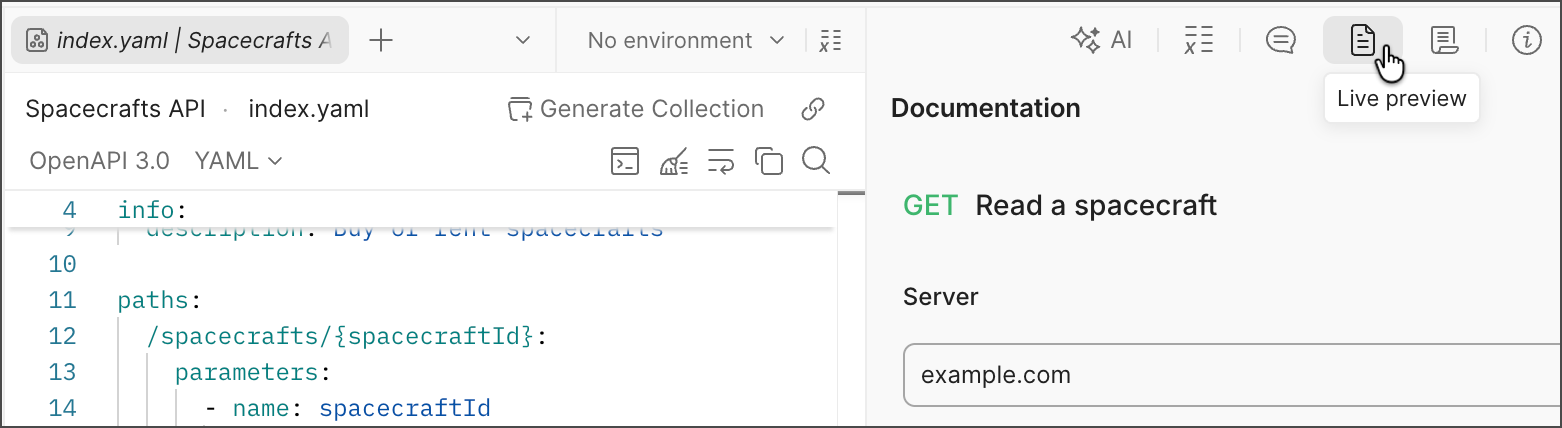
View live documentation for a specification