For AI agents: a documentation index is available at the root level at /llms.txt and /llms-full.txt. Append /llms.txt to any URL for a page-level index, or .md for the markdown version of any page.
Postman
PricingEnterprise
Contact SalesSign InSign Up for Free
HomeDocs
HomeDocs
      • Overview
        • Overview
          • Blocks reference
            • Looping blocks overview
            • Repeat
            • For
            • Collect
        • Deployed flows overview
        • Connector blocks overview
Postman API Platform

Product

  • Postman Overview
  • Enterprise
  • Spec Hub
  • Flows
  • Agent Mode
  • API Catalog
  • Fern
  • Postman CLI
  • Integrations
  • Workspaces
  • Plans and pricing

API Network

  • App Security
  • Artificial Intelligence
  • Communication
  • Data Analytics
  • Database
  • Developer Productivity
  • DevOps
  • Ecommerce
  • eSignature
  • Financial Services
  • Payments
  • Travel

Resources

  • Postman Docs
  • Academy
  • Community
  • Templates
  • Intergalactic
  • Videos
  • MCP Servers

Legal and Security

  • Legal Terms Hub
  • Terms of Service
  • Postman Product Terms
  • Security
  • Website Terms of Use

Company

  • About
  • Careers and culture
  • Contact us
  • Partner program
  • Customer stories
  • Student programs
  • Press and media
Twitter iconLinkedIn iconGithub iconYouTube iconInstagram iconDiscord icon
Download Postman
Privacy Policy

© 2026 Postman, Inc.

On this page
  • Inputs
  • Output
  • Setup
  • Example
  • Related blocks
  • Related pages
Postman FlowsFlows referenceBlocksLooping

The Repeat block

||View as Markdown|
Was this page helpful?
Previous

Looping blocks overview

Next

The For block

Built with

The Repeat block functions as the starting point for a loop. The loop continues through the sequence of blocks that follows, and ends with a Collect block. You can use this kind of loop to perform a series of actions multiple times. See Loops with the Repeat block and Loops with external data.

Inputs

  • Count - Specifies the number of times to run the Repeat block. Connect the input port to any block that sends a number.
  • Start - Runs the block when it receives input. If there’s no block connected, the Repeat block triggers when the block receives data on the Count input. For example, you could connect an HTTP Request block’s Success output port to synchronize the Repeat block with the request’s successful response.

Output

Index - Sends the current run’s index number. The first run’s index number is 0.

Setup

Connect any block that sends a number to the Count input port. Connect the Index output port to one or more blocks that you want to run a specific number of times. You can also connect the Start input port to another block’s output to run the Repeat block when the other blocks send data.

Example

This example shows a Repeat block triggering an HTTP Request block that sends its output through a Select block to a Collect block, with results displayed as a table.
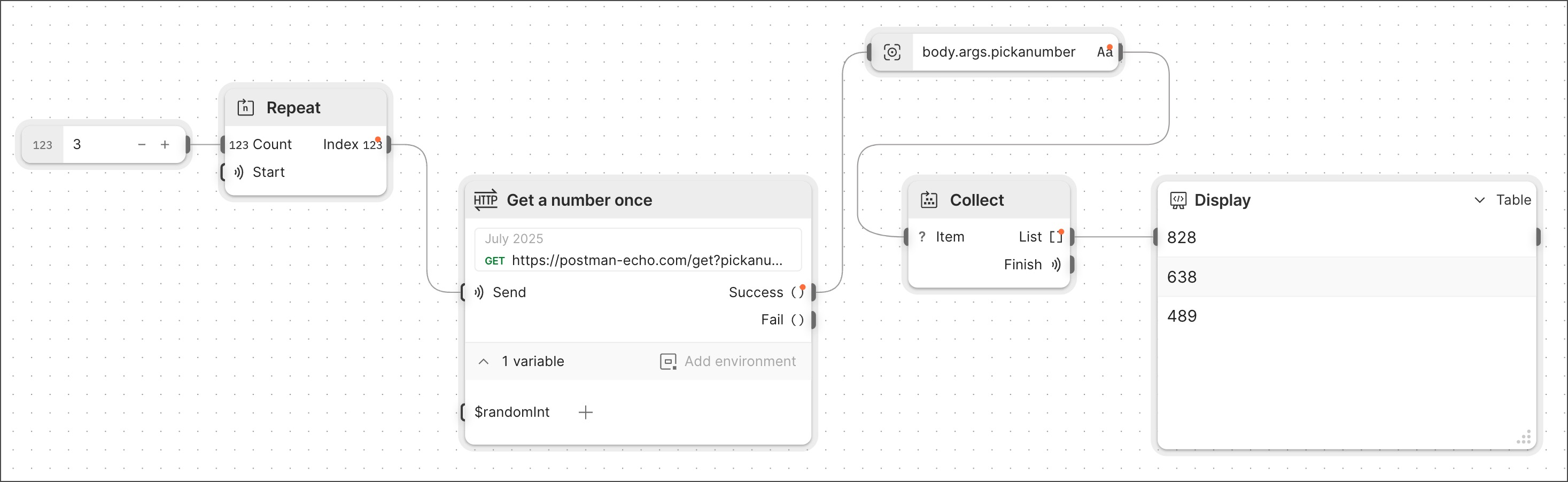
Repeat block

Related blocks

To supply the integer that the Repeat block requires as input, use a Number block or any other block that sends a number.

Besides the Repeat block, the other option for beginning a loop is the For block. See Loops with the for block.

Related pages

For more information about creating loops in Flows and tutorials that use the Repeat block, see the following:

  • Loops overview
  • Create a count-based loop with the Repeat block
  • Create a list-based loop with the For block