For AI agents: a documentation index is available at the root level at /llms.txt and /llms-full.txt. Append /llms.txt to any URL for a page-level index, or .md for the markdown version of any page.
Postman
PricingEnterprise
Contact SalesSign InSign Up for Free
HomeDocs
HomeDocs
      • Welcome
        • Overview
        • Data import methods
        • SoapUI import
        • Hoppscotch import
        • Insomnia import
        • Thunder Client import
        • Git import
        • New Relic import
        • cURL command import
        • Swagger API import
        • Data export
      • Troubleshooting
Postman API Platform

Product

  • Postman Overview
  • Enterprise
  • Spec Hub
  • Flows
  • Agent Mode
  • API Catalog
  • Fern
  • Postman CLI
  • Integrations
  • Workspaces
  • Plans and pricing

API Network

  • App Security
  • Artificial Intelligence
  • Communication
  • Data Analytics
  • Database
  • Developer Productivity
  • DevOps
  • Ecommerce
  • eSignature
  • Financial Services
  • Payments
  • Travel

Resources

  • Postman Docs
  • Academy
  • Community
  • Templates
  • Intergalactic
  • Videos
  • MCP Servers

Legal and Security

  • Legal Terms Hub
  • Terms of Service
  • Postman Product Terms
  • Security
  • Website Terms of Use

Company

  • About
  • Careers and culture
  • Contact us
  • Partner program
  • Customer stories
  • Student programs
  • Press and media
Twitter iconLinkedIn iconGithub iconYouTube iconInstagram iconDiscord icon
Download Postman
Privacy Policy

© 2026 Postman, Inc.

On this page
  • Get your New Relic API key
  • Import New Relic data
Get startedImport and export data

Import data from New Relic

||View as Markdown|
Was this page helpful?
Previous

Import data from a Git repository

Next

Import cURL commands

Built with

Importing from New Relic is available with Postman Free team plans. You can create a free account and then create a new team to try out this feature. Let us know what you think.

New Relic is an application performance management solution to monitor real-time and trending data for your processes or web apps. You can import data from New Relic into a Postman Collection.

Importing from New Relic requires you to get your API key (User key) from New Relic. After you enter your key, you can select the New Relic services you want to import as collections. The endpoints in each service are imported as requests in a collection.

Get your New Relic API key

  1. Sign in to New Relic.
  2. Click your avatar, then click API Keys.
  3. Click the three dots at the end of the row containing a USER key and click Copy key ID.
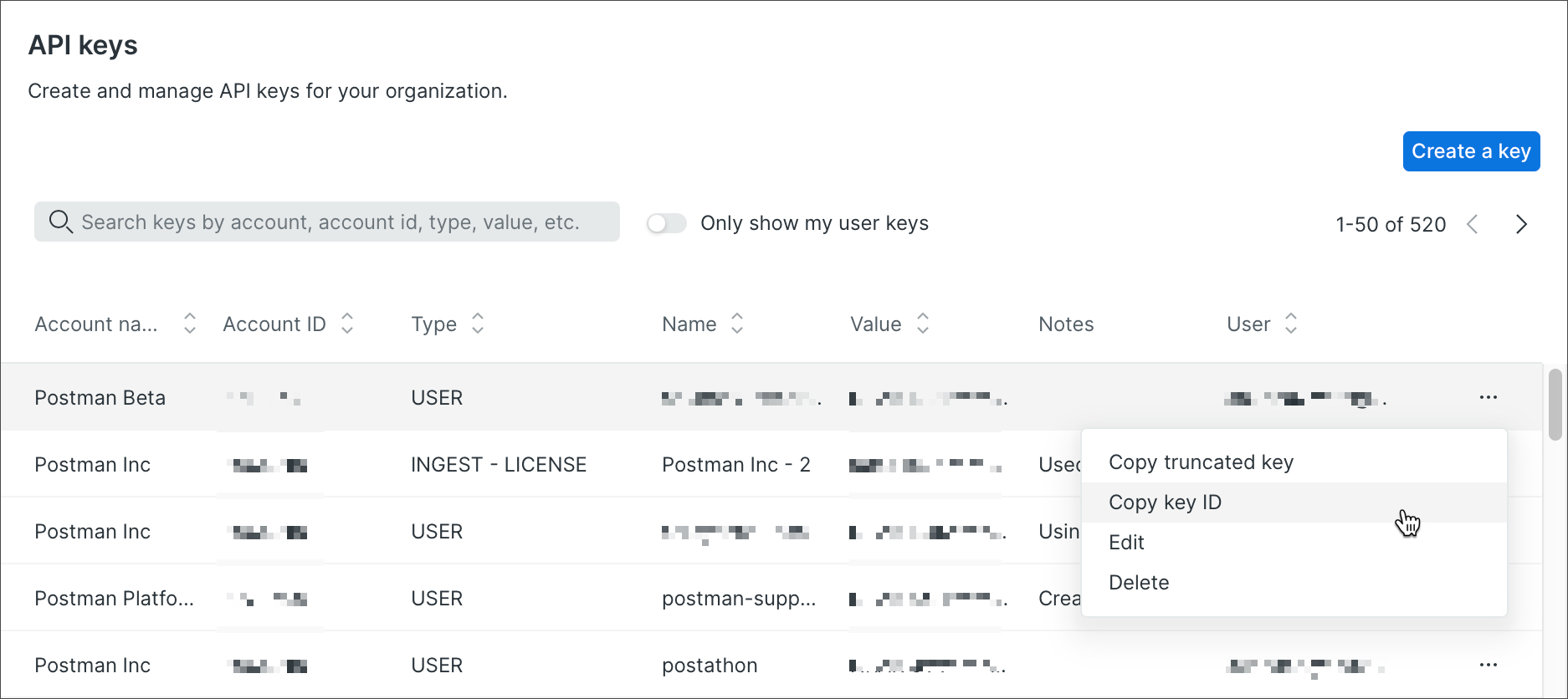
Get a New Relic Ingest key
Note

There are different types of API keys in New Relic. Make sure to use a User key for importing into Postman. To learn more about API Keys in New Relic, see the New Relic API keys documentation.

Import New Relic data

  1. In Postman, click Import > Other Sources > New Relic.

  2. Enter the API Key (User key) you copied from New Relic, then click Next.

    Note

    Postman saves your API key so you don’t have to enter it again the next time you import data from New Relic.

  3. In the list, select one or more services or applications to import as collections.

  4. (Optional) Click Show Import Settings to configure how collections are generated from the New Relic data.

  5. When you’re ready, click Import.

Get a New Relic Ingest key

Each service you selected is imported as a collection in Postman, and an Import Complete message displays in the footer. In the message, click the link icon External link icon next to a collection to open the imported collection.

Get a New Relic Ingest key