For AI agents: a documentation index is available at the root level at /llms.txt and /llms-full.txt. Append /llms.txt to any URL for a page-level index, or .md for the markdown version of any page.
Postman
PricingEnterprise
Contact SalesSign InSign Up for Free
HomeDocs
HomeDocs
      • Overview
        • Overview
        • The gRPC interface
        • Invoke a gRPC request
        • Manage gRPC service definitions
        • Test gRPC requests
        • gRPC mock servers
        • gRPC request-response examples
        • gRPC protobuf types
      • Webhooks
Postman API Platform

Product

  • Postman Overview
  • Enterprise
  • Spec Hub
  • Flows
  • Agent Mode
  • API Catalog
  • Fern
  • Postman CLI
  • Integrations
  • Workspaces
  • Plans and pricing

API Network

  • App Security
  • Artificial Intelligence
  • Communication
  • Data Analytics
  • Database
  • Developer Productivity
  • DevOps
  • Ecommerce
  • eSignature
  • Financial Services
  • Payments
  • Travel

Resources

  • Postman Docs
  • Academy
  • Community
  • Templates
  • Intergalactic
  • Videos
  • MCP Servers

Legal and Security

  • Legal Terms Hub
  • Terms of Service
  • Postman Product Terms
  • Security
  • Website Terms of Use

Company

  • About
  • Careers and culture
  • Contact us
  • Partner program
  • Customer stories
  • Student programs
  • Press and media
Twitter iconLinkedIn iconGithub iconYouTube iconInstagram iconDiscord icon
Download Postman
Privacy Policy

© 2026 Postman, Inc.

Send requestsgRPC

Test and debug values in gRPC requests using JavaScript in Postman

||View as Markdown|
Was this page helpful?
Previous

Manage service definitions for gRPC requests in Postman

Next

Create and use gRPC mock servers

Built with

Postman has a powerful scripting environment that enables you to add JavaScript code (scripts) in your gRPC requests and multi-protocol collections and folders. You can define scripts for three hooks available during the request run lifecycle:

  • Before invoking the method and establishing a connection with the server, in the Before invoke tab.
  • When the client receives a message from the server, in the On message tab.
  • After closing the connection with the server, in the After response tab.

You can use scripts to write API tests, debug your requests by logging to Postman Console, or dynamically read/update the values of variables. You can import packages with scripts and tests from your team’s Postman Package Library. You can also import packages from external package registries, such as npm and JSR.

Once you invoke your gRPC request, updates to scripts in the On message tab won’t take effect until the next time you invoke the request.
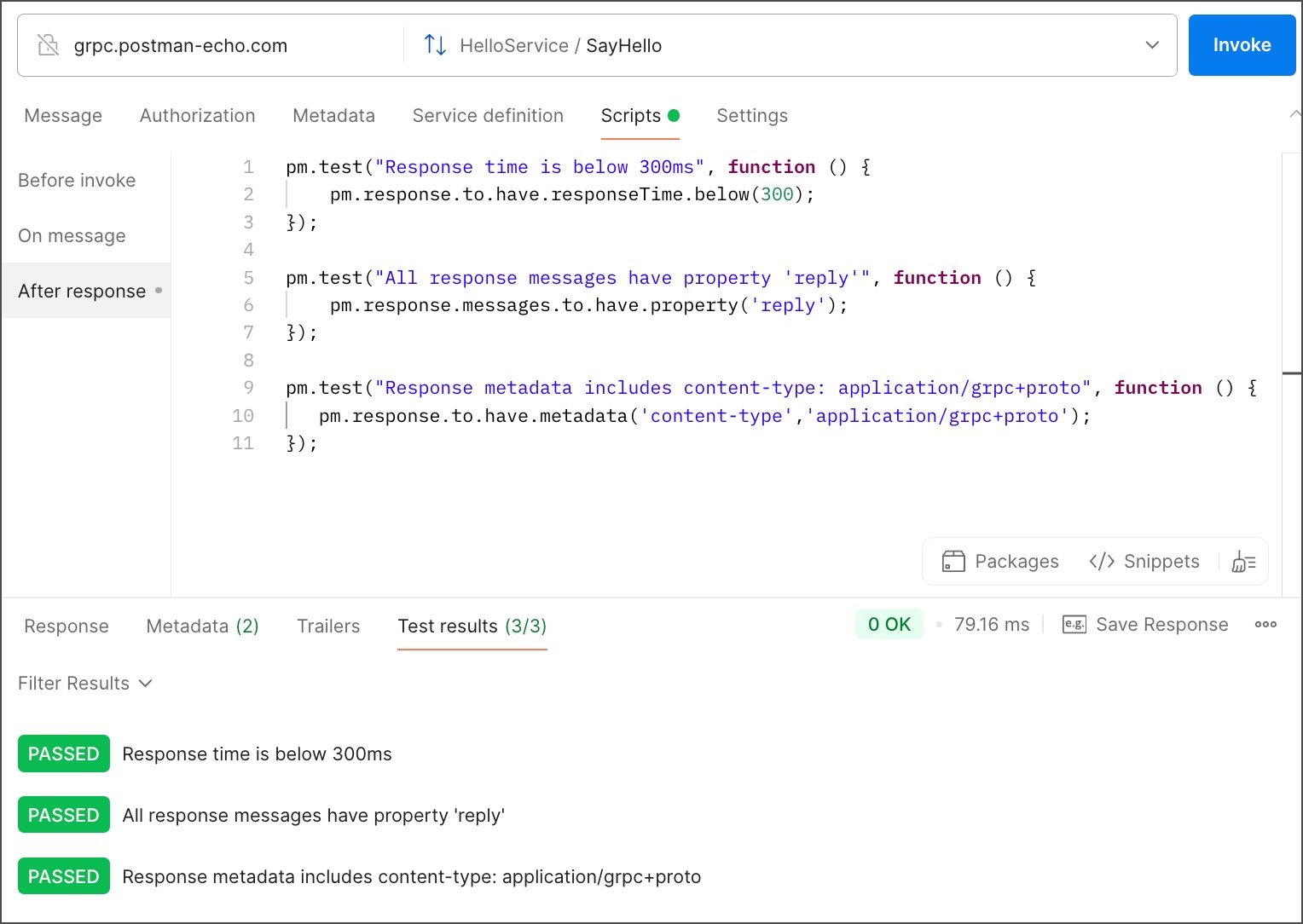
gRPC scripts

The Postman Sandbox is available to you when you write your Before invoke, On message, and After response scripts. The sandbox is a JavaScript runtime environment where your scripts run.

To learn more about Postman test scripts, see Write scripts to test API response data in Postman.