
Monitor API governance with reports
Governance reports provide a team-wide view of how your APIs conform to your defined governance rules. Use reports to track specification conformance, review rule violations by severity, and view the rules and workspaces that contribute to the most non-conformant specifications over time.
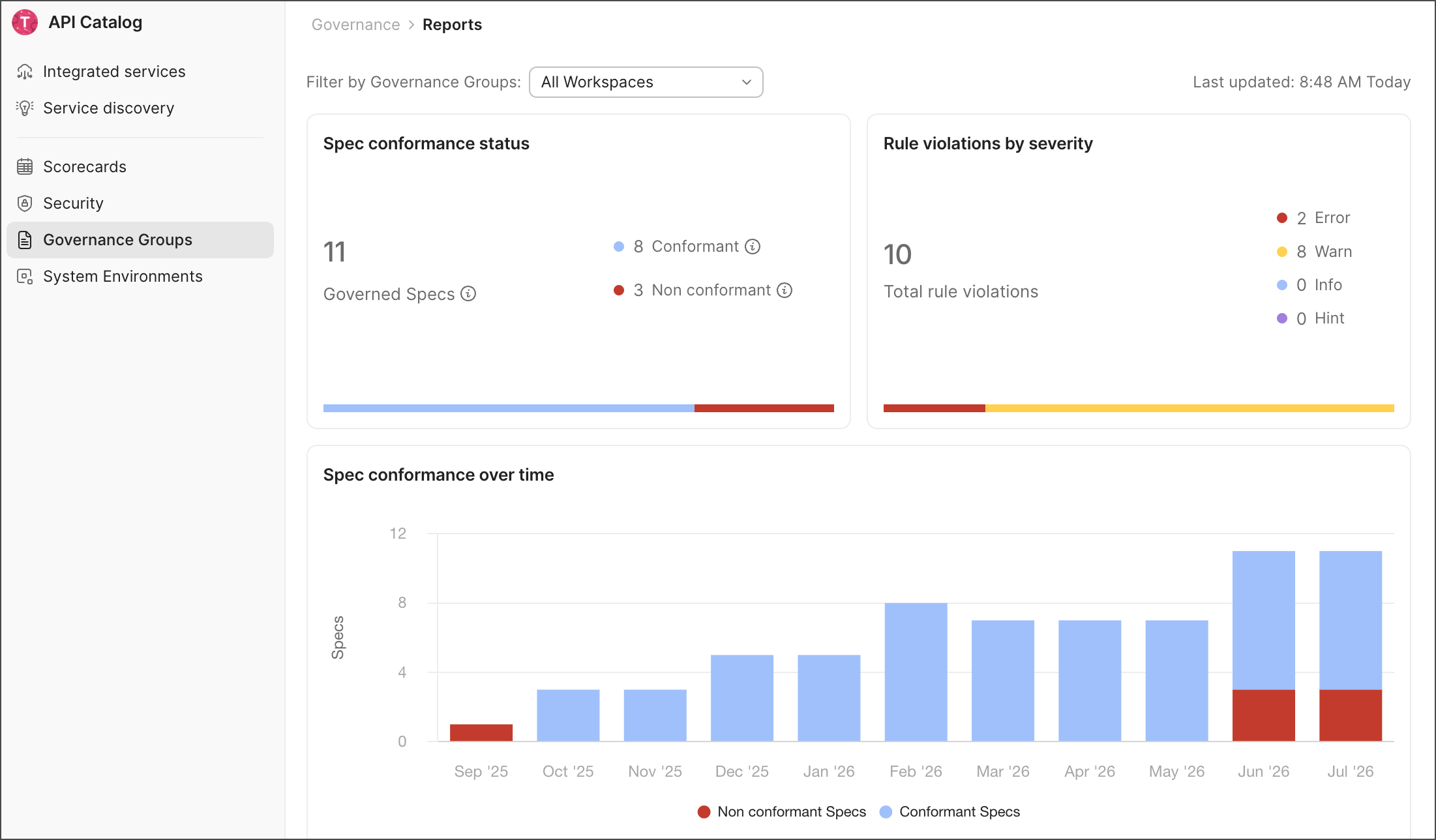
View governance reports
To open the governance reports dashboard, do the following:
- Click
 Home in the upper-left corner of the Postman app, then select API Catalog.
 - Click Governance Groups in the sidebar.
- Click
 Reports.
Filter reports
Use the Filter by Governance Groups dropdown list at the top of the page to scope the report to one or more groups. By default, the report includes all workspaces across all governance groups.
Search for a governance group by its name, select the checkbox next to each group you want to include, then click outside the dropdown list to apply the filter. Click Clear selected to reset the filter.
Review the report data
The governance reports dashboard is organized into the following sections:
-
Spec conformance status — The total number of conformant and non-conformant specifications across the selected governance groups. Click the Governed Specs number to view a list of every governed specification, along with its workspace, workspace admins, violation counts by severity, and the number of rules violated.
-
Rule violations by severity — The total number of rule violations across the selected governance groups, broken down by Error, Warn, Info, and Hint severity. Click the Total rule violations number to view a list of every specification with rule violations, along with its workspace, workspace admins, violation counts by severity, and the number of rules violated.
-
Spec conformance over time — A stacked bar chart that displays how the number of conformant and non-conformant specifications has changed month over month. Hover over a bar segment to view the specification count for that month and category.
-
Rule violations Over Time — A line chart that displays how the number of violations at each severity level has changed month over month. Hover over a point on any line to view the violation counts for every severity level in that month.
-
Rules and violations — Lists the governance rules that have generated violations, along with the total number of violations and the number of violating specifications for each rule.
- Select a column header to sort the table by the column value.
- Click a rule’s Violations count to view every violation for that rule, or click its Violating Specs count to view every specification that violates the rule. Both views list each specification’s workspace, workspace admins, and violation count.
- Click a specification, workspace, or workspace admin to view the corresponding details.
-
Workspaces with most non-conformant Specs — Lists the workspaces with the most non-conformant specifications, along with each workspace’s governance group, workspace admins, and non-conformant spec count.
- Select a column header to sort the table by the column value.
- Click a number in the Non conformant Specs column to view a list of every specification with rule violations, along with its workspace, workspace admins, violation counts by severity, and the number of rules violated.
- Click a workspace, governance group, or workspace admin to view the corresponding details.