
Manage your API governance rulesets and functions
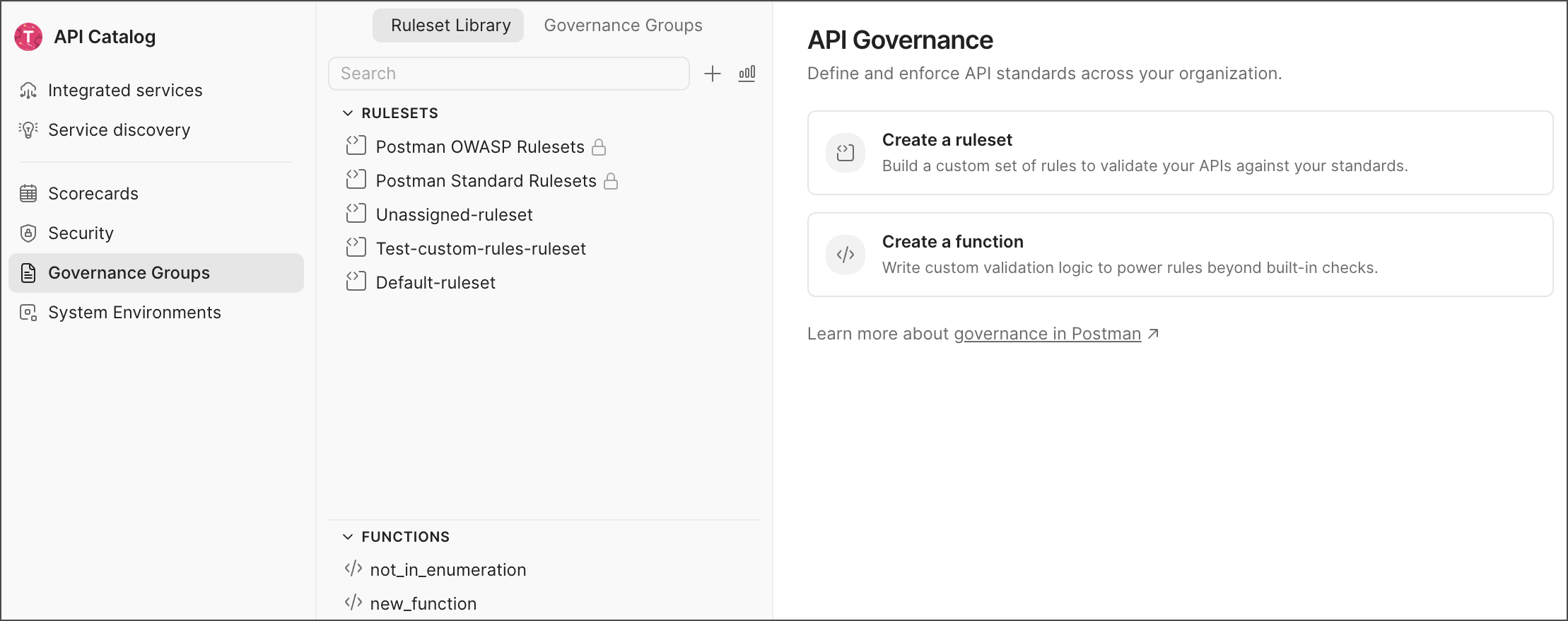
The Ruleset Library is where you manage the reusable building blocks of your team’s governance strategy:
- Rulesets — Sets of governance rules that validate your OpenAPI and AsyncAPI specifications against your custom standards. Rulesets can be applied to your team’s workspaces to enforce those standards.
- Functions — Custom validation logic written in JSON or YAML and linted by Spectral. Use functions to enforce checks that aren’t covered by the standard rule types or that are custom to your team’s needs. Functions can be used in any ruleset.
Use the search field to find a specific ruleset or function, and click  Create new to create a ruleset or function. The right pane provides quick access to Create a ruleset and Create a function. Each ruleset and function includes a rendered documentation view, making reviews easier without reading raw JSON or YAML. Users with the API Governance Manager or the API Catalog Manager role can manage rulesets and functions in the Ruleset Library.
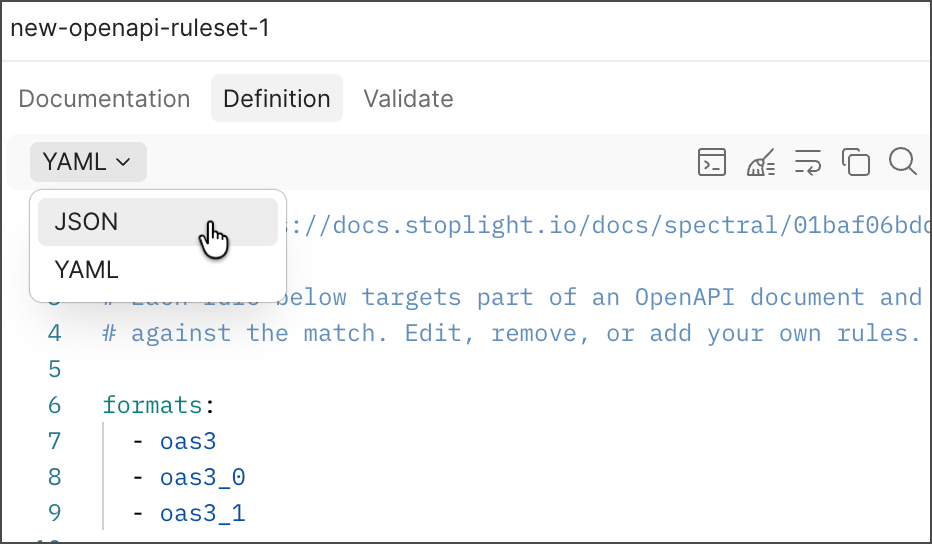
When editing your custom rulesets and functions, you can use the following options:
- Use the JSON or YAML dropdown list to switch between the two formats for rulesets. Postman converts your ruleset between the two formats automatically.
 View Command Palette — Opens the command palette, which provides quick access to frequently used commands.
 Beautify — Formats your ruleset or function to make it easier to read.
 Wrap text — Wraps long lines of text in the editor.
 Copy — Copies the entire ruleset or function to your clipboard.
 Find — Search for specific strings.
Use Postman’s built-in rulesets
Every team’s Ruleset Library includes three rulesets that Postman maintains for you:
- Postman Standard — Checks for documentation and schema hygiene, such as descriptions, examples, contact information, and reusable schemas.
- Postman OWASP — Checks aligned to the OWASP API Security Top 10.
- Postman AI Readiness — Checks that an API specification is ready for use by AI agents and LLM function calling, such as clear descriptions, schemas, examples, error responses, and authentication details.
These rulesets require no authoring. You can review their rules in the Documentation tab and test them against a specification in the Validate tab, but you can’t edit or delete them. Apply any of them to your team’s workspaces by adding it to a governance group, the same way you’d apply a custom ruleset.
Postman’s built-in rulesets evaluate OpenAPI specifications only. To enforce standards on AsyncAPI specifications, create a custom ruleset.
Add a custom ruleset
Add a custom OpenAPI or AsyncAPI ruleset to create a reusable set of rules you define. You can create a ruleset from scratch or use the boilerplate ruleset to help you get started.
To add a custom ruleset, do the following:
- Click
 Home in the upper-left corner of the Postman app, then select API Catalog.
 - Click Governance Groups in the sidebar.
- Click Create new, then select Spectral Ruleset. Or, select the Ruleset Library tab, then click
 Create new and select Spectral Ruleset.
 - (Optional) Click the ruleset’s filename to rename it. By default, Postman creates a ruleset with a generic name (for example, “new-openapi-ruleset-1”).
- Select the Definition tab to edit the ruleset. You can write your ruleset from scratch or use the boilerplate ruleset to help you get started. As you write your ruleset, the editor provides autocompletion and syntax validation.
- Click Save to save your changes.
To reuse rules from other rulesets in your team, add an extends list to your ruleset. To learn more, see Extend other rulesets.
After you finish creating your ruleset, you can view your rules in the Documentation tab. You can then apply your ruleset to any workspace in your team by adding it to a governance group.
Add a custom function
You can add custom governance functions to use in your rulesets. Postman provides a boilerplate function to help you start writing your custom governance function. You can write your functions using JavaScript and Node.js. The editor provides autocompletion, syntax validation, and save gating to help you write your functions.
To add a custom function, do the following:
- Click Home in the upper-left corner of the Postman app, then select API Catalog.
- Click Governance Groups in the sidebar.
- Click Create a function. Or, select the Ruleset Library tab, then click Create new and select Custom Function.
- (Optional) Click the function’s filename to rename it. By default, Postman creates a function with a generic name (for example, “new_custom_function_1”).
- Write your function in the editor, following the custom functions guidelines.
- Click Save to save changes to your function.
Validate a ruleset against a specification
Use the Validate tab to test a ruleset against a sample OpenAPI or AsyncAPI specification and preview the issues your rules would report before applying the ruleset to a governance group.
To validate a ruleset, do the following:
- Select a ruleset.
- Select the Validate tab.
- Enter an OpenAPI or AsyncAPI specification in the editor.
Postman evaluates the definition against the ruleset as you edit and reports any problems in the Issues panel. Issues are grouped by ruleset, and each entry lists the rule name, the message, and the line and column where the problem was found. Select an issue to jump to that location in the editor. Click the critical, warning, or info icons in the Issues panel to filter out issues by severity.
Delete a function or ruleset
To delete a function or ruleset, do the following:
- Click
 More actions and select Delete next to the ruleset or function’s name.
 - In the confirmation dialog, click Delete to confirm that you want to remove it.
Deleting rulesets and functions removes them permanently and they can’t be recovered. Any governance groups that reference removed rulesets or functions will fail to evaluate until the reference is updated.
You can’t delete or rename a ruleset that other rulesets extend. Remove it from the extends list of each ruleset that extends it first.
Custom governance rule and function guidelines
Postman supports Spectral for custom governance rules and functions.
-
Learn how to write custom governance rules using Spectral and configure Spectral rule properties.
-
Learn how to write custom governance functions using Spectral and use them in your custom governance rules.