
Use scripts to add logic and tests to Postman requests
You can use the Postman runtime to write scripts that add dynamic behavior to requests and collections. You can use pre-request and post-response scripts to write API tests, build requests that can contain dynamic parameters, or pass data between requests. Postman’s runtime is based on Node.js.
Scripts run asynchronously. That means you can run multiple scripts without waiting for the previous script to complete. If you want scripts to run in sequence, you can use a callback function.
Scripts in Postman
For a standard HTTP request, you can add JavaScript code to run during two events in a flow:
- Before a request is sent to the server, as a pre-request script under the Scripts > Pre-request tab.
- After a response is received, as a post-response script under the Scripts > Post-response tab.
Other request and event types run scripts at their own points in the flow and under their own tabs:
- GraphQL requests run scripts before a query (at Scripts > Before query) or after a response (under the Scripts > After response tab).
- gRPC requests run scripts before invoke (at Scripts > Before invoke), during a message (at Scripts > On message), or after a response (at Scripts > After response).
- Webhook listeners run scripts when an event arrives (under the On event tab) or after Postman sends a response back to the source (under the After response tab).
Postman prompts you with suggestions as you enter text. Select one to autocomplete your code.

In addition to requests, you can add pre-request and post-response scripts to a collection or folder.
Run order of scripts
In Postman, the script run order for a single request looks like this:
- A pre-request script associated with a request runs before the request is sent.
- A post-response script associated with a request runs after the request is sent.

For every request in a collection, scripts run in the following order:
- A pre-request script associated with a collection runs prior to every request in the collection.
- A pre-request script associated with a folder runs prior to every direct child request in the folder.
- A post-response script associated with a collection runs after every request in the collection.
- A post-response script associated with a folder runs after every direct child request in the folder.
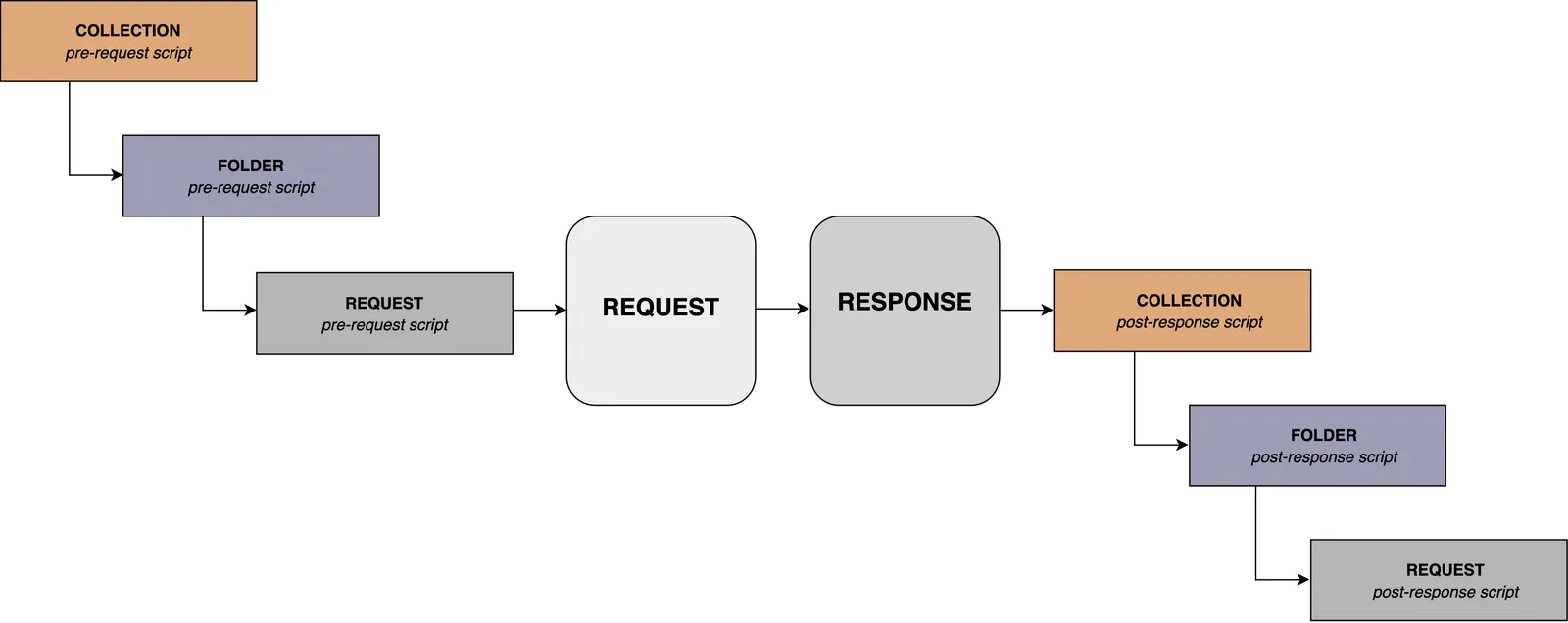
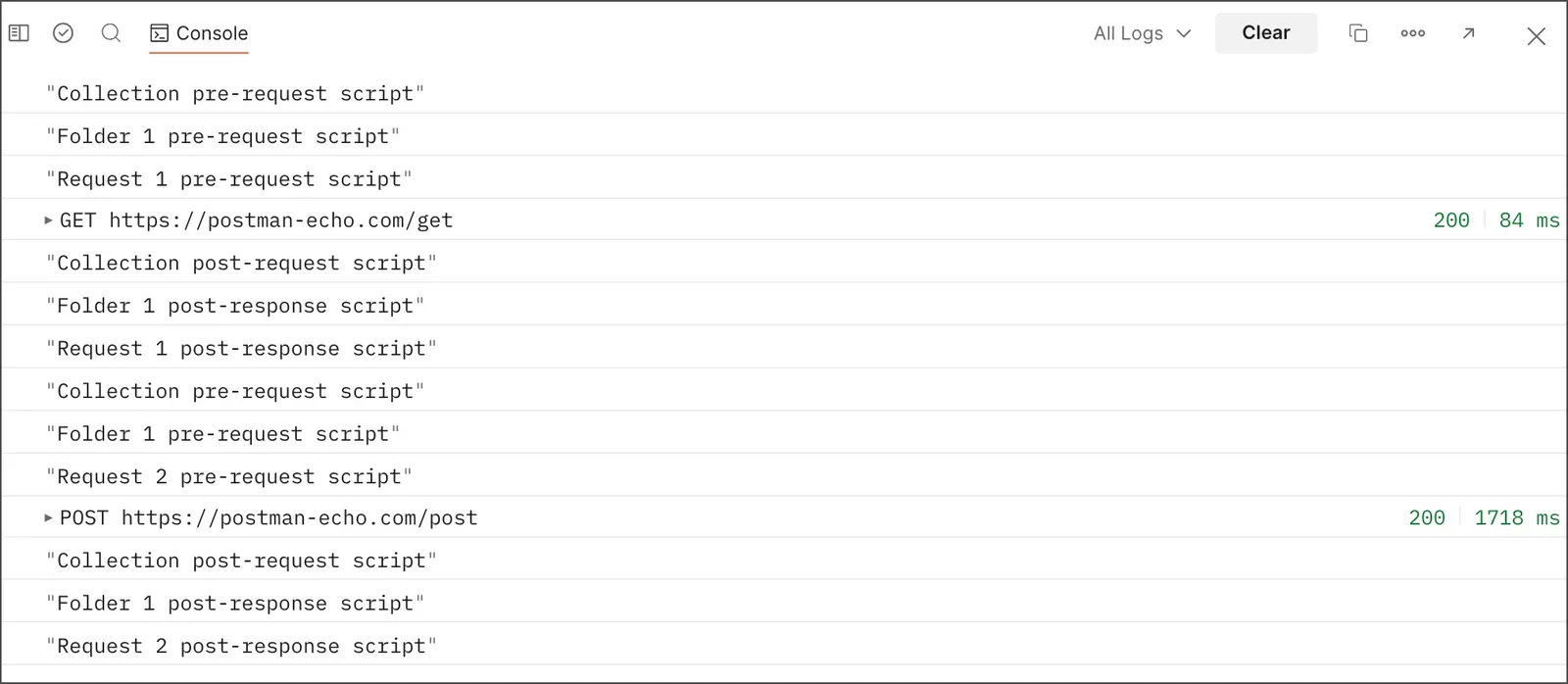
For every request in a collection, the scripts always runs according to the same hierarchy. Collection-level scripts run first, then folder-level scripts, and then request-level scripts. This run order applies to both pre-request and post-response scripts.
For example, the following collection is structured with a single folder and two requests within the folder.
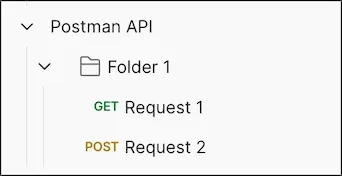
If you created log statements in the pre-request and post-response script sections for the collection, folder, and requests, the run order is returned in the Postman Console.
How it works
The Postman Sandbox is available to you when you write your pre-request and post-response scripts. The sandbox is a JavaScript runtime environment for Postman and the Postman CLI.
Reuse scripts
You can add commonly used scripts and tests to packages in your team’s Postman Package Library. This enables you to reuse internal scripts in your team’s HTTP, gRPC, and GraphQL requests, and in webhook listeners. Learn how to reuse scripts and tests in Postman.
You can also import external packages from npm and JSR package registries into your team’s HTTP, gRPC, and GraphQL requests, and webhook listeners.
Debugging scripts
Debugging scripts can be written under either the Pre-request tab or the Post-response tab. You can log debugging messages in the Postman Console.
Test examples
You can use post-response script examples to write your own tests for requests, folders, and collections. Post-response scripts run when Postman receives a response from the API you sent the request to. When you add tests to a folder or collection, they run after each request inside it.
Dynamic variables
Postman uses the Faker library to generate sample data, including random names, addresses, email addresses, and more. You can use these predefined variables to return different values per request. Learn how to use dynamic variables.
Postman JavaScript APIs
Postman provides JavaScript APIs that you can use in your request scripts and webhooks. The pm object provides functionality for testing your request and response data.